

 oliexdev
Request: bring back arrow colours to table view
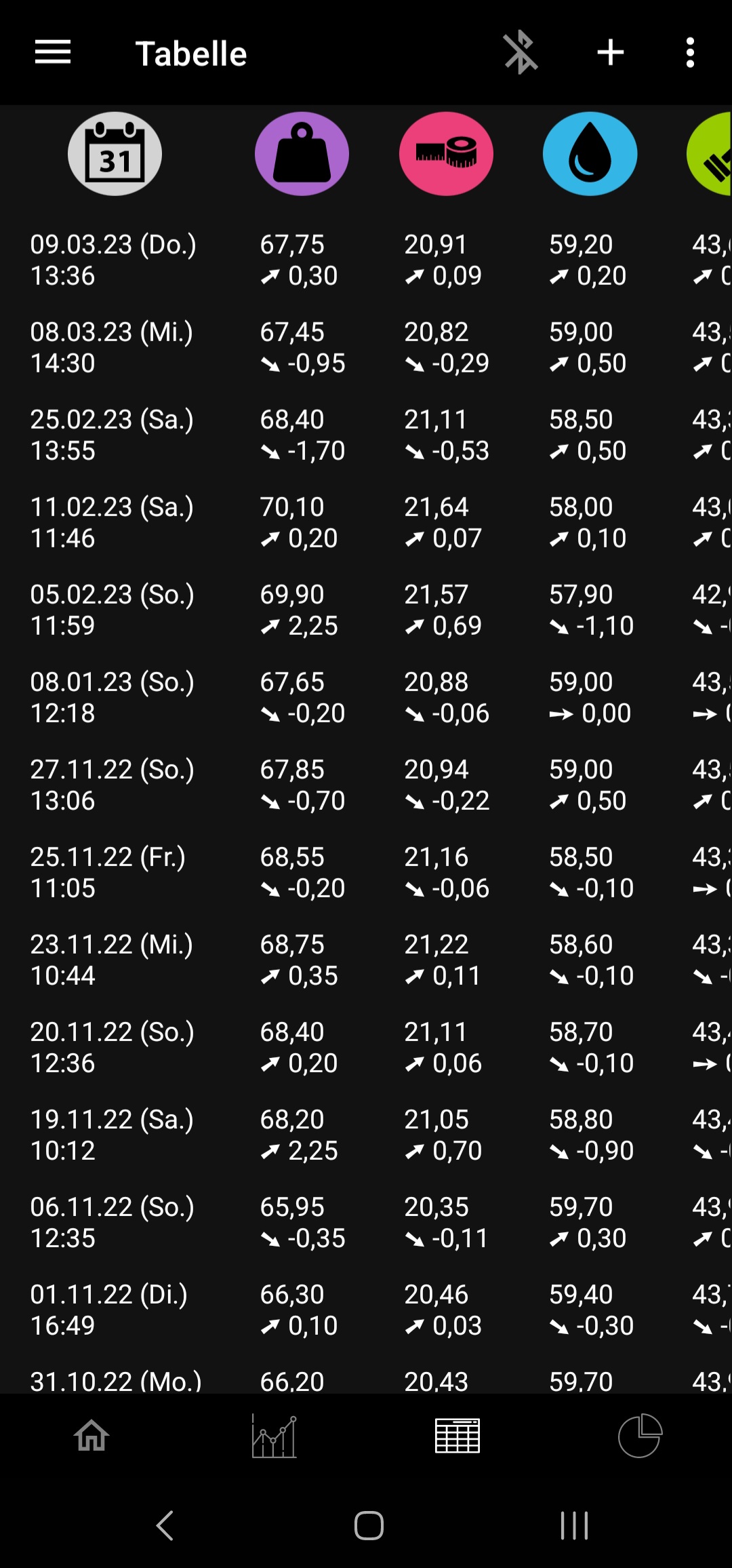
Is your feature request related to a problem? Please describe. Since updating from 2.4.6 to the current version the coloured arrows in table view are gone. Now it's really hard to tell at a glance if you have come closer to your goal (green) or moved away (red).
Describe the solution you'd like Please bring back the arrow colours depending on the goal.
Describe alternatives you've considered Maybe only show the arrow colours if a goal has been set? If there's no goal set it's understandable that openScale can't figure out what colours to choose for down/up arrows.
Additional context

I already tried that but the way I implemented it was really cpu consumption, so I skipped that.

I already tried that but the way I implemented it was really cpu consumption, so I skipped that.
I'm guessing you checked what color should be displayed for every entry upon loading the table view? If that's the case, maybe you could just look up the previous entry once when the new entry is added and save a came_closer_to_goal boolean with the created entry in the db. Then each time the table view is loaded, just read from the db. If a value is changed or removed afterwards (potentially affecting the arrow color of another entry) just rerun the same check once for the affected data point. With this implementation you would also get the added benefit that the user could export as csv and visualize how many entries in total came closer to their goal. Or how long a streak of green or red arrows was.
