

 oliexdev
Honor CH100 scale support
Hello, I'm looking for support for Honor CH100. I do some capture Hope you could help for integrating this scale into the application. I've attached the openScale logs and also HCI snoop.
Thanks in advance !
Best regards,

openScale_2019-01-13_23-00.txt
hci_snoop20190113225006.cfa.txt

Thanks we need all true data of your measurement regarding to the hci_snoop log for e.g. fat, water, muscle mass, sex, body height, activity level and so on.

Hello,
here's the data requested for the current measure : sex : male weight : 66,3kg fat percentage : 18,8% muscle mass : 51,3kg I stay available if you need more informations.
best regards,
Hello, I'm working in this integration too.
According a Huawei Support ticket, the Body Fat Scale uses the "Weight Standard Profile". The specifications doc here.
I see that if the scale support multiple users, to read the "Weight" or "Body Composition Measurement", you have to write the "User Control Point" first. The document says (setcion 4.6.3.2.2):
To request the consent of a Weight Scale user in order to access their UDS Characteristics, the Collector shall use the Consent Op Code followed by an array of 3 UINT8 Parameter Values that represents the User Index (1 octet) followed by the Consent Code (2 octets) defined by the user as defined
But, How I know what is this "Consent Operator Code".
Best regards, Javier Pintor

@anongeek your entered body height is missing. Could you provide this piece of information.
@jpintor14 is your implementation open-source? You could maybe look into the hci_snoop log to find the "consent operator code", see here.
Thanks for the help! This is the log of the official app.
I can't see in it the write operation with the standart command(0x2A9F). There are two "Sent Write Request" with the characteristic 0xFAA2. I can't decode it yet, any idea?
This is a piece of code of my project (Xamarin Android App in C#):
- DeviceControlActivity:
public void LoadPesoHuaweiCharacteristic(BluetoothGattService gattService) {
if (UUID_USER_DATA_SERVICE.ToString() == gattService.Uuid.ToString())
{
    BluetoothGattCharacteristic userControlPoint = null;
    BluetoothGattCharacteristic userIndex = null;

    IList<BluetoothGattCharacteristic> gattCharacteristics = gattService.Characteristics;
    foreach (BluetoothGattCharacteristic gattCharacteristic in gattCharacteristics)
    {
        if (UUID_USER_INDEX.Equals(gattCharacteristic.Uuid))
        {
            userIndex = gattCharacteristic;
        }
        if (UUID_USER_CONTROL_POINT.Equals(gattCharacteristic.Uuid))
        {
            userControlPoint = gattCharacteristic;
        }
    }

    if (userIndex!=null && userControlPoint != null)
    {
        Thread.Sleep(300);
        mBluetoothLeService.SetCharacteristicNotification(userIndex, true);
        Thread.Sleep(300);
        mBluetoothLeService.SetCharacteristicNotification(userControlPoint, true);
        Thread.Sleep(300);
        mBluetoothLeService.ReadCharacteristic(userIndex);
        Thread.Sleep(300);
        mBluetoothLeService.ReadCharacteristic(userControlPoint);
        Thread.Sleep(300);

        mBluetoothLeService.mandado = true;
        mBluetoothLeService.setDeviceControlActivity(this);

        Intent gattServiceIntent = new Intent(this, typeof(BluetoothLeService));
        BindService(gattServiceIntent, mServiceManager, Bind.AutoCreate);
    }


}

if (UUID_WEIGHT_SCALE_SERVICE.ToString() == gattService.Uuid.ToString())
{
    BluetoothGattCharacteristic weightMeasurement = null;

    IList<BluetoothGattCharacteristic> gattCharacteristics = gattService.Characteristics;
    foreach (BluetoothGattCharacteristic gattCharacteristic in gattCharacteristics)
    {
        if (UUID_WEIGHT_MEASUREMET_HUAWEI.Equals(gattCharacteristic.Uuid))
        {
            weightMeasurement = gattCharacteristic;
        }
    }


    if (weightMeasurement != null && weightFeature != null)
    {
        mNotifyCharacteristic = weightMeasurement;
        Thread.Sleep(300);
        mBluetoothLeService.SetCharacteristicNotification(weightMeasurement, true);

        mBluetoothLeService.mandado = true;
        mBluetoothLeService.setDeviceControlActivity(this);

        Intent gattServiceIntent = new Intent(this, typeof(BluetoothLeService));
        BindService(gattServiceIntent, mServiceManager, Bind.AutoCreate);
    }

}


if (UUID_BODY_COMPOSITION_SERVICE.ToString() == gattService.Uuid.ToString())
{
    BluetoothGattCharacteristic bodyCompositionMeasurement = null;

    IList<BluetoothGattCharacteristic> gattCharacteristics = gattService.Characteristics;
    foreach (BluetoothGattCharacteristic gattCharacteristic in gattCharacteristics)
    {
        if (UUID_WEIGHT_BODY_COMPOSITION_MEASUREMET_HUAWEI.Equals(gattCharacteristic.Uuid))
        {
            bodyCompositionMeasurement = gattCharacteristic;
        }
    }


    if (bodyCompositionMeasurement != null)
    {
        mNotifyCharacteristic = bodyCompositionMeasurement;
        mBluetoothLeService.SetCharacteristicNotification(bodyCompositionMeasurement, true);

        mBluetoothLeService.mandado = true;
        mBluetoothLeService.setDeviceControlActivity(this);

        Intent gattServiceIntent = new Intent(this, typeof(BluetoothLeService));
        BindService(gattServiceIntent, mServiceManager, Bind.AutoCreate);
    }

}
}
- BluetoothLeService:
public void ReadCharacteristic(BluetoothGattCharacteristic characteristic) { if (mBluetoothAdapter == null || mBluetoothGatt == null) { Log.Warn(TAG, "BluetoothAdapter not initialized"); return; }
if (UUID_USER_CONTROL_POINT.Equals(characteristic.Uuid))
{
    try
    {

        byte[] magicBytes = new byte[] { (byte)0x00, (byte)0x9f, (byte)0x2a };
        Log.Error("MagicBytes", characteristic.Uuid.ToString() + "->" + BitConverter.ToString(magicBytes));
        characteristic.SetValue(magicBytes);
        characteristic.WriteType = GattWriteType.Default;
        mBluetoothGatt.WriteCharacteristic(characteristic);

    }
    catch (Exception e)
    {

    }

}
else
{
    mBluetoothGatt.ReadCharacteristic(characteristic);
}
}
public void SetCharacteristicNotification(BluetoothGattCharacteristic characteristic, bool enabled) { if (mBluetoothAdapter == null || mBluetoothGatt == null) { Log.Warn(TAG, "BluetoothAdapter not initialized"); return; } mBluetoothGatt.SetCharacteristicNotification(characteristic, enabled);
#region weight
if (UUID_WEIGHT_MEASUREMENT_MEDISANA.Equals(characteristic.Uuid))
{
    Log.Error(TAG, "Medisana Measurement SetIndicationOn");
    BluetoothGattDescriptor descriptor = characteristic.GetDescriptor(
        UUID.FromString(SampleGattAttributes.CLIENT_CHARACTERISTIC_CONFIG));
    descriptor.SetValue(BluetoothGattDescriptor.EnableIndicationValue.ToArray());
    mBluetoothGatt.WriteDescriptor(descriptor);

}

if (UUID_WEIGHT_FEATURE_MEDISANA.Equals(characteristic.Uuid))
{
    Log.Error(TAG, "Medisana Feature SetIndicationOn");
    BluetoothGattDescriptor descriptor = characteristic.GetDescriptor(
        UUID.FromString(SampleGattAttributes.CLIENT_CHARACTERISTIC_CONFIG));
    descriptor.SetValue(BluetoothGattDescriptor.EnableIndicationValue.ToArray());
    mBluetoothGatt.WriteDescriptor(descriptor);

}

if (UUID_WEIGHT_BODY_COMPOSITION_MEASUREMET_HUAWEI.Equals(characteristic.Uuid))
{
    Log.Error(TAG, "Huawei SetIndicationOn");
    BluetoothGattDescriptor descriptor = characteristic.GetDescriptor(
        UUID.FromString(SampleGattAttributes.CLIENT_CHARACTERISTIC_CONFIG));
    descriptor.SetValue(BluetoothGattDescriptor.EnableIndicationValue.ToArray());
    mBluetoothGatt.WriteDescriptor(descriptor);
}

if (UUID_WEIGHT_BODY_COMPOSITION_FEATURE_HUAWEI.Equals(characteristic.Uuid))
{
    Log.Error(TAG, "Huawei SetIndicationOn");
    BluetoothGattDescriptor descriptor = characteristic.GetDescriptor(
        UUID.FromString(SampleGattAttributes.CLIENT_CHARACTERISTIC_CONFIG));
    descriptor.SetValue(BluetoothGattDescriptor.EnableIndicationValue.ToArray());
    mBluetoothGatt.WriteDescriptor(descriptor);
}

if (UUID_WEIGHT_MEASUREMET_HUAWEI.Equals(characteristic.Uuid))
{
    Log.Error(TAG, "Huawei SetIndicationOn");
    BluetoothGattDescriptor descriptor = characteristic.GetDescriptor(
        UUID.FromString(SampleGattAttributes.CLIENT_CHARACTERISTIC_CONFIG));
    descriptor.SetValue(BluetoothGattDescriptor.EnableIndicationValue.ToArray());
    mBluetoothGatt.WriteDescriptor(descriptor);
}

if (UUID_WEIGHT_FEATURE_HUAWEI.Equals(characteristic.Uuid))
{
    Log.Error(TAG, "Huawei SetIndicationOn");
    BluetoothGattDescriptor descriptor = characteristic.GetDescriptor(
        UUID.FromString(SampleGattAttributes.CLIENT_CHARACTERISTIC_CONFIG));
    descriptor.SetValue(BluetoothGattDescriptor.EnableIndicationValue.ToArray());
    mBluetoothGatt.WriteDescriptor(descriptor);
}

if(UUID_USER_CONTROL_POINT.Equals(characteristic.Uuid))
{
    Log.Error(TAG, "Huawei SetIndicationOn");
    BluetoothGattDescriptor descriptor = characteristic.GetDescriptor(
        UUID.FromString(SampleGattAttributes.CLIENT_CHARACTERISTIC_CONFIG));
    descriptor.SetValue(BluetoothGattDescriptor.EnableNotificationValue.ToArray());
    mBluetoothGatt.WriteDescriptor(descriptor);
}
#endregion
}
public void BroadcastUpdate(String action, BluetoothGattCharacteristic characteristic) { Intent intent = new Intent(action);
byte[] data = characteristic.GetValue();
Log.Info("SendBroadcast", characteristic.Uuid.ToString() );
for (int x = 0; x < data.Length; x++)
{
    Log.Info(characteristic.Uuid.ToString(), x + ": " + data[x]);
}


SendBroadcast(intent);
}
The UpdateBroadcast() method is not fired with the rightcharacteristics
Best regards, Javier Pintor
I just got Huawei Body Fat Scale AH100 and wanted to open ticket along with the logs - is Honor CH100 just a rebrand of the same scale? If so I could maybe help with some logs?

@raven-ie yes, is the same model. I have the Huawei AH100, but later de Bluettoth device is called CH100 too.
@oliexdev I am still testing writing to the 0xFAA1, but the FxFAA2 is not changed. I recevive the FxFAA2 values when the Scale connect to the App, not when the measurement is completed
This is my doc with the sequence registered in the log Comandos Huawei.xlsx
There is point when the app receive the same structure of the characteristic 0xfaa2. I have repeated some times the mesurement and there are the results, but I can't decode yet. The dynamic parts are in parentheses:
bc 11 0e bf (c6 c3 7e) d7 d6 eb d5 (fe 21 c2 11 8a 18) 76 0b => 84.7 kg bc 11 0e bf (dd c3 78) d7 d6 eb d5 (fe 23 cf 19 8a 56) 76 0b => 85.2 kg bc 11 0e bf (dd c3 78) d7 d6 eb d5 (fe 23 f9 37 8a 52) 76 0b => 85.2 kg bc 11 0e bf (da c3 67) d7 d6 eb d5 (fe 24 d4 2b 8a 51) 76 0b => 85.1 kg bc 11 0e bf (da c3 67) d7 d6 eb d5 (fe 24 d6 11 8a 50) 76 0b => 85.1 kg bc 11 0e bf (dc c3 78) d7 d6 eb d5 (fe 24 c0 2f 8a 5f) 76 0b => 85.3 kg bc 11 0e bf (dd c3 67) d7 d6 eb d5 (fe 24 c4 37 8a 5e) 76 0b => 85.2 kg bc 11 0e bf (dc c3 67) d7 d6 eb d5 (fe 24 f3 09 8a 5d) 76 0b => 85.3 kg bc 11 0e bf (da c3 66) d7 d6 eb d5 (fe 24 fe 16 8a 5c) 76 0b => 85.1 kg bc 11 0e bf (da c3 64) d7 d6 eb d5 (fe 25 cf 38 8a a0) 76 0b => 85.1 kg
The second variable part could be a datetime, but the first one, it doesn't have much logic:
da c3 =? 85.1 kg dd c3 =? 85.2 kg dc c3 =? 85.3 kg
These values of 0xfaa2 are received when the app writes 'bd 01 20 21'
Hola, estoy intentando leer las lecturas de peso de la bascula Huawei ch100 y ch18 y estoy teniendo los mismos problemas, alguien puede ayudarme?

I could research and the info is encrypted, and the Huawei support answer me that the product not allow third party integrations
Is any progress been made within this issue? I could provide additional decoding data if that helps.

Hi,
I have taken several samples from my scale (Huawei AH100, but reports as ChipseaT_82:65:40 (CH100S), same as other ogs from the thread) and analyzed the data to determine an algorithm to get a weight from the raw value of the bluetooth log.
Unfortunately it gives correct values only for my scale (on my sample of 60 values). When I tried to use same algorithm for other logs posted in this thread, it doesn't give expected values.
Basically I have to find a received value with characteristic 0xfaa2 starting with bc110e (it seems to always be followed by another that starts with bc118e, not sure what is it for yet). The fifth and sixth byte are a raw value for weight in little endian.
Example:
- raw value from log: bc 11 0e 30 6e 59 8d e8 b3 b5 10 44 6e 58 66 00 7e 42 ce
- the app shows 83.0 kg.
You can find it easily in the bluetooth dump, there is always a second received value that looks similar, it has similar prefix.
Ok, we have a raw value, it's in little endian: 596e.
Convert it to binary: 0101 1001 0110 1110
Split it to following parts, dump rest
- bits0-4: b01110 (14)
- bits5-6: b11 (3)
- bits7-8: b10 (2)
- bit9: b0 (0)
Now we transform pieces of the raw value into kg value
decimal TransformRawToKg(int raw)
{
	int bits0_4 = raw & 0b00_0001_1111;
	int bits5_6 = (raw & 0b00_0110_0000) >> 5;
	int bits7_8 = (raw & 0b01_1000_0000) >> 7;
	int bit9 = (raw & 0b10_0000_0000) >> 9;

	var kg_value =
	      (((bits0_4 + 16m) / 10m) % 3.2m)    // 1
	    + 3.2m * (                            // 2
		           ((bits5_6 + 2) % 4)    // 3
	             + (bits7_8 << 2)             // 4
	             + ((~bit9 & 1) << 4)         // 5
	             );
	 return kg_value;
}
Line explanation
- First 5 bits are a part of weight that don't really need much adjustment. When bit0_4 go up by 1, weight goes up by 0.1 kg. The modulo and scale are for alignment.
- Since bit0_4 specify values less than 3.2, the upper bits represent a band 3.2 kg wide, so normalize the transformed value.
- bits5_6 are kind of weird. The bit values cycle correctly 10 -> 11 -> 00 -> 01, but the carry that should happen when 11 increases to 00 + carry doesn't happen. Instead, the carry happens when 01 goes to 10. The modulo basically shifts the cycle so carry is in correct place (i.e. b10 changes to b00, b11 changes to b01, b00 to b10 and b01 to b11).
- bits7_8 are fine as is, no need to change them
- bit9 is 1 until roughly 55 kg and then it is 0. So just invert it, so it is 0 for values under roughly 55 kg and 1 for higher values.
The raw values from my logs (along with code for checking the algorithm) can be found at pastebin.
I have attached a some of the logs I used for the decoding: openScale-AH100-logs.zip

These weird shifts are xor, so no need for the transformation log from my previous post, you just need a correct xor value (not sure how to get it) and xor it. For me, it's 0x5a50. For @jpintor14 , its' 0xC089.
Take the raw value, xor it and you have the result in decagrams.
Example:
da c3 =? 85.1 kg dd c3 =? 85.2 kg dc c3 =? 85.3 kg
xor value is = 0xc3da ^ 851 = 0xC089; 0xc3da (raw value) ^ 0xC089 = 851; 0xc3dd ^ 0xC089 = 852; 0xc3dc ^ 0xC089 = 853;
Hello, was it possible to integrate this scale or is someone trying? Sorry for my English.

Can I help with something? I have this weight scale and am interested in this, but I don't even know how to start :(
Might that XOR value be related to SerialNumber (back of scale), or be calculated while the pairing process? Maybe from firmware and SN or something like that? I would like to start a colletion of XOR-values with transfered data while paring to maybe get the calculation for that XOR value. @jahav do you think there is a chance to crack that algorithm?
Hi there. I am also very interested in this - especially since the Huawei app for the AH100 cannot export its values (so everything is lost when you get a new phone). @diegoalbertopp did you give up only because of the differing constant, or were there other issues coming up? If it is only the constant that is different for each user, maybe the displayed weight can be entered on first coupling and by this the individual constant be determined and stored?

I have made effort to work on a decoder it and later abandoned and it would be shame not to share it (Directive 2009/24/EC, Article 6). Most of the stuff is not verified, there might be errors.
OpenScale - Communication
Receiver receives BlueTooth packets that are processed. There are three kinds of packets:
- Notification - scale notifies device that something has happend. There is a ~20 types of notifications (e.g. scale woke up, fat measured, history uploaded, reminder set, units changed, ). Notification packets start with a value
0xBD. - Chunks - a single notification is split into two packets. Chunks has to be combined and decrypted to get notification packet. Chunk packets start with a value
0xBC. - SDK auth result packet - not sure what is it for, if you receive [0x05,0xFA, ...], it means SDK authorized packet. Mostly ignored in further text. The packets has a specific pattern.
Each packet consists from a header 3 bytes long and payload. When the payload is referenced in the document, payload[0] is the first byte of payload, not first payload of packet (payload[0] = packet[3]).
Header is used to detect what kind of packet it is and how to process it before passing the packet data into notification parser.
Cipher and keys
In some cases, the payload of a command and notification packets is encrypted and it must be decrypted before sending or decrypted before processing. Both encryption and decryption use same key and iv and other parameters.
The protocol is using AES cipher with CTR mode. CTR mode effectively means that AES creates a stream of bytes from key+iv and then XORs them with plaintext payload bytes.
The cipher is initialized with same key+iv for each packet, so effectively each packet is XORed with same magic byte array.
Key for AES is created from scaleKey (a key created when pairing the scale to the device, various length) and preset key (const for all occurances). Key is created by taking initialKey and replacing its first bytes with scaleKey obfuscaled by scale MAC address. IV is also preset (const for all occurances) and is not modified.
Preset:
initialKey: 3D A2 78 4A FB 87 B1 2A 98 0F DE 34 56 73 21 56
iv: 4E F7 64 32 2F DA 76 32 12 3D EB 87 90 FE A2 19

Example:
scaleMac:         12 34 56 78 9A BC
scaleKey:         DE F0 12 34 67 89 AB
obfScaleKey(XOR): CC C4 44 4C FD 35 B9  (last byte is XORed with 12, because scaleMac is repeated)

key: CC C4 44 4C FD 35 B9 2A 98 0F DE 34 56 73 21 56
The obfuscated scale key is also sent as the first command packet type 0x24 to the scale during authentication.
Receiving data from the scale
Received packet can be either a notification packet (kind 0xBD) or can be a chunk of encrypted packet (kind 0xBC).
Notification packet should have its payload deobfuscated and processed.
Encrypted packet is wrapped in two chunk packets and should be assembled, decrypted, deobfuscated and processed. There are two encrypted packets: type 0x0E (measurement result) and and 0x10 (history).
Structure
Notification packet contains information from the scale about a result of some action. Each packet consists from a three byte header:
- kind of packet - is it a notification packet (
0xBD) or a chunk (0xBC). - payload length - length of (decrypted) payload.
- type - determines what kind of notification is it, what kind of payload to expect. Second chunk has a type of first chunk + 0x80. and optional payload.
Packets that don't fit the expected structure should be discarded.
Assembly
Encrypted packet consists from two chunks and can only be encrypted once both are received. Each chunk is either
- First chunk - its type (header[2]) is a notification type of the packet that was encrypted.
- Second chunk - its type (header[2]) is notification type of the packet that was encrypted shifted by
0x80.
Example: encrypted measurement packet (type of measurement packet is 0x0E) has following header
First chunk> BC:11:0E:encryptedPayload1
Second chunk> BC:11:8E:encryptedPayload2
Length specified in the chunks is not the length of the encrypted payload, it should be same as the length of decrypted and assembled payload.
Since encrypted packet is wrapped in two chunk packets, there is a chance of missing one chunk packet or other.
Decryption
Once both chunks are received, the payload of both chunks should be individullay decrypted using AES cipher with CTR mode and PKCS7 padding.
Decrypted payload should be assembled into a notification packet with
- the same type as the first chunk packet type (second one has same type + 0x80)
- length specified in the encrypted chunk header (both first and second chunk should have same ) payload length.
- payload consists from bytes of the decrypted first chunk payload and the decrypted first chunk payload.
This decrypted payload is still obfuscated, so it must be deobfuscated before it can be processed.
Deobfuscation
Payload of every notification packet received from the scale must be deobfuscated using scale MAC address. Each payload byte is XORed with a MAC address of the scale. MAC address bytes repeat, if payload is longer than message: first byte of payload is xored with first byte of the scale MAC, sixth byte of payload is xored with sixth byte of the scale MAC and seventh byte of payload is xored with first byte of the scale MAC. Header is not affected.
Sending commands to the scale
Every command that will be sent to the scale is first obfuscated and in some cases even encrypted.
Structure
Command packet has a three byte header:
- kind of packet - is it a command packet (
0xDB) or an encrypted command (0xDC). - payload length - length of (decrypted) payload plus one (type byte).
- type - type of command scale should perform, what payload to attach. and optional payload.
Obfuscation
Payload of every command (header[0] 0xDB) is obfuscated before sending. Each payload byte is XORed with a MAC address of the scale. MAC address bytes repeat, if payload is longer than message: first byte of payload is xored with first byte of the scale MAC, sixth byte of payload is xored with sixth byte of the scale MAC and seventh byte of payload is xored with first byte of the scale MAC. Header is not affected.
Encryption
If command contain sensitive information (only type 0x09), its obfuscated payload is also encrypted before sending.
Header of encrypted command has
- kind is
0xDCinstead of0xDB - length is same as the length of the former unobfuscated command
- type is same as type of the former unobfuscated command
Obfuscated payload is encrypted using AES cipher with CTR mode and PKCS7 padding. Keys are initial vector are same as for decryption.
Notification
Types of notification received from the scale.
Conventions
All payloads in the notification description are after the MAC deobfuscation.
Notification type 0x00 - Scale woke up
This is the first packet received by the device upon connecting. It might be sent received times. The packet has basically a fixed structure.
The device should request authentication and start sending hearbeat messages upon receiving the notification.
Payload should be just one byte with a value 0x01.
payload[0]: 0x01
Notification type 0x01 - Scale is about to sleep
Send to the device once the scale is about to go to sleep (e.g. some time after measurement is taken).
No payload.
Notification type 0x02 - Units set
Units on the scale were changed.
payload[0]: 0x01 for Kg, 0x02 for Pound
Notification type 0x03 - Reminder was set
A reminder was set on the scale.
payload[0]: reminder number
payload[5]: hour
payload[6]: minute
payload[8]: When will reminder beep
            0x01 Monday
            0x02 Tuesday
            0x04 Wednesday
            0x08 Thursday
            0x10 Friday
            0x20 Saturday
            0x40 Sunday
            0x80 indicates if enabled or disabled
payload[9]: snooze
Notification type 0x08 - Scale clock
Received the current clock of the scale.
Payload is in same format as the command 0x08
Length:8
payload[0]: lowerByte(year)
payload[1]: upperByte(year)
payload[2]: month (1..12)
payload[3]: dayOfMonth
payload[4]: hourOfDay (0-23)
payload[5]: minute
payload[6]: second
payload[7]: day of week (Monday=1, Sunday=7)
Notification type 0x0C - Get scale version
Not interested.
Notification type 0x0E - Measurement
The scale sends this notification, once a person stands on the scale and is weighted. The device doesn't have to ask for the packet.
This notification is created from first and second weight chunk packet. We never actually receive this packet directly from the scale, it is created from weight chunk packets. It contains
- Id of the user (user is determined by the scale)
- Timestamp of measurement
- Weight (multipled by 10) using currently set units of the scale - see notification 0x02.
- Fat percentage (multipled by 10)
- Resistance (no idea about units)
header[0]: 0xBD
header[0]: 0x11 - length of a payload
header[0]: 0x0E - notification type
payload[0]: userId
payload[1]: lowerByte(weight)
payload[2]: upperByte(weight)
payload[3]: lowerByte(fat)
payload[4]: upperByte(fat)
payload[5]: lowerByte(year)
payload[6]: upperByte(year)
payload[7]: month
payload[8]: dayInMonth
payload[9]: hour
payload[10]: minute
payload[11]: second
payload[12]: weekNumber
payload[13]: lowerByte(resistance)
payload[14]: upperByte(resistance)
payload[15..16]: unknown
Notification type 0x0F - Only weight measured
They likely use same fimrware in multiple products and this is a notification for ones that don't have resistence sensor.
Weight is in units * 10 (since it is an integer)
payload[0]: userId
payload[1]: lowerByte(weight)
payload[2]: upperByte(weight)
payload[3]: lowerByte(year)
payload[4]: upperByte(year)
payload[5]: month (1..12)
payload[6]: dayOfMonth
payload[7]: hour (0..23)
payload[8]: minute
payload[9]: second
payload[10]: weekNumber
Notification type 0x10 - History record
The structure of the payload is same as in the notification 0x0E. It is a response to command 0x0B.
Notification type 0x11 - Upgrade response
Not interested.
Notification type 0x12 - Upgrade result
Not interested.
Notification type 0x13 - Weight overload
Scale is being overloaded.
payload[0]: status, if bit 0x40 set, scale is overloaded, bit 0x80 indicates measurement has finished (bit not set means that it is still measuring). Bit 0x1 means that scale is using pounds (if not set kg)
payload[1]: lowerByte(weight)
payload[2]: upperByte(weight)
Notification type 0x14 - Low Power
Scale is low on power.
No payload.
Notification type 0x15 - Measurement error
An error during measurement
payload[0]: Type of the error
Notification type 0x16 - Set Clock Ack
An acknowledgement of set clock.
No payload.
Notification type 0x17 - OTA upgrade ready
Not interested.
Notification type 0x18 - Scale MAC received
Not interested.
Notification type 0x19 - History upload done.
An indication that scale has send all records (history is sent in an encrypted packets of type 0x10) it has.
No payload.
Notification type 0x20 - User statistic changed
Indicates data within the scale about a user (sex, height ...) were updated.
Payload not used.
Notification type 0x21
Not sure what this is for, never used "onGotLastRecordEmpty".
Notification type 0x26 - Authentication result
Packet is received from the device. The first byte of payload indicates authorization success (0x01) or failure. There can be more than one byte in the payload (unknown purpose).
payload[0]: Did device successfully authenticated on the scale
Notification type 0x27 Device binding successfull
If a binding to the device was successfull (scale can be bound only to one device).
No payload.
Notification type 0x28 - Fimrware update received
Not interested.
Commands
List of all commands:
- sendSetUnit 2 sendDeleteAlarmClock 3 sendSetAlarmClock 3 sendDeleteAllAlarmClock 5 sendGetAlarmClockByNo 6 sendSyncSystemClock 8
- sendSelectUser 10
- sendUserInfo 9 sendGetRecord 11 sendGetVersion 12 sendGetScaleClock 14 sendGetUserListMark 15 sendUpdateSign 16 sendDelAllUser 17 sendSetBleBroadcastTime 18 sendFatResultAck 19 sendGetLastRecord 20 sendDisconnectBt 22
- sendHeartBeatCmd 32
- sendAuthCmd 36
- sendBindUserCmd 37 sendOTAPackage kind: 0xDD
Authenticate command 0x24
A command to authenticate the device for further interactions with the scale. Payload is a scale key.
Length: 7 (?)
payload[0..6]: scaleKey bytes
Hearbeat command 0x20
A command sent to the scale indicating that it shouldn't go to sleep.
Heartbeat should be sent every two seconds, from time scale wakes up to the time scale is disconnected.
Length:0
Update scale clock command 0x08
Update clock on the scale. Uses local time, not UTC.
Length:8
payload[0]: lowerByte(year)
payload[1]: upperByte(year)
payload[2]: month (1..12)
payload[3]: dayOfMonth
payload[4]: hourOfDay (0-23)
payload[5]: minute
payload[6]: second
payload[7]: day of week (Monday=1, Sunday=7)
Set units command 0x02
Set units the scale will measure in.
Length: 1
payload[0]: 1 for kilogram, 2 for pounds
Get scale clock command 0x0E
Scale will send back currently set system clock.
Length: 0
Set user info command 0x09
Update information about a user in the scale. This command is encrypted before sending (see Sending commands to the scale).
Length:16
payload[0] = 0 or android_id:1st byte
payload[1] = 0 or android_id:2nd byte
payload[2] = 0 or android_id:3rd byte
payload[3] = 0 or android_id:4th byte
payload[4] = 0 or android_id:5th byte
payload[5] = 0 or android_id:6th byte
payload[6] = 0 or userId
payload[7] = sex == 1 ? age | 0x80 : age
payload[8] = height of the user
payload[9] = 0
payload[10] = lowerByte(weight)
payload[11] = upperByte(weight)
payload[12] = lowerByte(impedance)
payload[13] = upperByte(impedance)
TODO: Impedance is 200-1500 range and if outside, both impedance bytes at 0. What is sex 0 or 1? Decrypt. Android_id https://developer.android.com/reference/android/provider/Settings.Secure#ANDROID_ID (basically an identifier for the lifetime of device... unless you factory reset).
Get history command 0x0B
Send me a notification 0x10 with records about past measurements stored in teh scale (even ones taken offline). Once all records are sent, finish with notification 0x19.
Decoding example
You have a wireshark dump and want to see measurements:
- Open wiresharp BT dump and display only relevant packets:
btatt.handle == 0x36 or btatt.handle == 0x38
- Add a column for value in Wireshark (Title:Value, Type:Custom, Fields:
btatt.value). - Find authorization in the dump: It is a packet where value starts with DB0824[cipherKey].
- Create a key by combining cipherKey with preset initialKey (see Cipher and keys)
- Find packet measurement chunks: They start with
BC110E{payload1}andBC118E{payload2}. - Decrypt
{payload1}and{payload2}using the cipher with the key and initialIV. - Deobfuscate the
{payload1}{payload2}using the scale MAC - Decode the payload according to structure from notification type
0x0E
I created a gist of my test program I used during research (horrible, but should provide tips about how to decrypt a packet, it explanation wasn't clear) with values from the first post by @anongeek: https://gist.github.com/jahav/da3e46194f0bff6d5b96aa9f12e616c8
@diegoalbertopp FYI
Hi, it would be great if this scales are implemented, given that Huawei is no longer updating it's apps on Google Play. Also because even Huawei Health app can only export data in picture format, not text that may be pasted.

Hello!
I have wrote some code, basing on @jahav description.
Could someone who has the scale test my code?
it placed on my github (branch AH100)
https://github.com/Iliaroz/openScale.git
It should read online measurements and probably offline.

Thank you for the patch.. I've tested it - screenshot attached.
It seems that are no readings for Total Body Water, Muscle and the date is wonky.
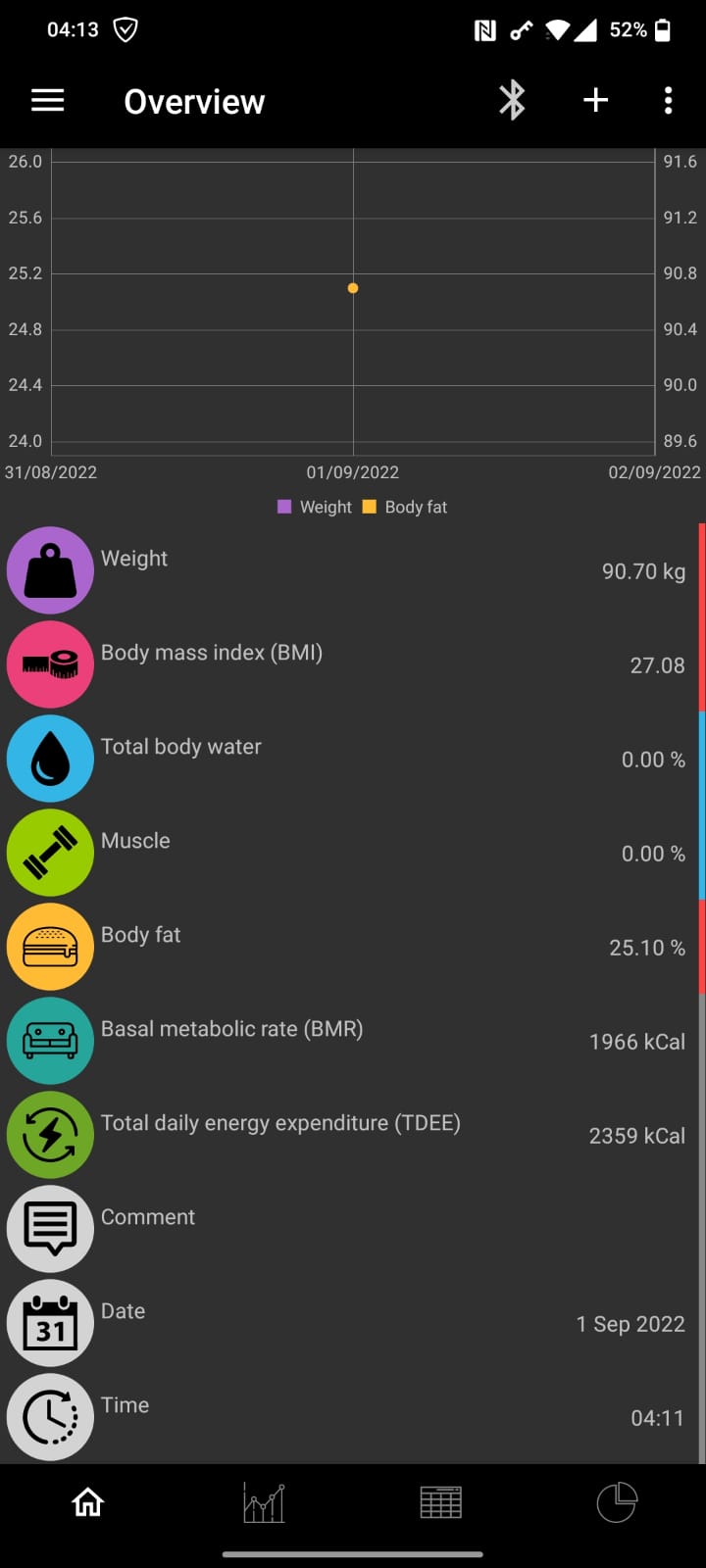

I'd really like to test the version as well, but I am not familiar with building the apk (I could not find any in the repo). Could someone provide it to me? Especially I have a CH100 skale (so not the same as RazvanSt: AH100).
Thank you for testing..
@RazvanSt The scale does not send muscle, water and bone info. So, it should be calculated somehow... in my todo list. wonky Date is corrected, thank you. Please, could you also check, does it read offline measurements? ( I mean, you weigh yourself without OpenScale app and after few minutes again with app)
@quixony
Please, find apk file on my github, branch AH100-TEST in folder test_apk
Please, could you also check, does it read offline measurements?
( I mean, you weigh yourself without OpenScale app and after few minutes again with app, in measure table should be both records)
Unfortunately there is no offline measurements reading. I only see the one that is taken while the application is connected to the scale.
I can confirm that. No offline measurements are shown.
Online measurements work great (besides the wrong date, and the app crashes if gps is disabled on adding Bluetooth devices).
I'd really appreciate if these scales get supported by OpenScale (main).
Thank you for your feedback.
@quixony
the app crashes if gps is disabled on adding Bluetooth devices
I suppose it is not my fault. Please, open new issue and describe the steps to reproduce.
Please, check last version. Does it read offline measurements? (Weight yourself online first)
ps. Water, muscles, bones are still in progress.