

 oleg-shilo
"CS-Script is busy."
it isn't doing anything else it just throws that error at me
i'm on macOS and have tried restarting my computer
how can i fix this?

It might be a side affect of VS updates. One of my PCs started exhibiting the same problem. Will need to investigate. Thank you for reporting

Well, just realized that it was another VSCode update pending. After the update has finished and VSCode restarted the problem has gone.
Can you please check that you have installed the latest version of VSCode and the extension.
What version of .NET SDK are you running. Can you please check your dotnet --list-sdks
Getting the very latest update has solved the problem on another machine as well:

Thanks for the interest! I will try applying the changes now.
I have .NET 3.1 and 5. the terminal outputs 3.1.409 [/usr/local/share/dotnet/sdk] 5.0.203 [/usr/local/share/dotnet/sdk]
For clarification, I am on a MacBook Air 2015 running macOS Big Sur.
Hope that helps, and hope your solution works,
crackerberries
Doesn't seem to have worked... do I have to add anything else to my project/code before running it? I've noticed it doesn't throw an error the first time I use it after i boot Visual Studio Code, but it also doesn't output anything.
I haven't read the documentation, and if this error is a result of my own incompetence, so sorry for wasting your time.
crackerberries
I cannot make a new CS-Script project, because it just throws the error again.
I'll try different things and try to find something that works.
crackerberries

The extension is doing lazy loading so it is not activated until you try to use it. That's why the problem is not immediate.
I feel that most likely the script engine binaries somehow failed to be deployed. You can check if they are present (e.g. cscs.dll):
_user_dir = path.join(process.env.HOME!, 'Library', 'Application Support', 'Code', 'User', 'cs-script.user');
if they are try to execute directly from the shell:
dotnet ./cscs.dll
And if it works then try "about" command from VSCode:

It is the simplest scenario that runs the engine and spits the output to the VSCode output window.
You being on mac makes it really difficult for me to investigate as I do not have mac handy. Debugging by yourself can be an option but it is not an easy one to take. It will be your time spent on it without any warranty of success. Sorry mate.
Windows 10 User here. I get this error as well on fresh install of CS-Script from chocolatey and version v2.1.0 of the vscode extension
C# Script execution engine (.NET Core). Version 2.0.0.0.
Copyright (C) 2004-2020 Oleg Shilo. www.csscript.net (github.com/oleg-shilo/cs-script.core)

   CLR:             5.0.17
   System:          Microsoft Windows NT 10.0.19044.0
   Architecture:    x64
   Install dir:     <not integrated>
   Script engine:   c:\programdata\chocolatey\lib\cs-script.core\tools\cscs.dll
   Config file:     <none>
   Compiler engine: dotnet (C:\Program Files\dotnet\dotnet.exe)
   NuGet manager:   dotnet
   NuGet cache:     C:\Users\tj\.nuget\packages
   Custom commands: C:\ProgramData\cs-script\commands
   Global includes: C:\ProgramData\cs-script\inc
and freshly installed CS-Script plugin
output of --list-sdks
3.1.421 [C:\Program Files\dotnet\sdk]
6.0.301 [C:\Program Files\dotnet\sdk]
6.0.302 [C:\Program Files\dotnet\sdk]
Followed instructions, F1, CS-Script: New C# Script
First execution of script (Green Triangle) nothing happens Second Click of button CS-Script is busy

It looks like you need to update your CS-Script version. This is the expected output:
CS-Script.VSCode - v2.1.0
-------------------------------------------------------
C# Script execution engine (.NET Core). Version 4.4.7.0.
Copyright (C) 2004-2020 Oleg Shilo. www.csscript.net (github.com/oleg-shilo/cs-script)

   CLR:             6.0.7
   System:          Microsoft Windows NT 10.0.19042.0
   Architecture:    x64
   Install dir:     C:\ProgramData\chocolatey\lib\cs-script\tools
   Script engine:   C:\ProgramData\chocolatey\lib\cs-script\tools\cscs.dll
   Config file:     C:\ProgramData\chocolatey\lib\cs-script\tools\css_config.xml
   Compiler engine: csc (C:\Program Files\dotnet\sdk\6.0.302\Roslyn\bincore\csc.dll)
                  : dotnet (C:\Program Files\dotnet\dotnet.exe)
   NuGet manager:   dotnet
   NuGet cache:     C:\Users\oleg.shilo\.nuget\packages
   Custom commands: C:\ProgramData\cs-script\commands
   Global includes: C:\ProgramData\cs-script\inc
-------------------------------------------------------
Syntaxer
   C:\ProgramData\chocolatey\lib\cs-syntaxer\tools\syntaxer.dll
Extension
   c:\Users\oleg.shilo\.vscode\extensions\oleg-shilo.cs-script-2.1.0\out
I suggest you update your CS-Script as it is not exactly matching the runtime installed. Then we will proceed from there.
You said that it was a fresh install from choco but the version there is 4.4.7 (https://community.chocolatey.org/packages/cs-script)
It is possible you have an old obsolete CS-Script.Core installed (https://community.chocolatey.org/packages/cs-script.core).
If it is the case you will need to remove it and install choco install cs-script.
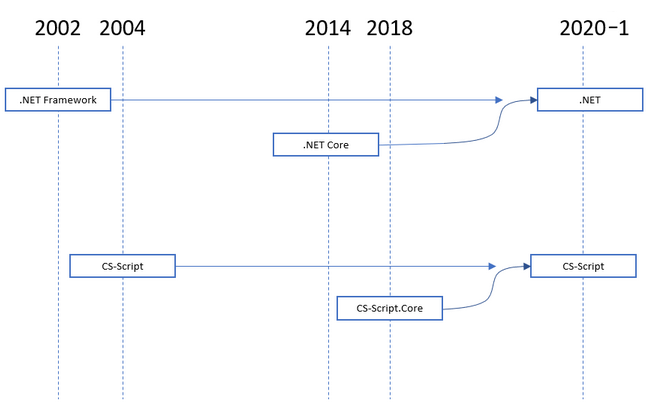
After MS dropped support for .BNET Framework and renamed .NET Core in just .NET, CS-Script followed the suite and renamed CS-Script.Core in just CS-Script.
Oh, I see , I figured that since I wanted to use Net Core, I installed the CSScript.Core version instead of CSScript.
I've been using CSScript since before Net.Core was a thing but this is the first time reinstalling it in a while.
So is Net.Framework no longer supported? Is CSScript basically .Net now?
I will try uninstalling that older version and hopefully the problem will go away
Starting from version v2.2.0 any accidental "hanging" of the script being executed can be fixed by CS-Script: reset busy status command