

 olefirenko
Disable autofill in chrome
Its really anoying, that you get the autofill overlay on chrome:
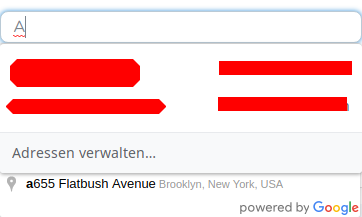
To get rid of this, you just have to add the attribute autocomplete="disabled" on the input field. See https://stackoverflow.com/questions/47775041/disable-autofill-in-chrome-63

If anyone else encounters the same issue, came up with a inelegant but working fix here:
https://github.com/olefirenko/vue-google-autocomplete/issues/62#issuecomment-447904883

Another inelegant one ;) : wrap your component inside a form tag
<form autocomplete="off">
<vue-google-autocomplete</vue-google-autocomplete>
</form>

This worked for me:
<vue-google-autocomplete
    // ...
    onfocus="this.setAttribute('autocomplete', 'new-password');"
>
</vue-google-autocomplete>
Note that the field can still be auto-filled by other "auto-fillable" inputs (which can be annoying).
