

 okta
okta
When IdP Routing Rules are enabled, some users on corporate networks are unable to login
Describe the bug?
When IdP Routing Rules are configured for my Okta tenant, some users are unable to complete the login process and are presented with this error:

I was able to temporarily mitigate the issue by disabling all routing rules, but this functionality is required for a good user experience.
After many hours of debugging, I was able to identify the causes and remediations.
The cause of the login failure is that the IdP lookup using a GET request to the /.well-known/webfinger endpoint is unsuccessful. FYI: The console error in the below screenshot was triggered manually, but it's the same method the SDK is programmed to call automatically when IdP routing rules are active.
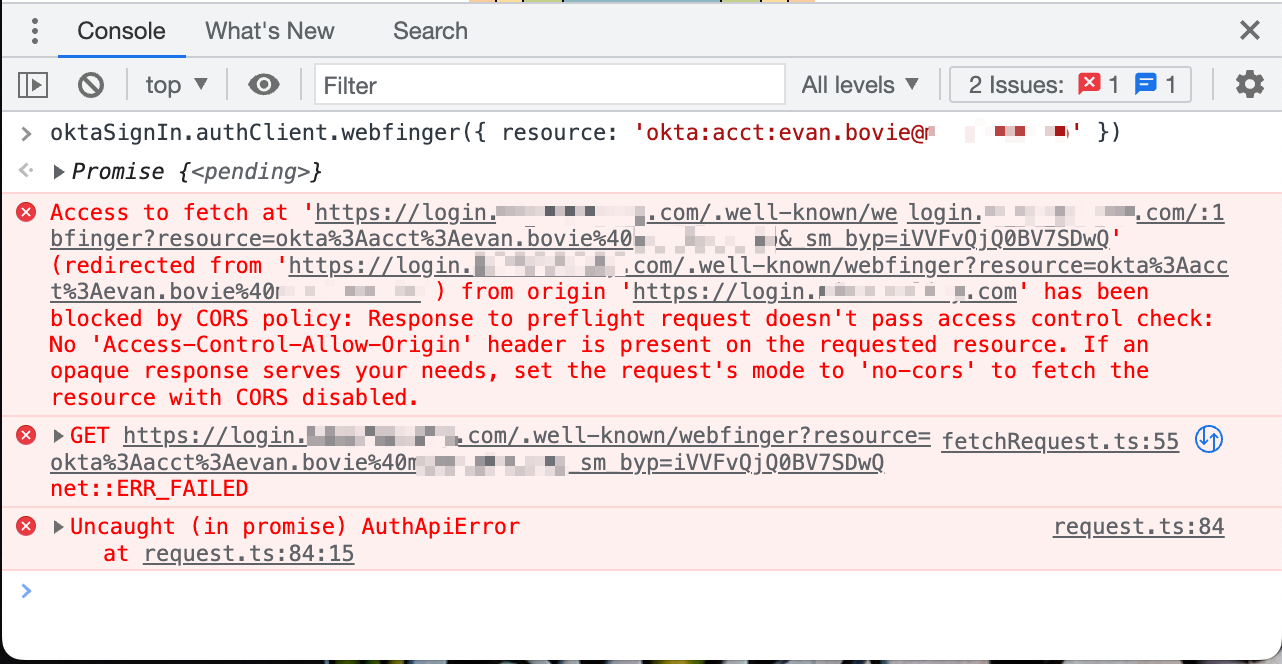
So the CORS-preflight response (OPTIONS request made to the WebFinger endpoint) lacks an Access-Control-Allow-Origin header.
Full response to the OPTIONS request to the WebFinger endpoint
HTTP/1.1 200 OK
Connection: Keep-Alive
Content-Length: 0
Date: Wed, 27 Apr 2022 16:17:22 GMT
Keep-Alive: timeout=5, max=100
Server: nginx
Strict-Transport-Security: max-age=315360000; includeSubDomains
X-Robots-Tag: noindex,nofollow
allow: GET, HEAD, POST, PUT, DELETE, OPTIONS, PATCH
cache-control: no-cache, no-store
content-security-policy-report-only: frame-ancestors 'self'
expect-ct: report-uri="https://oktaexpectct.report-uri.com/r/t/ct/reportOnly", max-age=0
expires: 0
p3p: CP="HONK"
pragma: no-cache
set-cookie: sid=""; Expires=Thu, 01-Jan-1970 00:00:10 GMT; Path=/
set-cookie: autolaunch_triggered=""; Expires=Thu, 01-Jan-1970 00:00:10 GMT; Path=/
set-cookie: JSESSIONID=361C3DAC5307673EDF12AFA5A54675E2; Path=/; Secure; HttpOnly
set-cookie: DT=DI0YhrKFq8JTGGDZjgOehBoog;Version=1;Path=/;Max-Age=63072000;Secure;Expires=Fri, 26 Apr 2024 16:17:22 GMT;SameSite=None
vary: Origin
x-frame-options: SAMEORIGIN
x-okta-request-id: YmlskpCr34E8lujtj9ZJ0gAABnA
x-rate-limit-limit: 10000
x-rate-limit-remaining: 9999
x-rate-limit-reset: 1651076302
x-xss-protection: 0
This seems like a bug for the Okta API team. But there's more… If OPTIONS requests are broken for this endpoint, why is the endpoint not broken for everyone?
Well, it seems that in a normal environment, a GET request to the WebFinger endpoint is made without a CORS-preflight request.
So what's special about the customer environments that are causing CORS-preflight requests for the WebFinger endpoint?
Something is responding to the original GET request with a series of redirects to another origin, https://gateway.zscalertwo.net. Now a CORS-preflight request is required because the origin is different from the hosted sign-in widget.

So the user environment trait that triggered the bug is that the users were accessing our hosted sign-in widget from behind a corporate proxy, Zscaler Internet Access (ZIA). Normally, when a corporate proxy is not involved or when one does not redirect requests, a request to the WebFinger endpoint is made without a CORS-preflight request because the origin of the authorization server is the same as the origin of the hosted sign-in widget.
ZIA apparently has a feature where it identifies users who are accessing internet resources by cookies it injects into the users' browsers through a series of redirects, and then it can allow or deny access based on whether or not a user has recently authenticated to the proxy. A vague description of this behavior is present on the About Zscaler Cookies documentation page. Implementation note relevant later: One of the most notable cookies is ssm_au_c with the Domain set to the hostname of the original request and expires at the end of the session. This means most future requests to the same domain will include the ssm_au_c cookie and ZIA is able to assume that the request is authenticated and will let it proceed to the intended origin without redirects.
An obvious solution is to ask our customers to exempt our login.awesomeapp.invalid origin from ZIA Authentication, but there's probably more we can do to help others track down the issue and to inform users that it's not their fault.
Suggestion: The error We found some errors. Please review the form and make corrections. should instead be something generic like the pre-existing There was an unexpected internal error. Please try again., or something more specific regarding CORS. This might require some work in okta/okta-signin-widget.
It would be great if there was a way to fall back to another method if the WebFinger request cannot be made, but it's kinda required to direct the user to the correct IdP method.
I'll note that I don't think Okta Identity Engine (OIE) tenants are afflicted by this issue. The /.well-known/webfinger endpoint is replaced with the (undocumented) /idp/idx/identify endpoint, which includes cookies / credentials.
I dove in deeper to answer the question "since ZIA has already set an ssm_au_c cookie for the hosted sign-in widget origin, why is it not being sent with the WebFinger request?" Well, that's because the fetch request to this endpoint is made with the credentials: 'omit' option.
So I explored a few mitigations:
- Include
withCredentials: truein theoptionsobject of the WebFinger method: https://github.com/okta/okta-auth-js/blob/d8da0b98531b75e45a564347ae2df23e19bafdda/lib/OktaAuth.ts#L586-L594 - Modify the Okta API's WebFinger
OPTIONSendpoint to respond with anAccess-Control-Allow-Originheader so that the CORS-preflight request succeeds. - Prevent the CORS-preflight request by omitting the
'Content-Type': 'application/json'header for the WebFinger method.
(1) works, but may raise issues like those in #631.
Both (2) & (3) fail to solve the issue (at least in my simulations) because, even after ZIA does its redirects and sends the Set-Cookie header for ssm_au_c, the cookie is not stored or sent due to the credentials: 'omit' fetch option, and then the system enters a redirect loop because (maybe) ZIA keeps trying to authenticate the request. With an actual ZIA instance (I don't have access to one and would have to test with a customer), there might be mitigations for this, and therefore the request might actually succeed.
So it seems like the only options within my control are to:
- Ask our customers to exempt our
login.awesomeapp.invalidorigin from ZIA Authentication. - Migrate to OIE.
Does anyone have better suggestions?
What is expected to happen?
Users in environments with a Zscaler Internet Access (ZIA) proxy are able to log in when IdP Routing Rules are enabled.
What is the actual behavior?
Users in environments with a Zscaler Internet Access (ZIA) proxy are unable to log in when IdP Routing Rules are enabled. WebFinger endpoint requests fail in these environments.
Reproduction Steps?
Be behind a ZIA proxy, or simulate one with some Proxyman scripts. Ping me for the scripts if you want them and I'll attach them to this issue.
If you have access to an Okta-hosted sign-in widget, you may run the following snippet in your browser's console:
oktaSignIn.authClient.webfinger({ resource: 'okta:acct:[email protected]' });
SDK Versions
Okta Classic Engine
Okta Hosted Sign-In Widget: ^5
Same code, and therefore likely behavior, seems to be present in @okta/okta-auth-js: 6.7.0
Execution Environment
My environment used in repro simulation: Chrome Beta on macOS (Mozilla/5.0 (Macintosh; Intel Mac OS X 10_15_7) AppleWebKit/537.36 (KHTML, like Gecko) Chrome/104.0.0.0 Safari/537.36)
In-the-wild, real users' environments that triggered the bug: Chrome on Windows (Mozilla/5.0 (Windows NT 10.0; Win64; x64) AppleWebKit/537.36 (KHTML, like Gecko) Chrome/100.0.4896.127 Safari/537.36)
Additional Information?
No response

Thank you for a thorough investigation @phaseOne. We will review this issue.
Internal ref: OKTA-510070

@oleksandrpravosudko-okta I am also having the same issue. What was the outcome from the internal review?

We have also experienced issues with this. Hello? @oleksandrpravosudko-okta
