

 oklai
oklai
Koala.exe using constant data - Send/Receive sits at ~900kbps constantly... [POSSIBLE SECURITY ISSUE]
Koala version v2.0.4 Bug report or feature request? Bug? Possibly malicious?
Noticed my send and receive were not falling below 888kbps despite sitting idle. After closing out processes one by one I discovered that Koala was responsible for the constant send/receive and that it apparently has been doing this for a while.
Looking at my usage report it has sent an incredible amount of data SOMEWHERE but I have no idea what would cause this much data to be transferred when I barely ever use the program.
I also tried closing and re-opening Koala and the second it is opened the data flow continues - turn it off and it stops...
Please explain why this program is using this much data and confirm that this is not malicious behavior...
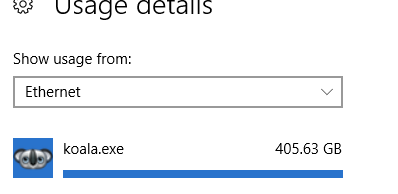

Real scary stuff. What version of Koala are you using? I suggest you downgrade to v2.0.4. No hitches there.

@PhilipsEkuma Actually, I am using v2.0.4 - I've updated my post with the version as well.
This is real scary indeed. But before we jump into conclusions, @Jaded-Design:
- Have you installed a custom compiler plugin?
- Is any of you projects or files on the network? (the usage your showing us is labeled Ethernet which includes local traffic not just internet)
- Can you update to the latest version of Koala (v2.3.0)?
Koala only uses the internet for checking for updates, which happens once on startup.

@zaygraveyard is right. Every traffic on your local dev machine could be routed via Ethernet depending on how your network is configured. In fact, this would be the case even if you turned off your internet. I in fact suggest you do that and then see if the usage stats continue to ramp up despite internet turned off. The way my own dev environment is configured, I don't even use Ethernet at all.
If problems persist, I suggest you use an app like IOBit Uninstaller to clean uninstall Koala App. Then restart your system and check if the problem persist, (perhaps the rogue app doing this has found another app to latch onto and abuse).
Then re-install Koala App and continue using it and then see if the problem returns. If it does return to Koala, heck, switch to Grunt or Gulp or Prepros.
same issue. windows, avast auto blocked, had to restart, delete it off my computer.

@alicex0error2 What do you mean same issue? Does Koala communicate over the internet when it shouldn't have?
@Jaded-Design Didn't say that an antivirus blocked it, why did yours block it?
@zaygraveyard I've had security issues on my network before, so i've cracked down on security policy.... The security extension I had said the site was insecure, but I thought it was a false positive, so I went ahead and ignored https everywhere and ublock origin.
After Komodo blocked the connections it was trying to make, avast made me restart my computer before further damages were made, then windows isolated koala at startup.
Though, I went on the website today, and it was perfectly secure, whatever it was, seems to have been resolve?
also, windows pointed out that the app was being mirrored from someone elses computer, not koala.
hope that helps.
https://github.com/oklai/koala/issues/768 YES Koala appears to communicate in some ways it should not. (v. 2.3.0, OS X)

Does someone have found a fix? Got some troubles with Koala aswell, same pattern.
