
exa
 exa copied to clipboard
 ogham
ogham
exa is not in repo of Ubuntu 18.04 LTS
I have a one VM with Ubuntu 18.04 LTS
When I've tried to install I've got:
~# apt install exa
Reading package lists... Done
Building dependency tree... 50%
Building dependency tree
Reading state information... Done
E: Unable to locate package exa
I've seen that the similar question was related to Ubuntu 20.10

You need Ubuntu 20.10 or later to install with apt. Following the instructions for manual installation from https://the.exa.website/install/linux worked for me (Ubuntu 18.04).

Maybe it should be mentioned next to the manual part at https://the.exa.website/install/linux or better Ubuntu line in section "USING A PACKAGE MANAGER" should looks like:
On Ubuntu (20.10 Groovy Gorilla and later) install the exa package with apt install exa On Ubuntu (20.04 Focal Fossa and previous) install the exa package by "MANUAL INSTALLATION" as below
Maybe the section about Ubuntu rephrased from:
On Ubuntu, On Ubuntu 20.10 (Groovy Gorilla) and later
to
On Ubuntu 20.10 (Groovy Gorilla) and later,
so that «Ubuntu» don’t stand on its own before a comma and is never interpreted on its own. (Also, maybe the «Manual installation» section should be called «Manually», since «Using a package manager» is referring the title of the page «Installing exa on Linux». It also sounds weird to me that some instructions include sudo and not others…)
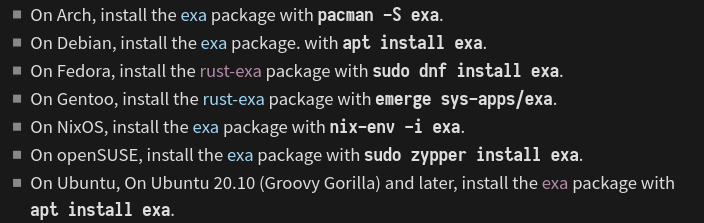
Here’s a suggestion for the installation page, maybe it’s clearer for you?
Before:
After:
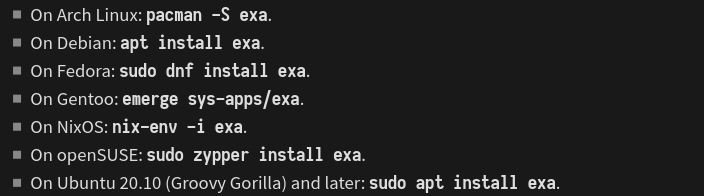
Also, I’m in the opinion that long term, a PPA would be good for those two Ubuntu LTS (18.04 and 20.10), as I suggest in #783.

It's more clear (the line describing Ubuntu installation) but there is still assumption that if something works on 20.10 it should works on 18.04 as well and manual installation is an another option if you don't wont to use package manager (not if you are using 18.04 then is mandatory) Maybe simply the line for Ubuntu should looks:
On Ubuntu 20.10 (Groovy Gorilla) and later: sudo apt install exa (Ubuntu 20.04 and older: use the MANUAL INSTALLATION )
On Ubuntu, On Ubuntu 20.10 (Groovy Gorilla) and later
Ack, that's a typo! I must have copy-and-pasted it from the README.
I kind of agree that the Linux page is a bit cluttered with text. Let me see what I can do.

OK, I spaced out everything on the install page. I wanted to keep the links to the packages rather than just listing the commands to run, so I gave them all headings and made the shell commands big like on the macOS page. I also moved all the sudos to a paragraph above; no idea why some had them and some did not.
Can you extend the links to include the «package» word in the link? Because right now, the links are only on the word «exa» and it’s really tiny and annoying to click on/not accessible.
on ubuntu 20.10 it seems the exa package hasnt been updated for a while. its still at version 0.9


on ubuntu 20.10 it seems the exa package hasnt been updated for a while. its still at version 0.9
Hi @pdeva,
@ariasuni has updated the maintainers of the Debian package (see comment). It might take a while before we see the update. If you want to try the lasted version, then you probably need to compile it yourself. Or download it from the release page.

@ogham Also, exa is now available in Debian stable, the text in the README has been changed to reflect that, but the website needs to be updated as well (comment made following #886).