

 offspot
RPI does not boot after succesfull run
With:
- Kiwix Hotspot 2.4.5
- Ubuntu 20.04
- A new 16GB SD card (which has never ever been tested earlier with Kiwix Hotspot)
Here is what I get:
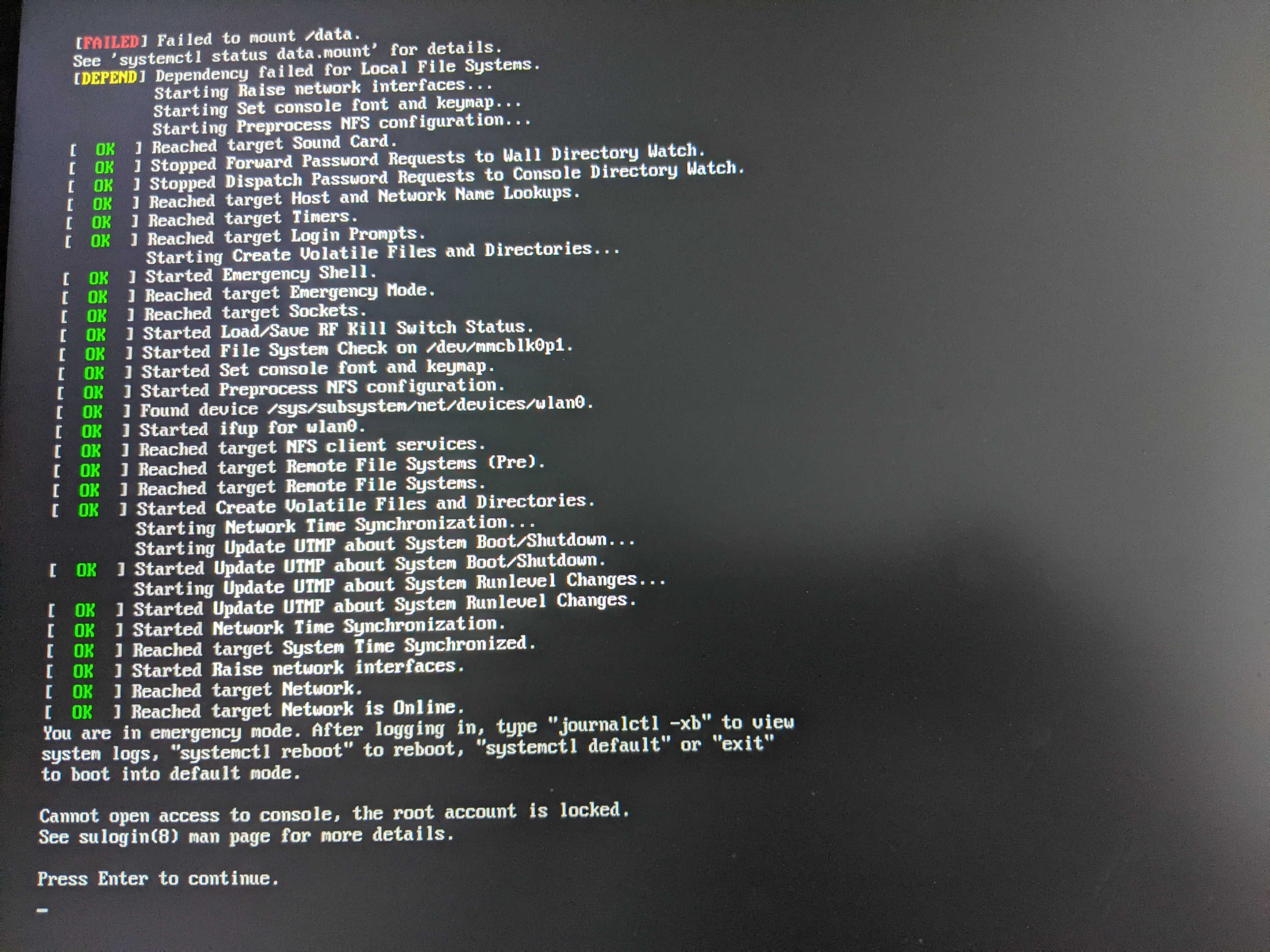
Log is: broken-boot.log

Article about this behaviour https://samx18.io/blog/2017/11/05/piBootIssue.html
First line of your log says it: Failed to mount /data. As we depend on it, it's in fstab and that's the reason it can't boot.
Potential reasons:
- Missing exfat drivers. Ruling this out as the modules are included (from raspiOS) in this master and it's in modprobe.conf.
- Erroneous sector right on the exfat partition (beginning of it). Unlikely ; especially given it's a new card. I think etcher would have complained about that also as I think we do a checksum test when writing.
- Not properly unmounted from host before writing. That's the most likely. Will have to test with Ubuntu 20.04 in GUI mode (cardshop uses cli with --root which triggers different mount/format mechanisms that are more reliable). I have the feeling this is not systematic and hope it's not related to #592

I am having the same issue. After downloading the hotspot builder and selecting the options I get this same exact error after booting from a pi 4 4gb. Seems the start elf issue has now been replaced with this.

No. I am using windows to create the Hotspot. I just left the settings as they were, I selected my usb flash drive. I selected the desktop as the working path. I only selected one Ted Talk as last time I attempted this it took hours to complete and then failed. The program completed successfully. I then removed the USB from my windows machine and placed it into my the USB port on my raspberry pi 4 4g. It is configured to boot from USB first. When applying power the start elf error has been resolved however now it gives the same exact error as listed above. Its states it unable to access the system and asks me to press enter where the process repeats.
We will need to fix it, but this might take a good month before the next release of 2.4.6. What would be good for the moment is:
- Know if this is a systematic bug
- Do we have a workaround? Does the manual writting of the image fixes the problem?
@Di9italZero Like you can see this ticket is part of the next milestone. If you want to get this fixed even quicker, please make a PR.
This issue has been automatically marked as stale because it has not had recent activity. It will be now be reviewed manually. Thank you for your contributions.
![stale[bot] avatar](https://avatars.githubusercontent.com/in/1724?v=4 "Published by a pub.dev verified publisher")