

 ocornut
ImGUI set color and borders to labels
Could someone help with a clear example on how to use ImGUI to set color and borders to labels?
Of course, just using:
ImGui::LabelText("##LabelID", Text_to_Display, Text_Size);
The result has the same color as the background and there are no borders.
I was reviewing the documentation but cannot realize how to implement these features.
Thanks in advance for your help!

First of all, please fill out issue template. It's purpose is not to be ignored. Also, please use http://discord.dearimgui.org/ to get general help.
To change a label color do this:
ImGui::PushStyleColor(ImGuiCol_Text, <your color>);
ImGui::LabelText("##LabelID", Text_to_Display, Text_Size);
ImGui::PopStyleColor();
To render a border around it, use ImGui::GetWindowDrawList() to render a rect around the label. You can get min/max square points of last item (label in this case) by calling ImGui::GetItemRectMin()+ImGui::GetItemRectMax().

@rokups : First of all, thanks very much for your answer!
As you know and you can see, in the below screenshot, using:
ImGui::PushStyleColor(ImGuiCol_Text, <your color>);
I can only change the font color of the text, in the LabelText.
However, I do not need to handle the font color. Instead, I need to provide a color to the Label itself (not to the text inside the Label). And that color has to be different from the background color of the entire app.
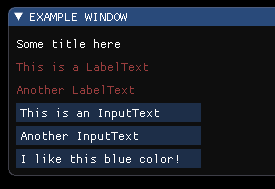
For example: In the below screenshot, you can see:
- Black background color for the entire app.
- Red font color for the text in the label.
- But the background color of the Labels is still black. This does not meet my requirements. For my requirements, it would be perfect giving to the Labels the exact appearance as the InputText (blue background, white text, in my example).
Could you help with this, please?
To do a background color you should render a filled rect into a drawlist and then render label 9n top. This would be a bit more complicated than rendering a border because you would have to either calculate label size beforehand and render background first, then SetCursorPos() to original location and render a label or use ImDrawListSplitter, render label first into channel 1 and render background later into channel 0.
On November 16, 2020 21:13:43 acerrano [email protected] wrote:
@rokups : First of all, thanks very much for your answer! As you know and you can see, in the below screenshot, using: ImGui::PushStyleColor(ImGuiCol_Text,
); I can only change the font color of the text, in the LabelText. However, I do not need to handle the font color. Instead, I need to provide a color to the Label itself (not to the text inside the Label). And that color has to be different from the background color of the entire app. For example: In the below screenshot, you can see:Black background color for the entire app. Red font color for the text in the label. But the background color of the Labels is still black. This does not meet my requirements. For my requirements, it would be perfect giving to the Labels the exact appearance as the InputText (blue background, white text, in my example). Could you help with this, please? — You are receiving this because you were mentioned. Reply to this email directly, view it on GitHub, or unsubscribe.
Just randomly found another solution for that using a table:
static ImGuiTableFlags flags = ImGuiTableFlags_Borders |
ImGuiTableFlags_NoHostExtendX | ImGuiTableFlags_SizingFixedFit;

ImGui::PushStyleVar(ImGuiStyleVar_CellPadding, ImVec2(10.0f, 10.0f));
if (ImGui::BeginTable("table1", 2, flags)) {
                ImGui::TableNextRow();
                ImU32 bg_color = ImGui::GetColorU32(ImVec4(0.3f, 0.3f, 0.7f, 1.0f));
                ImGui::TableSetBgColor(ImGuiTableBgTarget_RowBg0, bg_color);
                ImGui::TableSetColumnIndex(0);
                ImGui::TextUnformatted("Hello");
                ImGui::TableSetColumnIndex(1);
                ImGui::TextUnformatted("World");

                ImGui::EndTable();
}
ImGui::PopStyleVar();
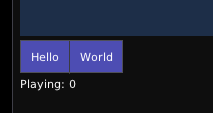
Not perfect, obviously! Still interested about other solutions! Is there a simple example of DrawList API somewhere? Thanks!
