

 ocornut
Large Tables
Version/Branch of Dear ImGui: Version: Dear ImGui 1.80 WIP (17905), merged with tables branch Branch: docking merged with tables Printout from imgui_demo at end of this text.
Back-ends: imgui_impl_glfw.cpp + imgui_impl_glfw.cpp Compiler: gcc (Ubuntu 5.4.0-6ubuntu1~16.04.9) 5.4.0 20160609 Operating System: Linux stalin 4.4.0-127-generic #153-Ubuntu SMP Sat May 19 10:58:46 UTC 2018 x86_64 x86_64 x86_64 GNU/Linux
My Issue/Question:
Question: What would be the best way to handle large tables?
General: ImGui table architecture is good for showing "spreadsheet tables. Customizable column headers, frozen columns, and row headers make it flexible for many uses. The question is more about how to use it efficiently when the table is big.
I was testing Dear ImGui to display large data tables: I modified the code a bit to avoid the 64 column limit.
- I tested with a table of 400 columns and 20000 rows. I changed the appropriate type of ImS8->ImS16, 64 bitmasks to arrays, and appropriate defines for the test. This is just simple mechanical change, changes marked with string "PEKKA" in https://github.com/iocafe/bluetree/blob/master/egui/code/imgui/imgui_internal.h and https://github.com/iocafe/bluetree/blob/master/egui/code/imgui/imgui_widgets.cpp.
- It works, but it makes the UI sluggish. Looping through a large number of rows x columns at screen refresh, not the best way.
- Overall I liked table API and examples. Clean and understandable.
So I was looking for a better way to do this:
- Determining cell size by content may not be ideal for large tables, maybe it would be ok if it is done only when table content changes. Using a fixed or predetermined row height and a predetermined column is what I can think of.
- Skipping the invisible rows and columns would make it fast. Displayed part of the table is a small window into a large table. The application should somehow figure out (information from the table) ranges of visible rows and columns and call ImGui only for those cells.
- Alternatively, I could think that I always present the only subtable of a large table to ImGui. This is a bit of cake on top of a cake solution and leaves issues with scrolling, moving input focus, etc. open.
Then I am unsure if displaying large tables is needed often enough to justify handling it. If it is not, that is also good information, then I can make a modified version of ImGui Table what is optimized for my case. Modifications for that are relatively small. Just idea of me writing own GUI components is a bad one, they will easily be incompatible with the future version of ImGui, and I know that the day will come when that would bite me back.
Screenshots/Video
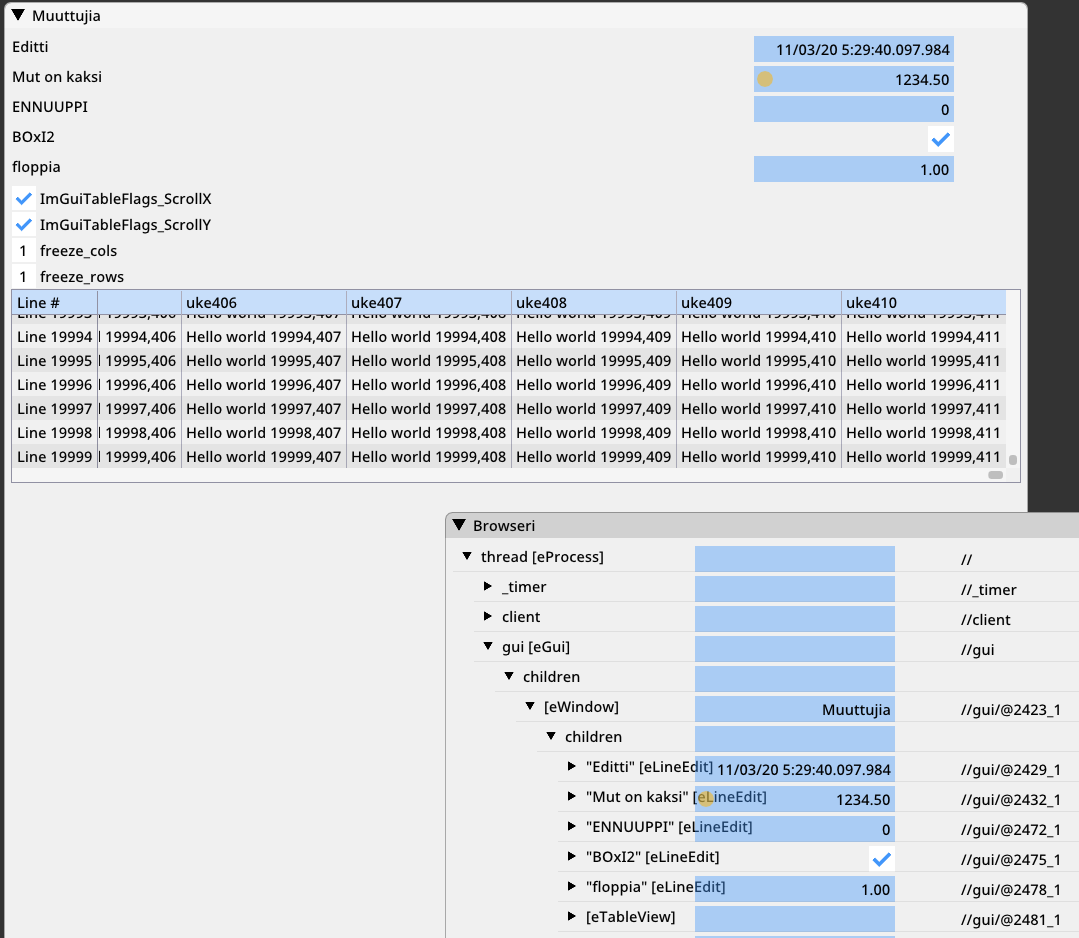
Best regards, Pekka
ps. I hope I post to the right place this time.
Dear ImGui 1.80 WIP (17905) sizeof(size_t): 8, sizeof(ImDrawIdx): 2, sizeof(ImDrawVert): 20 define: __cplusplus=199711 define: linux define: GNUC=5 define: IMGUI_HAS_VIEWPORT define: IMGUI_HAS_DOCK io.BackendPlatformName: imgui_impl_glfw io.BackendRendererName: imgui_impl_opengl3 io.ConfigFlags: 0x00000000 io.ConfigViewportsNoDecoration io.ConfigInputTextCursorBlink io.ConfigWindowsResizeFromEdges io.ConfigWindowsMemoryCompactTimer = 60.0f io.BackendFlags: 0x0000140E HasMouseCursors HasSetMousePos PlatformHasViewports RendererHasVtxOffset RendererHasViewports io.Fonts: 1 fonts, Flags: 0x00000000, TexSize: 512,256 io.DisplaySize: 1515.00,1547.00 io.DisplayFramebufferScale: 1.00,1.00 style.WindowPadding: 8.00,8.00 style.WindowBorderSize: 1.00 style.FramePadding: 4.00,3.00 style.FrameRounding: 0.00 style.FrameBorderSize: 0.00 style.ItemSpacing: 8.00,4.00 style.ItemInnerSpacing: 4.00,4.00


Thank you for the really fast reply:) I have not looked ImGuiListClipper, I will check it and try it out tomorrow.
ImGuiListClipper work on the vertical axis which is were the count can grow the most.
Both TableSetColumnIndex() and TableNextColumn() return a bool reporting the column visibility so you can skip rendering your contents.
Thank you. You had taught this through, and I missed it. This seems to exactly what is needed to quickly render large tables. I get a row range from clipper and I guess I can save the list of visible columns (return values from TableSetColumnIndex()) when rendering the first row.
   if (ImGui::BeginTable("##table", 6, flags, outer_size_enabled ? outer_size_value : ImVec2(0, 0), inner_width_to_use))
    ...
        ImGuiListClipper clipper;
        clipper.Begin(items.Size);
        while (clipper.Step())
        {
            for (int row_n = clipper.DisplayStart; row_n < clipper.DisplayEnd; row_n++)
I was thinking about what would have helped me to realize that a clipper is needed. Perhaps if I saw a comment like "use a clipper to optimize rendering of large tables" would help someone in the future. I will test it better tomorrow.
I renamed the "vertical scrolling" section to "vertical scrolling, with clipper". Also pushed a small fix for using 64 columns.
I'll have to do measurement of switching those masks to use small arrays as suggested, it's probably worth it.
Link to the commit for reference https://github.com/iocafe/bluetree/commit/fdc0d3394ec5d6cda8c49b46c2f3fd6c47532d51#diff-7ceeececb8278435ae286b06004bf7f6b961ee5e290910ef20f8d9094d2bc2b8
Success: A large table does work really well with the clipper. Fast and smooth.
FYI, while this doesn't entirely nullify your patch, I committed this for now: c35c136d42f57c2b740410cd0e8f7aa3dba36d03
I haven't yet wrapped the usage of the ImU64 mask so there's still a few things to do, but I'm hoping to do it later. I would suggest to not bother with updating your patch until this is all done.
Hi Omar, It is really good to hear that you are working on it. I think that there are other issues with my patch, that I did not treat table column sizing code right.
On Tue, Dec 1, 2020 at 1:21 PM omar [email protected] wrote:
FYI, while this doesn't entirely nullify your patch, I committed this for now: c35c136 https://github.com/ocornut/imgui/commit/c35c136d42f57c2b740410cd0e8f7aa3dba36d03
I haven't yet wrapped the usage of the ImU64 mask so there's still a few things to do, but I'm hoping to do it later. I would suggest to not bother with updating your patch until this is all done.
— You are receiving this because you authored the thread. Reply to this email directly, view it on GitHub https://github.com/ocornut/imgui/issues/3572#issuecomment-736732845, or unsubscribe https://github.com/notifications/unsubscribe-auth/ANCVOSFP27DSCYWZJ42ECWTSSUX3FANCNFSM4TITMQ7A .
The clipper works really well for large vertical tables - text as well as images. However I also run into the horizontal limitations mentioned above (max. 64 columns).
@ocornut: Do you have any plans incorporating e.g. @iocafe 's proposal into the mainline?

I needed support for >64 columns recently myself, and saw this was still sitting open. I decided to leverage some existing ImGui infrastructure to do this, via ImBitArray.
ImBitArray should provide the least increase in memory footprint while being compile-time constant with almost equivalent performance (on 32bit system it should be the same since they'd have had to split the 64bit mask check anyways, on 64bit systems you'll incur a small bit of extra ALU ops to get the offset to mask). I added in some static asserts to verify that ImGuiTableColumnIdx & ImGuiTableDrawChannelIdx are able to hold IMGUI_TABLE_MAX_COLUMNS, it is a bit janky however due to MSVC not providing constexpr std::numerical_limits, so it assumes signed types are used (as a lowest-common-denominator).
Unfortunately the project where this comes from is an SVN repo, so I have attached the required changes (base off 1.83 release) as patches for anyone else wanting this. imgui_tables.variable_column_support.zip

Opened: https://github.com/ocornut/imgui/pull/4876 with the patches supplied by Necrolis

Is there a plan to extend the 64 column limit anytime soon? Maybe with #4876 or #5305 .

I don't have a calendar. Both PR are clearly too slow/expensive and I've given up since my feedback on the second one are misunderstood or ignored. I'll just write it more optimally at some point.
Now pushed an official change for that: lifting columns limits while maintaining equivalent performances. See details on this comment : https://github.com/ocornut/imgui/pull/6094#issuecomment-1399085189