

 obsproject
UI: Add tabbed properties
Description
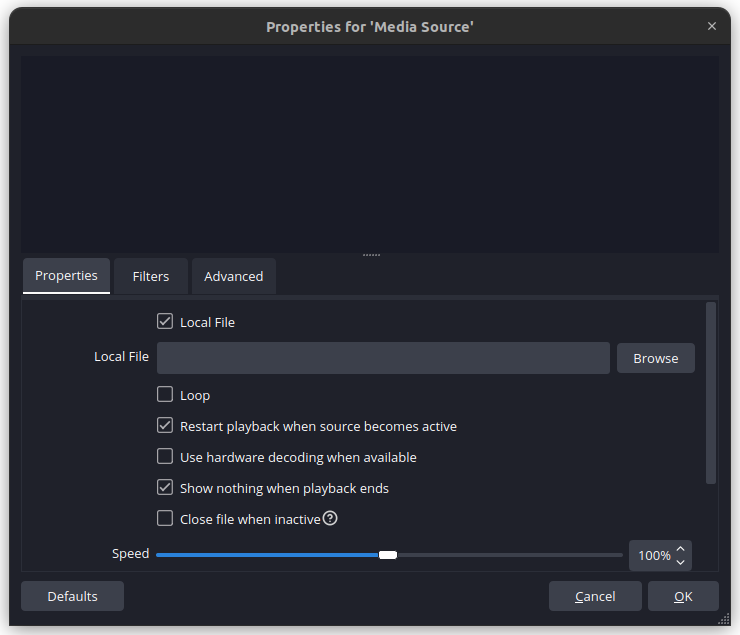
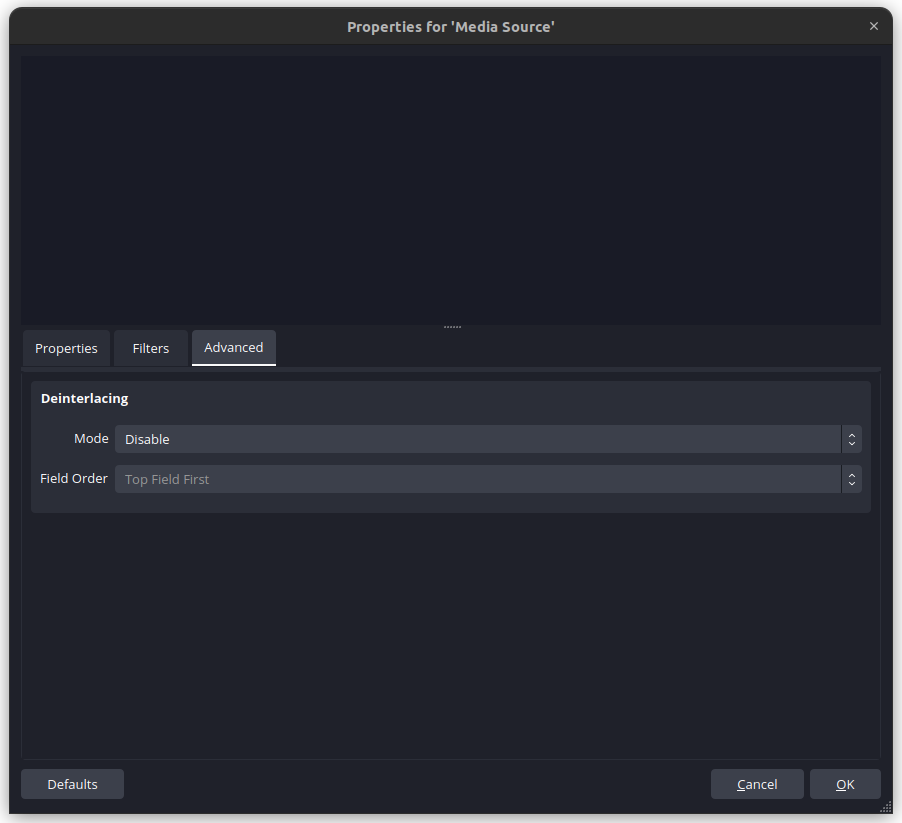
This adds tabbed properties for sources. The tabs are properties, filters and advanced (deinterlace settings).
Properties:
Filters:

Advanced:
Motivation and Context
Redo of #1254
This one is simpler because it only is done for sources, not scene items. Scene items properties can be done in the future.
How Has This Been Tested?
Opened properties of different sources.
Types of changes
- Tweak (non-breaking change to improve existing functionality)
Checklist:
- [x] My code has been run through clang-format.
- [x] I have read the contributing document.
- [x] My code is not on the master branch.
- [x] The code has been tested.
- [x] All commit messages are properly formatted and commits squashed where appropriate.
- [x] I have included updates to all appropriate documentation.

I'll try to find time to test but I'm super excited to move towards this change, especially when we can get scene item things added.
Looking at the diff, this removes the Filters button from the context bar. I'd like to hold off on removing that for at least one major release to give users time to learn Filters in part of the properties window. Can that button open to the Filters tab?
How does the defaults button behave in the bottom bar? Does it properly respect the context of what tab you're in and what filter might be selected?
Filters tab is a bit cramped now for source types that support both audio/video filters and effect filters. As a pure hypothetical question, how feasible is it to have each type of filters in their own tab?

Looking at the diff, this removes the Filters button from the context bar. I'd like to hold off on removing that for at least one major release to give users time to learn Filters in part of the properties window. Can that button open to the Filters tab?
Yes, I will add back the filters button. It will also directly go to the filters tab.
How does the defaults button behave in the bottom bar? Does it properly respect the context of what tab you're in and what filter might be selected?
The defaults button resets whatever the current tab is.
Filters tab is a bit cramped now for source types that support both audio/video filters and effect filters. As a pure hypothetical question, how feasible is it to have each type of filters in their own tab?
It would probably be possible, but it would take a lot more code. I got some ideas that might work, with just re-arranging few a things in the filters.
Filters tab is a bit cramped now for source types that support both audio/video filters and effect filters. As a pure hypothetical question, how feasible is it to have each type of filters in their own tab?
Tabs within tabs, all the way down

I have updated the filters tab to have the async and effect lists to be tabs.
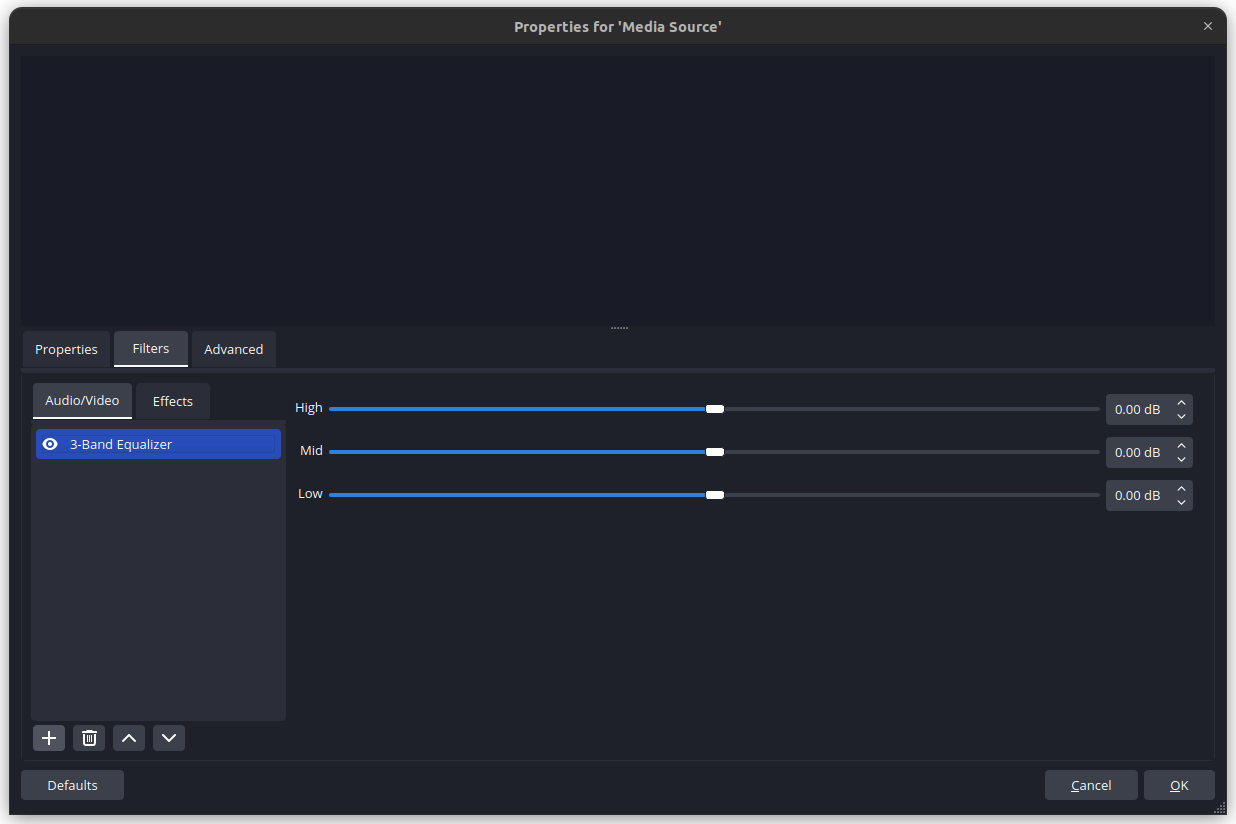
Tabs within an already tabbed navigation feels like one of those scenarios where you're made a mistake somewhere.
It would probably be possible, but it would take a lot more code. I got some ideas that might work, with just re-arranging few a things in the filters.
If it's possible, I'd prefer to go down that path
I would go even further with adding more tabs for individual settings on the sources, the show/hide transition overrides, scale filters and the 'Edit Transform' dialog values could get a tab.
This would potentially result in 2 places where you can find the properties for a source, having the tabs in a single properties dialog as well as the individual popup dialogs or context menu foldouts;, could do as suggested by making the current context menu options open the correct tab in the new properties dialog, which would get rid of duplicate info dialogs.

I would go even further with adding more tabs for individual settings on the sources, the show/hide transition overrides, scale filters and the 'Edit Transform' dialog values could get a tab.
This would potentially result in 2 places where you can find the properties for a source, having the tabs in a single properties dialog as well as the individual popup dialogs or context menu foldouts;, could do as suggested by making the current context menu options open the correct tab in the new properties dialog, which would get rid of duplicate info dialogs.
This is part of the eventual goal