

 obsproject
Major RAM usage on Mac after latest update (tested 04.10.2022)
Operating System Info
macOS 11
Other OS
MacOS BigSur
OBS Studio Version
Other
OBS Studio Version (Other)
28.0.3
OBS Studio Log URL
https://obsproject.com/logs/E_y6KWYbSmNvU_F6
OBS Studio Crash Log URL
No response
Expected Behavior
Virtual Camera output
Current Behavior
No virtual Camera output, but also 11-20GB RAM and usage. Idle it still uses 1+GB

Steps to Reproduce
- Start OBS
- Start virtual camera
...
Anything else we should know?
No response

That’s virtual memory, representing the addressable space of memory. This can increase when opening a large file for reading (as the token disk space is added to this value), also memory shared with other processes.
See how Microsoft Teams below that has over 400GB of ‘virtual memory’ usage.
More interesting is the ‘RES’ column for resident memory, which displays the actual amount of physical memory used by the app.

FWIW I just did a memory profiling run of OBS with and without the virtual camera enabled (without any changes to the scene setup) and did not immediately see any issues - memory usage was quite stable at around half a gigabyte of used memory and most allocations done by video_init which allocates memory for each frame generated for the virtual camera (but prior memory regions are free'd in turn as well).
Please provide a more precise description of the observed issue, the expected results, and specific reproduction steps.
I observe a similar problem. Virtual Camera is running and my scene is completely empty except for my Logitech Brio on High settings. My Video Settings are set to 1920x1080.
The Memory consumption keeps creeping up constantly until it reaches a critical size and the OS is suggesting to force kill application to free up memory.


@Brototype Please create either a new issue for your problem, or add the same required information to your post.
At the very least we need an OBS log to determine your machine type and macOS version, as well as the OBS version used. Otherwise we do not have enough data to investigate.
I've been seeing similar behavior for the past few months. I don't know which version was the first to show those problems, but I don't recall it happening during first half of the year.
macOS Ventura 13.1, OBS 28.1.2, and a logfile: https://obsproject.com/logs/V0zIh-eHuOaZqgVJ
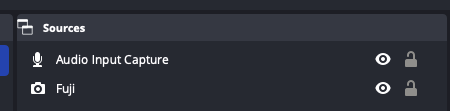
I don't have any plugins installed and my setups is 1 video input which is then output to virtual camera. I keep virtual camera enabled all the whole time. After roughly 12 hours OBS is taking over 12 GB of memory and it keeps increasing.

This happens very consistently on my machine (actually 100% of the time) so I can help run some additional debugging if needed

In that case you'd need to compile OBS with Xcode and attach instruments to it to see which callstack is heaviest memory-wise.
Given that you use Virtual Camera, this could be a case of raw video frames being cached and not freed.
That's what I see in instruments after 30 minutes of running virtual camera. Memory usage for obs was over 1GB at that point.
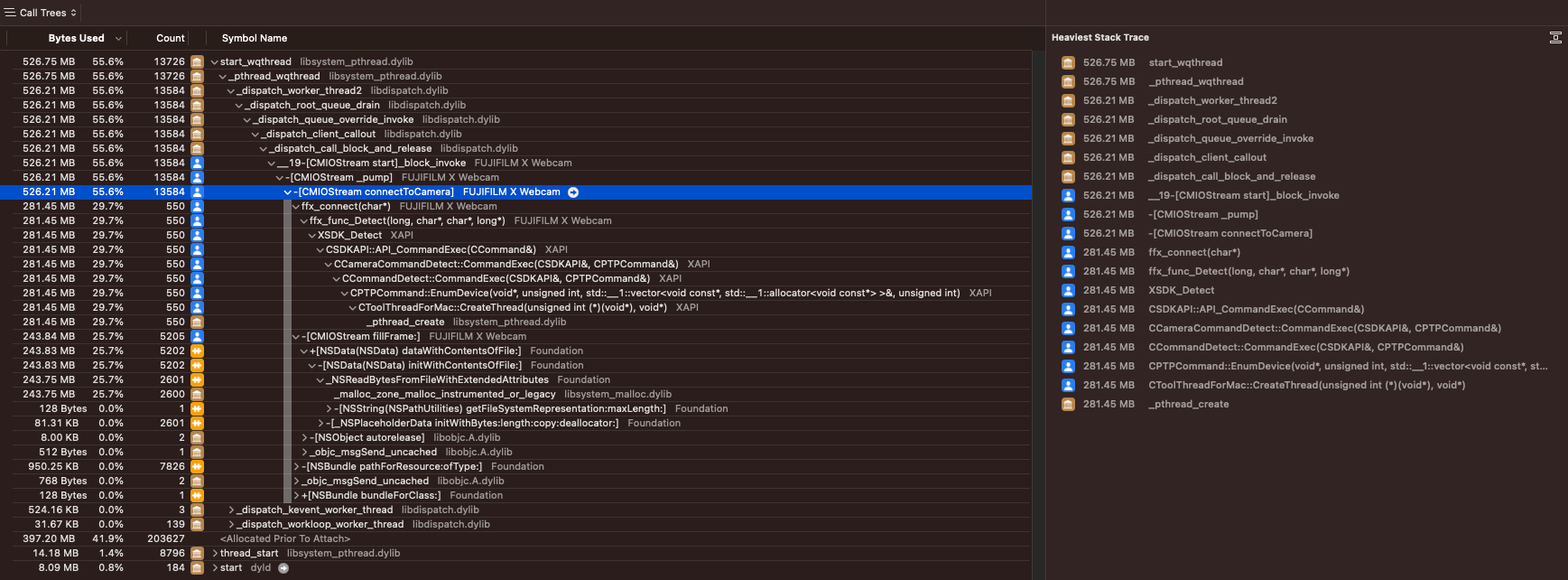 And here's the whole call tree https://gist.github.com/glowacki-dev/80d5e5c37e990d4156f96b12dc45e2b4
As you can see from the trace, none of the calls are related to OBS, but the FujiFilm camera plugin. Please refer to Fuji for any support regarding their plugin's memory usage.
I'm going to make the decision to close this. The additional information requested was not provided, and the resident memory usage cited (about 1212M) based on the scene collection in the log (multiple video capture devices, multiple media sources, etc.) does not seem out of the question based on further examination and investigation on our side.
If someone believes that there is an unusually high resource usage by OBS on macOS, please be prepared to provide an OBS log as well as an Instruments trace.
