

 obsproject
UI, libobs: Add lock aspect ratio to transform dialog
Description
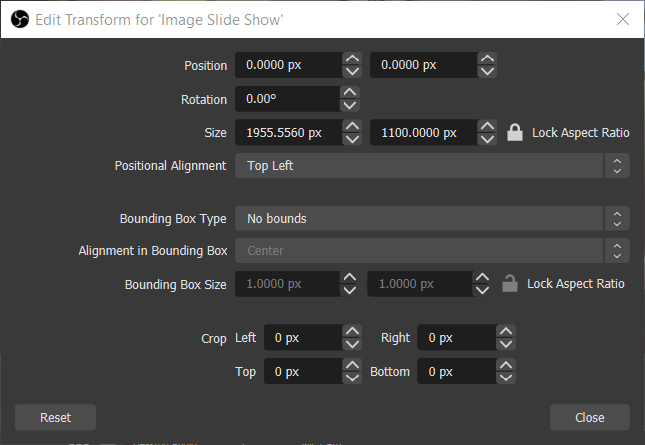
This adds the ability to lock the aspect ratio for the size and bounding box, in the transform dialog.
Motivation and Context
https://ideas.obsproject.com/posts/1338/button-to-lock-aspect-ratio-under-transform
How Has This Been Tested?
Locked the aspect ratio and made sure the width/height changed accordingly.
Types of changes
- New feature (non-breaking change which adds functionality)
Checklist:
- [x] My code has been run through clang-format.
- [x] I have read the contributing document.
- [x] My code is not on the master branch.
- [x] The code has been tested.
- [x] All commit messages are properly formatted and commits squashed where appropriate.
- [x] I have included updates to all appropriate documentation.

The lock/unlock button does not visually appear to be clickable. Can some sort of border be added to suggest that it can be interacted with?

IMO, I don't think that's necessary, as it is the same as every other lock icon in the program.
There's other lock icons? And they're clickable but don't appear to be? This sounds to me like something that should probably be changed across OBS as a whole. There's precedent for it in Gimp.
I agree with @nofew, it’s not really obvious that the lock can be clicked.
Unrelated, since this appears to get stored in the sceneitem properties and isn’t just a temporary dialog thing, how would this interact with scene editing in the preview? As in, is there a difference whether one of the locks is clicked and if not, should there be?

Thirding the request to make the lock button more obviously clickable/toggleable. That was my immediate thought upon seeing the screenshot.
That said, I'm definitely thankful for this change, it's something I've heard people ask for and it makes a lot of sense.

I would agree that while this is a really nice QoL feature to have for the transform dialog, as a user I would also expect locking the aspect ratio to propagate down with any future changes/resizing I do in the preview itself. It's not immediately obvious that locking the ratio is ONLY for manually entering values, as other changes are passed down to the preview (such as the bounding box). This creates inconsistent UX. Is it possible to lock the ratio in the preview as well?

Updated to also lock the aspect ratio when dragging in the preview.
I'm not sure I like the idea of being able to apply a lock in the transform dialog that is then only visible there.
Is it difficult to modify the canvas selection outlines? A modification to indicate locked ratio would be helpful here, and also a handy bonus for making Shift + Drag resizing more obvious to users by appearing when Shift is held

The lock is not the link.
Guys, have you ever edit an images in some editors? The transform values usually vertically organized (or narrow, single line widgets) and has to be placed on sides of the screen just not to cover the main edit area. This is obvious for the user of any editor.
And this PR change sets even more limits on the Transform window minimum width while preserving its height. It's no good.
The lock(the bind) aspect ratio tool button can be placed between the values similar to other editors. To not confuse the users.
More over, there is bug with the Transform window update - the size of grouped sources after the whole group was resized doesn't updates the values in the Transform window until the Transform window re-opened by the user:
- select group of few items
- open Transform window (title says Edit Transform for Group)
- resize the whole group in preview by mouse (values changes, no issues)
- select the source inside the group (title says Edit Transform for Source's Name)
- resize the selected source by mouse in preview (no values for the fields changes in the Transform window !!!)
- try to select the group again (title says No Item Selected)
- close Transform window and re-open it again (updated values are finally shown)
This bug should be addressed first, I think. Then new features can be added to the Transform window. Or you may step onto unknown lands of the selected items, locked aspect ratios and not selected sources.

As currently implemented, this is not going to be merged due to the above concerns. This dialog needs a larger overhaul with features like this in consideration.