

 obsproject
Large Image in Image Slide Show causing drop frames
Operating System Info
Windows 10
Other OS
No response
OBS Studio Version
27.1.3
OBS Studio Version (Other)
No response
OBS Studio Log URL
https://obsproject.com/logs/mNQgDcXUpN_4yHs7
OBS Studio Crash Log URL
No response
Expected Behavior
Should not drop frames when switch scenes with Image Slide Show
Current Behavior
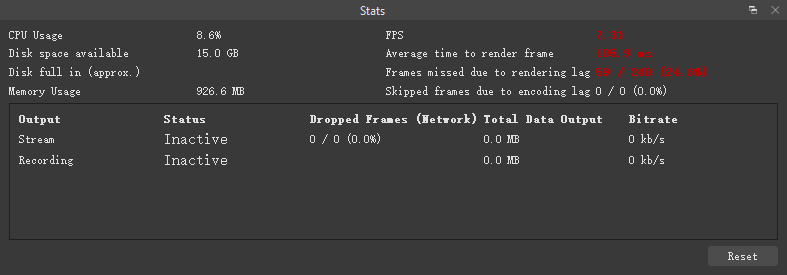
When select a image file with 27MB in Image Slide Show source and do a transition, the video freeze for about 2 sec.
Steps to Reproduce
- add a new Image Slide Show source
- select some images with large size over 20MB
- click OK
- do a transition to other scenes and switch back
- then you can see drop frames in Program window and the record file.
Anything else we should know?
No response

We are unable to reproduce in either OBS Studio 28.1.2 or OBS Studio 29.0.0 Beta 2. Please retest in a recent version of OBS Studio. Please also consider providing sample files to us so that we can try to reproduce with those files.

We are unable to reproduce in either OBS Studio 28.1.2 or OBS Studio 29.0.0 Beta 2. Please retest in a recent version of OBS Studio. Please also consider providing sample files to us so that we can try to reproduce with those files.
OBS Studio Version
28.1.2
Steps to Reproduce
- turn on Studio Mode with Duplicate Sources open (I tried it again and found out the key is Duplicate Sources)
- add 2 scenes
- in scene A, add random text source with Scroll filter to better observe of droping frames
- in scene B, add random large image more than 20MB.
- now switching Program from scene A to B, then it starts droping frames
it should be reproduced by any large image, just in case I will add some wallpaper example here
alse notise that loading 220324.jpg and 20130516105243858.jpg as the first image file cause the Image Slide Show frooze at that image, not switching to next one. and when those images in the middle of file list could cause Image Slide Show ignore the remaining image and jump to the next loop, or show the image one time then jump to next loop.