obs-studio
 obs-studio copied to clipboard
 obsproject
UI: Add audio track mixer
Description
This adds a dock, hidden by default, which shows volume controls for each audio track. Each track can be hidden.

Motivation and Context
IMO, this feature is sorely needed in OBS.
I took the code from #1469, and tried to simplify it as much as possible, so it would be more likely to be merged.
How Has This Been Tested?
Controlled different audio tracks and used the audio monitor with them to make sure it functions as expected.
Types of changes
- New feature (non-breaking change which adds functionality)
Checklist:
- [x] My code has been run through clang-format.
- [x] I have read the contributing document.
- [x] My code is not on the master branch.
- [x] The code has been tested.
- [x] All commit messages are properly formatted and commits squashed where appropriate.
- [x] I have included updates to all appropriate documentation.


I really like this, but I can already see people asking us why this isn't part of the normal mixer, or its own dock. Would it be possible to add this as a dock, or optionally to the main mixer dock itself?

That'd be a design decision - the original PR had it as its own optional dock (hidden by default). I used the original PR for a while and agree that it'd be best as its own dock, which'd allow for choosing multiple tracks in future.

I built this using my standard RelWithDebInfo build environment on Windows, and this is how it lists the tracks:
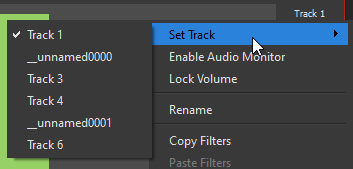
Which, outside of the unnamed tracks, is ignoring the custom name I already have set:
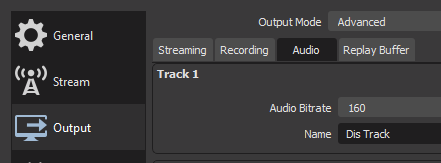
Additionally, using "Rename" in the context menu does not update the track name in Settings either, so they remain completely out of sync.
And finally, switching scene collections or profiles also does not update the names listed in the context menu.
I now get a crash on shutdown.
Freeing OBS context data
private source '__unnamed0005' destroyed
private source '__unnamed0004' destroyed
private source '__unnamed0003' destroyed
private source '__unnamed0002' destroyed
private source '__unnamed0001' destroyed
private source '__unnamed0000' destroyed
	6 source(s) were remaining
Exception thrown: read access violation.
**mx** was nullptr.
>	w32-pthreads.dll!pthread_mutex_unlock(pthread_mutex_t_ * * mutex) Line 61	C
 	obs.dll!obs_source_destroy(obs_source * source) Line 634	C
 	obs.dll!obs_source_release(obs_source * source) Line 733	C
 	obs.dll!obs_free_audio() Line 626	C
 	obs.dll!obs_shutdown() Line 1065	C
 	obs64.exe!OBSApp::~OBSApp() Line 1175	C++
 	obs64.exe!run_program(std::basic_fstream<char,std::char_traits<char>> & logFile, int argc, char * * argv) Line 2120	C++
 	obs64.exe!main(int argc, char * * argv) Line 2797	C++
 	obs64.exe!WinMain(HINSTANCE__ * __formal, HINSTANCE__ * __formal, char * __formal, int __formal) Line 97	C++
 	[External Code]
Track name behaviour is now much better, but does not update when switching Profiles.
The name should now be updating when switching profiles. I don't know what could be causing the crash.
I really like this, but I can already see people asking us why this isn't part of the normal mixer, or its own dock. Would it be possible to add this as a dock, or optionally to the main mixer dock itself?
I also agree that this should at the very least be it's own dock, or part of the main audio mixer (Perhaps pinned to the top of the list)

The name should now be updating when switching profiles. I don't know what could be causing the crash.
With more testing, this occurs in a blank scene collection in both Debug & RelWithDebInfo. I'm not sure what else I can try to track it down.
I updated to the latest code just in case, and now it appears like this in debug:
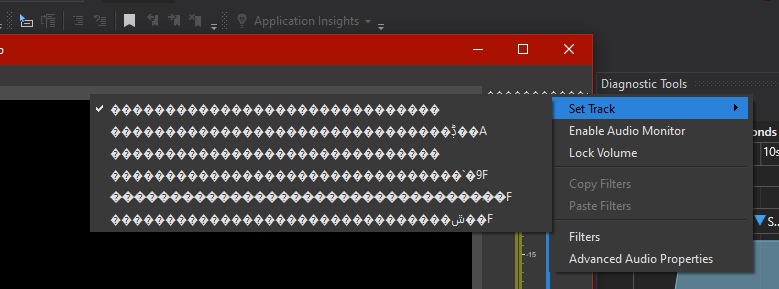
@WizardCM with the latest update, could you check if the text is now rendered correctly in debug mode?
I didn't realize this was a meter for every audio track that could be swapped between.
I'd like this to just be a single master meter for all tracks and pinned to the top of the audio mixer dock
I know there was a very large advanced mixer PR this got splintered off from, but I think there are better ways to approach audio controls for other tracks
Marking this draft for now as there are some design issues that need to be addressed on the UI/UX side.
If it were to put in the mixer dock, how would it be differentiated from the other meters?
My current understanding is that this should be a single master mix for all tracks, pinned at the top of the mixer dock. Perhaps we can put a border around it to indicate it's a static part when enabled?
If it were to put in the mixer dock, how would it be differentiated from the other meters?
Lots of ways that themes can determine

But it's not necessary either. The naming is often enough, especially if it can be "pinned" as always the first entry in the list

I have been looking for a Master Fader for a while now, I would love to test your Plug-In!
As far as I can see there is no download link in this post? Sorry to bother, but I don't use Github very often. 😅

This is not a plugin, it's a proposed code change for the base OBS Studio. There is no download available currently as this is not finished yet.
Better than what is currently implemented, but I really think what pkv has done with music edition is exactly what the majority of users would benefit from. It is super clean, not bloated, and seems very user friendly overall.

I didn't realize this was a meter for every audio track that could be swapped between.
I'd like this to just be a single master meter for all tracks and pinned to the top of the audio mixer dock
I know there was a very large advanced mixer PR this got splintered off from, but I think there are better ways to approach audio controls for other tracks
This isn't possible with the current way OBS audio is programmed, to have a single master meter. There is no master audio buffer. When each source's audio is processed, its audio is immediately sent to the different audio tracks, it is set up to use.
As to the location the meter should be: I feel like the best place for it is still be next to the preview. This is how other broadcasting software do it, such as vMix and Wirecast.
One example of why I think the volume controls dock wouldn't be as optimal: when the user scrolls past the master meter, it is no longer visible, so they would have to scroll all the way up to view it again.
Also the volume controls dock is cramped for space, so adding another volume control widget, would take up even more space.
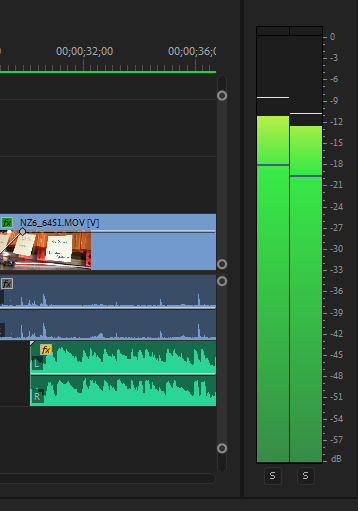
I've been playing around with this a bit and I do like the position next to the preview. It's such a useful tool to see if you're clipping, it's very nice to have it always visible. Even if people want the master fader in the mixer panel, at least having the levels display next to the preview would be desirable, and I think a lot of software does it this way. E.g., Premiere has an audio mixer panel that includes the master fader, but there is also an extra level meter that is nice and big to see problems at a glance. An extra dockwidget that could be put wherever would be nice, but the current implementation adjacent to the main preview is sensible.

As to the location the meter should be: I feel like the best place for it is still be next to the preview. This is how other broadcasting software do it, such as vMix and Wirecast.
One example of why I think the volume controls dock wouldn't be as optimal: when the user scrolls past the master meter, it is no longer visible, so they would have to scroll all the way up to view it again.
Also the volume controls dock is cramped for space, so adding another volume control widget, would take up even more space.
We could have the master meter exist outside the scroll area, so it can't be scrolled away from. I've seen plenty of apps take this approach
I'm trying to understand why is this needed, I see bloatware and we already have a hard time managing the poor space v28 gives us due to the oversized controls.
I'm not against new features, just make this optional.
The audio mixer is more than enough for a good chunk of us, and doesn't occupy 25% of UI space without our consent.
This is the type of feature that fits more as a addon, rather than bloating OBS that has already a convoluted code.

I disagree that this is not needed. In fact, I think this feature is one of the most critical missing features in OBS. I have seen so many content creators not understand that their output audio is peaking when mixing their game, microphone, and alert audios together. Other broadcasting software like vMix and Wirecast have this critical feature, and non-linear editors like Adobe Premiere and Davinci Resolve have it too for this exact reason. I don't see why this can't be behind a checkbox that isn't default, but I honestly think it should be default and available in the base OBS.

I'm reasonably sure that the general consensus is that this a desirable feature, it's just that the implementation details need to be worked out (although I'm not up-to-date on the current state of this PR).
~~@Kobi-Blade as with every dock in OBS this feature would be optional, as you could just close the dock.~~ Actually you might be right, I don't think this is a dock. Looks like it's still optional though.

I'm reasonably sure that the general consensus is that this a desirable feature, it's just that the implementation details need to be worked out (although I'm not up-to-date on the current state of this PR).
@Kobi-Blade as with every dock in OBS this feature would be optional, as you could just close the dock.
That is my concern, that is forced onto the preview screen, instead of being another dock, cause from the feedback and images it looks like they want it in the preview screen.
This could be an optional feature of the current audio mixer dock, to avoid bloating OBS with docks, or as original suggested make an addon.
So in the time since this PR has been pending, the Audio Monitor plugin has shown up that seems to do pretty much everything we want (and is implemented as a dock, so it can go next to the preview window or wherever). I've only played around with it a little bit, but it looks like it works fine, though when I was testing it a couple months ago on a pre-v28 custom build for ARM Mac, it was crashing a fair bit and there are some outstanding issues about audio delay, so I don't know if it's stable enough to be added to core OBS, but I do like how it's a dock and since this PR is getting a bit stale, might be a good source of inspiration. This is really an important enough feature to be in core though, rather than a third party plugin.
So in the time since this PR has been pending, the Audio Monitor plugin has shown up that seems to do pretty much everything we want (and is implemented as a dock, so it can go next to the preview window or wherever). I've only played around with it a little bit, but it looks like it works fine, though when I was testing it a couple months ago on a pre-v28 custom build for ARM Mac, it was crashing a fair bit and there are some outstanding issues about audio delay, so I don't know if it's stable enough to be added to core OBS, but I do like how it's a dock and since this PR is getting a bit stale, might be a good source of inspiration. This is really an important enough feature to be in core though, rather than a third party plugin.
Whilst the audio monitor plugin IS useful, I don't believe it is a substitute for a master audio meter, which in my belief is absolutely required, and that we shouldn't let perfect be the enemy of good by delaying a master output meter, for the sake of any other audio feature / mixing.
I feel it's appropriate that it can either be swapped between, or show a meter per track (if multiple output tracks are in use) But feel that filters being applied to the whole, or a volume scaler is perhaps not needed, and can be delayed until some implementation of buses/mixes can be arrived at, for the sake of releasing a master meter sooner, and having a more cohesive solution for buses/mixes.
I'd like this to just be a single master meter for all tracks and pinned to the top of the audio mixer dock
@Warchamp7 What are you imagining here? Unless you mean, having multiple master meters for all tracks, in a single dock, I don't follow how the result of merging all 6 output tracks into a single meter would be useful.