
react-native-vector-icons
 react-native-vector-icons copied to clipboard
 oblador
Custom font with custom tool
I've created a custom tool for generating icon font from SVG files. The result of glyphMap is something like this:
{
    "add-circle-outline": "\\f101",
    "add": "\\f102",
    "arrow-down": \\f103",
    "arrow-up": "\\f104",
    "check-circle": "\\f105",
    "check": "\\f106",
}
and here is my code to create a custom icon set:
import { createIconSet } from 'react-native-vector-icons'
import GlyphMap from '../themes/fonts/icon_fonts/icon_font.json'

const ReyhoonIcons = createIconSet(GlyphMap, 'custom_icon_font')
but when I use it, the result is like this:
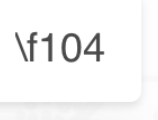


@hamidhadi I have the same problem, did you solve this? @zxccvvv your suggestion is only useful if you are willing to use IcoMoon, it's a great tool, but it makes it that you can not automate this process

I'm having the same issue guys! Did anyone solve it without using IcoMoon or Fontello?


That glyph map doesn't look right. See the example in the README
const glyphMap = { 'icon-name': 1234, test: '∆' };
the value should be a UTF-8 character or its character code.

You should try to convert your unicode to character. And then use that character in glyph map.
{ "add-circle-outline": "\\f101", }
to
{ "add-circle-outline": "", }
Here is a link I found online for convert, but you can use any tool you prefer.
https://r12a.github.io/app-conversion/
