
nvm
 nvm copied to clipboard
 nvm-sh
Getting error on "nvm install-latest-npm"
Hello everyone,
I am getting an error when trying to install the latest npm.
Am I doing something wrong?


The implication is that you don’t have owner permissions on your $NVM_DIR. Can you chown/chmod it until that’s fixed?

diluka@Diluka-Z7:~$ chown -R diluka:diluka $NVM_DIR
diluka@Diluka-Z7:~$ ll $NVM_DIR
总用量 208
drwxr-xr-x 1 diluka diluka    512 7月  23 09:50 ./
drwxr-xr-x 1 diluka diluka    512 12月  3 17:31 ../
drwxr-xr-x 1 diluka diluka    512 7月  23 09:50 alias/
-rw-r--r-- 1 diluka diluka   2122 7月  23 09:39 bash_completion
drwxr-xr-x 1 diluka diluka    512 7月  23 09:42 .cache/
-rw-r--r-- 1 diluka diluka   1057 7月  23 09:39 CONTRIBUTING.md
-rw-r--r-- 1 diluka diluka   4043 7月  23 09:39 Dockerfile
-rw-r--r-- 1 diluka diluka    140 7月  23 09:39 .dockerignore
-rw-r--r-- 1 diluka diluka    416 7月  23 09:39 .editorconfig
drwxr-xr-x 1 diluka diluka    512 7月  23 09:39 .git/
-rw-r--r-- 1 diluka diluka      9 7月  23 09:39 .gitattributes
drwxr-xr-x 1 diluka diluka    512 7月  23 09:39 .github/
-rw-r--r-- 1 diluka diluka    253 7月  23 09:39 .gitignore
-rwxr-xr-x 1 diluka diluka  13527 7月  23 09:39 install.sh*
-rw-r--r-- 1 diluka diluka   1113 7月  23 09:39 LICENSE.md
-rw-r--r-- 1 diluka diluka     51 7月  23 09:39 .mailmap
-rw-r--r-- 1 diluka diluka   5364 7月  23 09:39 Makefile
-rw-r--r-- 1 diluka diluka     19 7月  23 09:39 .npmrc
-rwxr-xr-x 1 diluka diluka    344 7月  23 09:39 nvm-exec*
-rw-r--r-- 1 diluka diluka 115357 7月  23 09:39 nvm.sh
-rw-r--r-- 1 diluka diluka   2004 7月  23 09:39 package.json
-rw-r--r-- 1 diluka diluka  31814 7月  23 09:39 README.md
-rw-r--r-- 1 diluka diluka    882 7月  23 09:39 ROADMAP.md
drwxr-xr-x 1 diluka diluka    512 7月  23 09:39 test/
-rw-r--r-- 1 diluka diluka   4186 7月  23 09:39 .travis.yml
-rwxr-xr-x 1 diluka diluka   2364 7月  23 09:39 update_test_mocks.sh*
drwxr-xr-x 1 diluka diluka    512 7月  23 09:50 versions/
diluka@Diluka-Z7:~$ nvm install-latest-npm
Attempting to upgrade to the latest working version of npm...
* Installing latest `npm`; if this does not work on your node version, please report a bug!
npm ERR! code EACCES
npm ERR! syscall rename
npm ERR! path /home/diluka/.nvm/versions/node/v12.20.0/lib/node_modules/.staging/npm-52a5d73a/node_modules/yargs-parser
npm ERR! dest /home/diluka/.nvm/versions/node/v12.20.0/lib/node_modules/.staging/yargs-parser-88a15fdd
npm ERR! errno -13
npm ERR! Error: EACCES: permission denied, rename '/home/diluka/.nvm/versions/node/v12.20.0/lib/node_modules/.staging/npm-52a5d73a/node_modules/yargs-parser' -> '/home/diluka/.nvm/versions/node/v12.20.0/lib/node_modules/.staging/yargs-parser-88a15fdd'
npm ERR!  [OperationalError: EACCES: permission denied, rename '/home/diluka/.nvm/versions/node/v12.20.0/lib/node_modules/.staging/npm-52a5d73a/node_modules/yargs-parser' -> '/home/diluka/.nvm/versions/node/v12.20.0/lib/node_modules/.staging/yargs-parser-88a15fdd'] {
npm ERR!   cause: [Error: EACCES: permission denied, rename '/home/diluka/.nvm/versions/node/v12.20.0/lib/node_modules/.staging/npm-52a5d73a/node_modules/yargs-parser' -> '/home/diluka/.nvm/versions/node/v12.20.0/lib/node_modules/.staging/yargs-parser-88a15fdd'] {
npm ERR!     errno: -13,
npm ERR!     code: 'EACCES',
npm ERR!     syscall: 'rename',
npm ERR!     path: '/home/diluka/.nvm/versions/node/v12.20.0/lib/node_modules/.staging/npm-52a5d73a/node_modules/yargs-parser',
npm ERR!     dest: '/home/diluka/.nvm/versions/node/v12.20.0/lib/node_modules/.staging/yargs-parser-88a15fdd'
npm ERR!   },
npm ERR!   errno: -13,
npm ERR!   code: 'EACCES',
npm ERR!   syscall: 'rename',
npm ERR!   path: '/home/diluka/.nvm/versions/node/v12.20.0/lib/node_modules/.staging/npm-52a5d73a/node_modules/yargs-parser',
npm ERR!   dest: '/home/diluka/.nvm/versions/node/v12.20.0/lib/node_modules/.staging/yargs-parser-88a15fdd'
npm ERR! }
npm ERR!
npm ERR! The operation was rejected by your operating system.
npm ERR! It is likely you do not have the permissions to access this file as the current user
npm ERR!
npm ERR! If you believe this might be a permissions issue, please double-check the
npm ERR! permissions of the file and its containing directories, or try running
npm ERR! the command again as root/Administrator.

npm ERR! A complete log of this run can be found in:
npm ERR!     /home/diluka/.npm/_logs/2020-12-08T01_19_54_219Z-debug.log
* npm upgraded to: v6.14.8

The implication is that you don’t have owner permissions on your $NVM_DIR. Can you chown/chmod it until that’s fixed?
How do I change the ownership of $NVM_DIR? Change the ownership of .nvm?

@ljharb I tried, but it still didn't work. I upgraded wsl to wsl2 and it updated npm successfully. I don't know why? Very strange.
My setup: Using WSL(1) with shell zsh on Win10, using Ubuntu 20.04.2 lts.
- Installed NVM via cloning repo in root directory. This called the latest version to the date
- Also installed succesfully node lts (as to the date)
- npm and npx are installed.
Problem:
npm -v and npx -v reveal outdated versions - older than the lts reported. I would like to update them both, but I can't change to WSL2 like @ljharb and I know I want to keep my npm/npx versions under nvm, without istallling them globally.
What have I tried:
npm install npmruns successfully, but when I checknpm -vit is the same (old) version.nvm install-latest-npmand/ornpm install -g npmreveal EACCES error same as revealed by OP.sudo chown -R $(whoami) ~/.nvmdid not solve the EACCESS error.
Is there any possible solution?

When I do npm root -g this is the output:
/home/lithya/.nvm/versions/node/v14.17.5/lib/node_modules
When I do which node this is the output:
/home/lithya/.nvm/versions/node/v14.17.5/bin/node
When I do which npm this is the output:
/home/lithya/.nvm/versions/node/v14.17.5/bin/npm
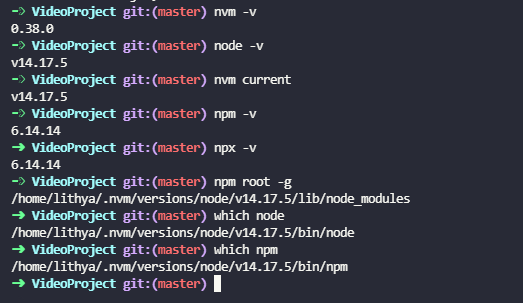
The EACCESS error is strange then, if you do in fact fully own ~/.nvm (not just chown but also chmod)
Not quite sure as to what value of chmod I should give to which directory/file.
- Ran
chmod -R 777 .nvmandsudo chmod -R 777 .nvmfrom root -still EACCES error. - Ran
chmod -R 775 .nvmandsudo chmod -R 775 .nvmfrom root -still EACCES error.
nah those should work.
what does /home/lithya/.nvm/versions/node/v14.17.5/bin/npm -v print out?
6.14.14...
If it wasn't for the 100+ vulnerabilities I would have given up, honestly. I tried updating the dependencies manually (audit fix doesn't work due to he same error)... There has to be something I can do.
Running npm install -g npm from inside the project, or running it from root:

Running it with sudo from either pwd simply returns sudo: npm: command not found
You definitely don’t need and shouldn’t ever use sudo with nvm.
It’s likely that this is a bug in WSL 1, and that nothing can fix it short of upgrading to WSL2.
@ljharb I also have this bug and I am on WSL v1. If I upgrade to version 2, will my files on my current WSL version be lost? Could this upgrade cause issues?

@AJLandry1000000000 i have no idea; i don't use WSL. I assume that you wouldn't lose any files, though.
I have tried all the above steps and am still getting the issue
 I see on the NPM docs website
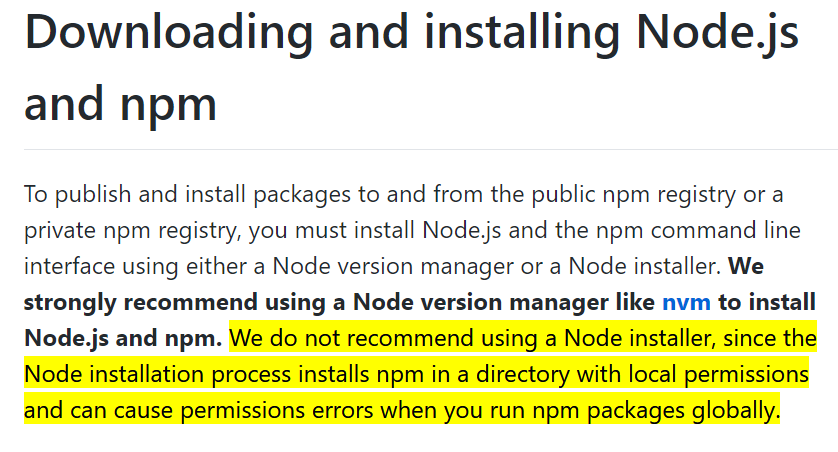 I do not remember where I downloaded node or npm originally, but I think this could be related. Beyond this I have no idea where to go with this issue.
I also cannot upgrade to WSL v2 as my company specifically uses WSL v1...
I do not remember where I downloaded node or npm originally, but I think this could be related. Beyond this I have no idea where to go with this issue.
I also cannot upgrade to WSL v2 as my company specifically uses WSL v1...
That particular error suggests you used sudo npm install -g at some point, and permissions are messed up. You should fully own everything inside $NVM_DIR.
I have run each of the following commands:
- sudo chown -R austin:austin $NVM_DIR
- chown -R austin:austin $NVM_DIR
- sudo chmod -R 777 $NVM_DIR
- chmod -R 777 $NVM_DIR
I own the directory and everything inside:

I am still getting the same permission denied error.
 😥
😥
hm, very strange. it might be an npm 7 bug just on Windows, or just on WSL1; also, node 13 is very very EOL.
Running
npm install -g npmfrom inside the project, or running it from root:
Running it with sudo from either pwd simply returns
sudo: npm: command not found
So, coming back to this after some time because I realized what was causing this:
I hadn't taken into account that although I was running the terminal from inside my WSL, I was hosting my proyects inside the windows distro... So it was "fixed" by simply creating a new folder under my "root" using the terminal (mkdir ...) , and moving the project files there, then opening my IDE from the terminal (code .).
Sharing is caring.
I had a similar permissions issue when trying to upgrade npm using nvm install-latest-npm. It turned out to be the result of a conflicting installation of npm installed from apt (and thus under ownership of root). Uninstalling the conflicting version with sudo apt remove npm, followed by reinstalling npm via nvm solved the issue for me.
Example using node v14. Substitute for whatever version of node you're using for your project.
sudo apt remove npm
nvm use 17                  # any version other than your desired version
nvm uninstall 14            # uninstall and reinstall your desired node version
nvm install 14
nvm install-latest-npm
Granted this was in WSL 2, Ubuntu 18.04, not WSL 1

@BraxtonLowers apt should never be used to install node or npm, and npm should never be installed separately (except by npm itself), so that likely was your issue.
I have this same issue on WSL 1. No idea what to do about it unfortunately. There's so many hits that come back for similar errors via searches on google.

Anyone care to share how they resolved this issue? Upgrading to WSL2 is not an option for me sadly.
