

 nvaccess
X shape is not announced by NVDA.
Steps to reproduce:
- Turn on NVDA.
- Open the attached Notepad.
- Navigate the edit pane and observed that NVDA is not narrating the 'X' shape.
Actual behavior:
X shape is not announced by NVDA.
Expected behavior:
X shape should be announced by NVDA.
System configuration:
NVDA installed/portable/running from source:
Installed
NVDA version:
Version 2021.3.5 (eSpeak NG Synthesizer)
Windows version:
OS: Windows 11 Version 21H2 (Build 22000.613)
Name and version of other software in use when reproducing the issue:
Other information about your system:
Other questions
Does the issue still occur after restarting your computer?
Yes
Have you tried any other versions of NVDA? If so, please report their behaviors.
No
If NVDA add-ons are disabled, is your problem still occurring?
Does the issue still occur after you run the COM Registration Fixing Tool in NVDA's tools menu?

Hi, which character is NVDA not announcing? At least with latest alpha build (25262), NVDA with eSpeak NG enabled does announce black square and filled up pointing triangle characters. I don’t think Narrator is announcing any characters in the attached document (I opened it on Windows 11 nickel build 22598 with Notepad 11.2203 installed). Thanks.

The character which is not announced is the following: ☓ It is the first character in the file.
It is character unicode 9747, i.e. u+2613 in hexa. It is not part of CLDR.
There are probably other tickets to increase the number of symbols that are announced by NVDA so this should probably be commented there.
@msftedad, could you please indicate in which circumstance you have decided to open this ticket? In which real-life example have you found this character? That would help understand why it is important to have it reported. Thanks.
and it is called SALTIRE in the Unicode norm.


@CyrilleB79, Thank you for acknowledging the issue. We have observed this character in Power BI under this path: 'Visualizations' pane-> Visual-> Markers-> Shape-> Marker Shape drop-down. (Adding the screenshot for reference)
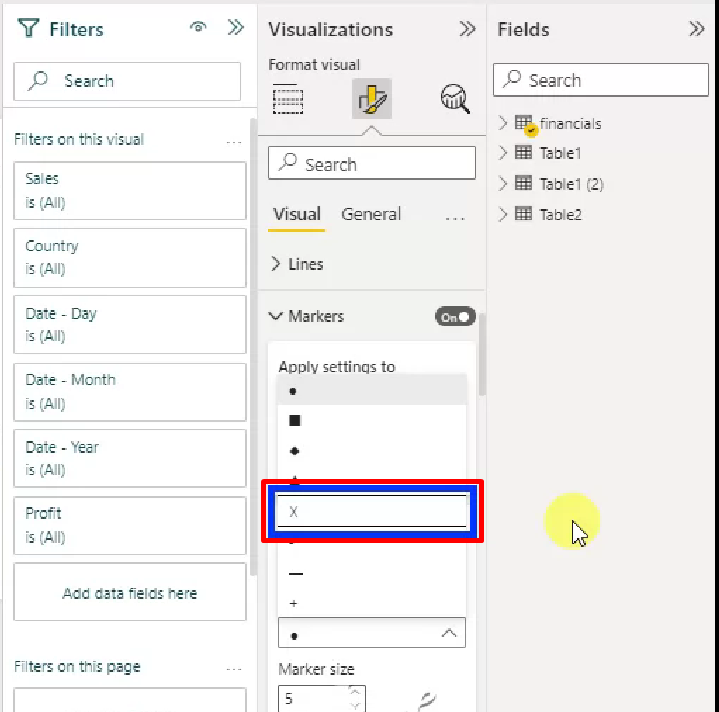
And JAWS is announcing this character as "SALTIRE" but not NVDA.
