

 nvaccess
NVDA freeze - Unable to write to nvda-slave.log
Steps to reproduce:
Do not remember
Actual behavior:
NVDA freeze occurred. No way to make it speak again. I have some vision left and have been able to see that a message box has appeared. I have tried to make a screen shot but lost it. I can remember that the message was something like this:
Error Could not open C:\Program files (x86)\nvda\nvda_slave.log. Permission denied.
I have forgotten to press OK to see what happened and just restarted NVDA with ctrl+alt+N.
I will send the log privately to NVAccess since this is from my company's computer and am not sure if this log can contain any sensitive information.
Expected behavior:
- No freeze when such issue occurs so that NVDA can read the error message.
- No error if log cannot be written? If I am not mistaken a log should not be written in the Program Files folder at user level.
System configuration
NVDA installed/portable/running from source:
Installed
NVDA version:
2020.3
Windows version:
Version de Windows : Windows 10 1809 (64-bit) build 17763.1518
Name and version of other software in use when reproducing the issue:
Other information about your system:
Other questions
Does the issue still occur after restarting your computer?
Do not know. This occurred only once.
Have you tried any other versions of NVDA? If so, please report their behaviors.
No
If addons are disabled, is your problem still occuring?
Not tested
Did you try to run the COM registry fixing tool in NVDA menu / tools?
No

That type of error for me occurs if a file is locked, open somewhere else or the machine is slow due to the system being very heavily loaded. Its incredibly rare, and not restricted to NVDA. Being a company machine, it could be some activity to do with security that runs out of sight, such as a scan which coincidentally was checking a file nvda wanted to access. I think unless you can actually induce the problem somehow it would be a swine to find! Brian
[email protected] Sent via blueyonder. Please address personal E-mail to:- [email protected], putting 'Brian Gaff' in the display name field. Newsgroup monitored: alt.comp.blind-users ----- Original Message ----- From: "Cyrille Bougot" [email protected] To: "nvaccess/nvda" [email protected] Cc: "Subscribed" [email protected] Sent: Wednesday, November 04, 2020 8:01 AM Subject: [nvaccess/nvda] NVDA freeze - Unable to write to nvda-slave.log (#11805)
Steps to reproduce:
Do not remember
Actual behavior:
NVDA freeze occurred. No way to make it speak again. I have some vision left and have been able to see that a message box has appeared. I have tried to make a screen shot but lost it. I can remember that the message was something like this:
Error Could not open C:\Program files (x86)\nvda\nvda_slave.log. Permission denied.
I have forgotten to press OK to see what happened and just restarted NVDA with ctrl+alt+N.
I will send the log privately to NVAccess since this is from my company's computer and am not sure if this log can contain any sensitive information.
Expected behavior:
- No freeze when such issue occurs so that NVDA can read the error message.
- No error if log cannot be written? If I am not mistaken a log should not be written in the Program Files folder at user level.
System configuration
NVDA installed/portable/running from source:
Installed
NVDA version:
2020.3
Windows version:
Version de Windows : Windows 10 1809 (64-bit) build 17763.1518
Name and version of other software in use when reproducing the issue:
Other information about your system:
Other questions
Does the issue still occur after restarting your computer?
Do not know. This occurred only once.
Have you tried any other versions of NVDA? If so, please report their
behaviors. No
If addons are disabled, is your problem still occuring?
Not tested
Did you try to run the COM registry fixing tool in NVDA menu / tools?
No
-- You are receiving this because you are subscribed to this thread. Reply to this email directly or view it on GitHub: https://github.com/nvaccess/nvda/issues/11805

I just have had the same issue again, without having restarted the computer. This time, I have been able to make a screen shot of the message. Here it is:
Errors in 'nvda_slave.exe' The logfile 'C:\Program Files (x86)\NVDA\nvda_slave.log' could not be opened: [Error 13] Permission denied: 'C:\Program Files (x86)\NVDA\nvda_slave.log'
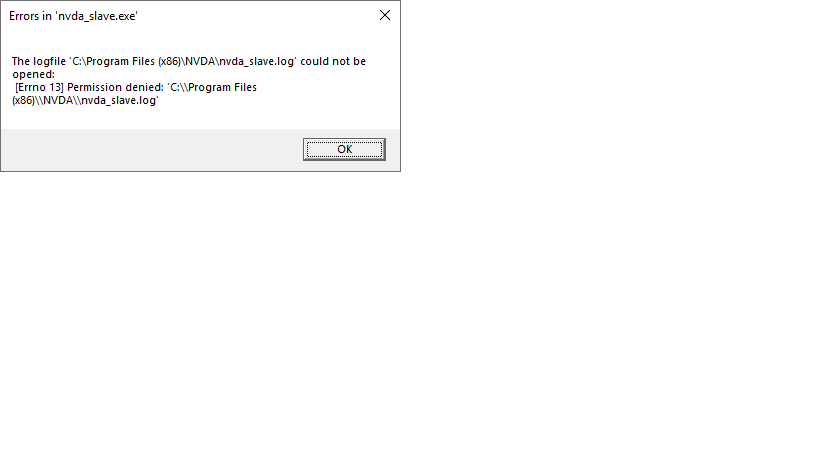
This time I have pressed OK and NVDA has been working again for some minutes. Then, it has frozen again, but I do not know if this is related. I have then restarted NVDA with ctrl+alt+N. I will also send this second log privately to NVAccess (nvda-old[2].log).

Thanks @Qchristensen and @michaelDCurran for your reply (private) and your look at the logs.
As explained, I have not been able to reproduce this issue after having restarted my computer. Being unable to reproduce the issue with or without add-ons disabled, I understand that the root cause of the issue may be difficult to find. And it is probably not worth to look for it if the problem does not occur again. I will tell you if it occurs again. But I will not be able to work many days with add-ons disabled to try to reproduce this issue, sorry.
One thing however bother me: The error message dialog indicates:
Could not open C:\Program files (x86)\nvda\nvda_slave.log. Permission denied.”
I imagine nvda_slave.exe was trying to write in this file. Why should it write in the Program Files (x86)\nvda folder? Couldn’t the log be written in the %tmp% folder as nvda.exe does? Thanks.
These kinds of error logs are only written when an error occurs in one of these exe files before we have had a chance to redirect stdout to our own logging. The log being written to the same directory as the exe file is handled by py2exe, and I don't think we have any way of changing the log path.
That error therefore would have occurred very early, probably when importing other modules at the top of nvda_slave.pyw.

@michaelDCurran wrote:
These kinds of error logs are only written when an error occurs in one of these exe files before we have had a chance to redirect stdout to our own logging. The log being written to the same directory as the exe file is handled by py2exe, and I don't think we have any way of changing the log path. That error therefore would have occurred very early, probably when importing other modules at the top of nvda_slave.pyw.
It seems that it is not the case. Just look at the log to see that this did not occur just after starting NVDA. Except if nvda_slave.exe could be restarted in some way while NVDA is running?
@Qchristensen wrote in an e-mail:
Yes these bugs which occur intermittently and with no obvious trigger are notoriously tricky to pin down. Keep an eye on it, and do please let us know if you notice any developments. If NVDA does crash completely, there should be an extra file in the %temp% folder called nvda-crash.dmp which will also have some extra information about what is happening in memory and so on which can be useful for debugging.
I will have a look in the %tmp% folder if there is a dumpfile of the same time stamp as the log when working on this computer again.
@CyrilleB79 wrote:
It seems that it is not the case. Just look at the log to see that this did not occur just after starting NVDA. Except if nvda_slave.exe could be restarted in some way while NVDA is running?
yes, NVDA_slave is not started when NVDA starts, rather it is being run on demand when a given operation needs to be executed in a separate process.

I cannot try to reproduce since the bug was occurring randomly and I had not identified which steps were causing the bug. But I do not remember to have had this issue recently. I have regularly Outlook crash (Outlook crashes and restart) and/or NVDA freeze when using Outlook, but there is noting specifically indicating a link with this issue.
Why are you asking me?
- If you are asking in the hope to close this ticket, I would say that we can close it and re-open in case the issue occurs again
- If you are asking because someone else has encountered this issue, do you have more information?
I couldn't reproduce this for at least one year now working on the same Laptop where i reproduced it originally. I think something solved this issue, I guess maybe removing some programs which used lot of CPU power. Meanwhile testing with NVDA 2022.3.1. I am closing this for now but we can reopen it in case it starts occuring again.
FYI, the same or a similar issue has been reported here. It also happened with Outlook; but the path of the log file is different.
I could reproduce it today aswell, and there is a file called exchangeperflog, it is a .dat file. Not sure whether it is related, but Outlook uses the Microsoft exchange server to update profiles, log files etc. So the log file us created by Outlook to send RPC performance data to exchange. Probably something is blocking there due to security reasons, causing NVDA to fail running. cc: @gerald-hartig, @msftedad any idea how to solve this? When this happens, NVDA doesn't work at all. Opening outlook makes NVDA silent imediately and the same error posted above appears again and again until the computer is restarted.
In general, Exchangeperflog_*.dat files are created to cache client-side monitoring data that a process was unable to send to the server at that moment. This file was created in my %temp% folder exactly in the moment when I started Outlook and NVDA displayed the slave.log error.
FYI, the same or a similar issue has been reported here. It also happened with Outlook; but the path of the log file is different.
And another user reported to me privately the same issue just now, NVDA 2024.3, Windows 10, still opening Outlook. He had restarted, but without success (we'll try to get a clean reboot tomorrow).

Hi, today this happened to a friend. I'm not facing this issue on my corporate laptop, but I'm using the new outlook interface that seems to be a web interface. She was able to take a screenshot, and this is the description according to Be My Eyes.
Errors in 'nvda_slave.exe'
The logfile 'C:\Users\xxx\AppData\Roaming\nvda_slave.log' could not be opened: [Errno 13] Permission denied: 'C:\Users\xxx\AppData\Roaming\nvda_slave.log'

I am facing this issue every time I open Outlook since one week, I found out some more information that might be helpful. CC: @SaschaCowley, @gerald-hartig
- The Exchange_perflog dat file is generated everytime when the error apears
- NVDA is completely silent as long as the slave log file cannot be written or opened
- Pressing ok button on the error makes NVDA speak again. NVDA tries to open or write this log file multiple times, so the error appears multiple times.
- After pressing ok however, NVDA does not report any flags on outlook messages anymore (e.g. unread, has attachment, priority, whether it is an appointment or not, etc.)
Conclusion: it seems NVDA is not able to access some of the object information delivered through COM by MS Office via the accessibility API, due to permission restrictions. I wonder whether this issue is related to #8961? Because the error appears always when starting outlook.
The error from #8961 is as follows:
ERROR - RPC process 8380 (nvda_slave.exe) (19:46:47.529):
__main__.main:
slave error
Traceback (most recent call last):
  File "nvda_slave.pyw", line 94, in main
  File "comHelper.pyo", line 22, in _lresultFromGetActiveObject
  File "comtypes\client\__init__.pyo", line 180, in GetActiveObject
  File "comtypes\__init__.pyo", line 1247, in GetActiveObject
  File "_ctypes/callproc.c", line 950, in GetResult
WindowsError: [Error -2147221021] Vorgang nicht verfügbar
Did the COM registration fixing tool solve this issue for anyone here? I cannot run it due to security restrictions at work.
@michaelDCurran since #17246 is closed now, do you think we can close this one too? It disappeared on my side at least as well last week, probably after a Windows update.
I asked to my friend and the issue disapeared too. She thinks that this issue was fixed in an update of NVDA, but I think it was solved due to a windows update. So, te issue could be closed I think.
Yeah let's close this issue for now. If anyone enceounters this issue again, please open a new one.
Hi all! It happened again... Windows 11, Office 2021 ProPlus, NVDA 2024.4.2 and Alpha 35820. We keep this issue or should I create another one?

