
Mock
 Mock copied to clipboard
 nuysoft
A simulation data generator

###### 如题,菜鸟ing > 由于用另一个插件的时候用到了上传图片,调用时发现报错,各种查找后发现xhr.responseType在发送前是ok的,回来就空了,于是后边的代码因为用到了DataView,所以这个坎就过不去了(vue cropper)。 然后接着找看到   > this中保存了responseType的值,但是看代码由于在custom中的xhr已经在前边的代码中赋值是个新的了,我想在如图的位置直接更改custom.xhr中的responseType已经不能了。 由于时间关系(其实是能力有限)果断干脆就放弃了那个插件,mark一下问题望解决

刚写了一个值 {"code":0,"msg":"操作成功","bannerList":[{"content":"1","createDate":{"date":29,"day":1,"hours":19,"minutes":35,"month":5,"nanos":0,"seconds":26,"time":1593430526000,"timezoneOffset":-480,"year":120},"id":1374,"img":"https://btc018.oss-cn-shenzhen.aliyuncs.com/202006291935026_aGFPr.jpg","mImg":"","shunxu":4280,"status":1,"title":"E","type":6,"url":"https://coinw.zendesk.com/hc/zh-cn/articles/360050284674"},{"content":"1","createDate":{"date":29,"day":1,"hours":11,"minutes":17,"month":5,"nanos":0,"seconds":42,"time":1593400662000,"timezoneOffset":-480,"year":120},"id":1364,"img":"https://btc018.oss-cn-shenzhen.aliyuncs.com/202006291117042_bPEB6.jpg","mImg":"","shunxu":4290,"status":1,"title":"G","type":6,"url":"https://coinw.zendesk.com/hc/zh-cn/articles/360050258694"},{"content":"1","createDate":{"date":22,"day":1,"hours":21,"minutes":23,"month":5,"nanos":0,"seconds":24,"time":1592832204000,"timezoneOffset":-480,"year":120},"id":1345,"img":"https://btc018.oss-cn-shenzhen.aliyuncs.com/202006222123024_7Vobs.jpg","mImg":"","shunxu":4300,"status":1,"title":"H","type":6,"url":"https://coinw.zendesk.com/hc/zh-cn/articles/360049906014"},{"content":"1","createDate":{"date":16,"day":2,"hours":17,"minutes":47,"month":5,"nanos":0,"seconds":47,"time":1592300867000,"timezoneOffset":-480,"year":120},"id":1334,"img":"https://btc018.oss-cn-shenzhen.aliyuncs.com/202006161747047_RfWOr.jpg","mImg":"","shunxu":4400,"status":1,"title":"F","type":6,"url":"https://coinw.zendesk.com/hc/zh-cn/articles/360050390833"},{"content":"y","createDate":{"date":1,"day":5,"hours":22,"minutes":41,"month":10,"nanos":0,"seconds":8,"time":1572619268000,"timezoneOffset":-480,"year":119},"id":514,"img":"https://btc018.oss-cn-shenzhen.aliyuncs.com/202005252101037_9zLSF.jpg","mImg":"","shunxu":4850,"status":1,"title":"C","type":6,"url":"https://coinw.zendesk.com/hc/zh-cn/articles/360048095634"},{"content":"1","createDate":{"date":7,"day":4,"hours":10,"minutes":23,"month":4,"nanos":0,"seconds":44,"time":1588818224000,"timezoneOffset":-480,"year":120},"id":1234,"img":"https://btc018.oss-cn-shenzhen.aliyuncs.com/202005071023044_tkdts.jpg","mImg":"","shunxu":5100,"status":1,"title":"X","type":6,"url":"https://coinw.zendesk.com/hc/zh-cn/articles/360047252214"},{"content":"1","createDate":{"date":30,"day":1,"hours":21,"minutes":27,"month":11,"nanos":0,"seconds":55,"time":1577712475000,"timezoneOffset":-480,"year":119},"id":829,"img":"https://btc018.oss-cn-shenzhen.aliyuncs.com/202003311531017_LDC2t.jpg","mImg":"","shunxu":9080,"status":1,"title":"hpy","type":6,"url":"https://hyperpay.me/hardware?lang=zh-cn"},{"content":"1","createDate":{"date":21,"day":6,"hours":11,"minutes":57,"month":11,"nanos":0,"seconds":52,"time":1576900672000,"timezoneOffset":-480,"year":119},"id":747,"img":"https://btc018.oss-cn-shenzhen.aliyuncs.com/201912211157052_wsi7H.jpg","mImg":"","shunxu":9320,"status":1,"title":"1","type":6,"url":"https://www.coinw.to/front/verification"},{"content":"b","createDate":{"date":18,"day":5,"hours":11,"minutes":48,"month":9,"nanos":0,"seconds":30,"time":1571370510000,"timezoneOffset":-480,"year":119},"id":397,"img":"https://btc018.oss-cn-shenzhen.aliyuncs.com/upload/images/201910181148030_P1laT.jpg","mImg":"","shunxu":9600,"status":1,"title":"新手营","type":6,"url":"https://www.coinw.to/buy_Bitcoin_guide"},{"content":"-259","createDate":{"date":28,"day":4,"hours":12,"minutes":14,"month":10,"nanos":0,"seconds":28,"time":1574914468000,"timezoneOffset":-480,"year":119},"id":663,"img":"https://btc018.oss-cn-shenzhen.aliyuncs.com/202004021715039_gyp3h.jpg","mImg":"","shunxu":9700,"status":1,"title":"otc","type":6,"url":"https://coinw.zendesk.com/hc/zh-cn/articles/360039155774"}]} 这个接口值 去在线json 网站检查 是没有问题的但是就是生成然后保存的时候也是正常的 但是预览的时候 就报错 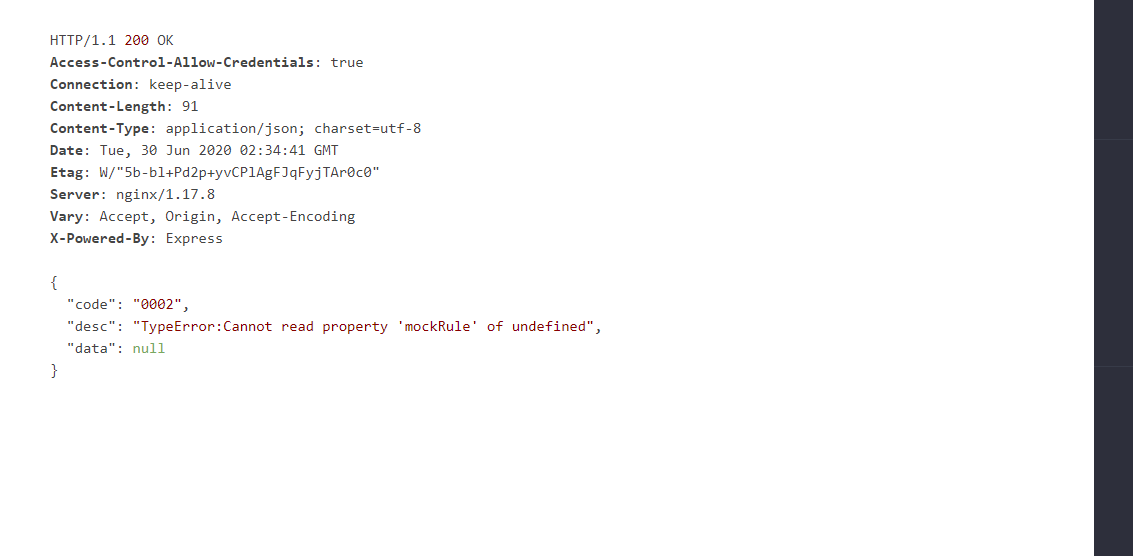

含 `@` 的数据 mock 报错,已经修复在 [fix: getValueByKeyPath 追加 fallback 逻辑](https://github.com/nuysoft/Mock/commit/c801353449904cc9f6b9bd10f2c865ef8269e93b) 但 http://mockjs.com/examples.html 控制台仍然报错 控制台显示 `Mock.version` 是 "1.0.1-beta1"

TypeError: module.require is not a function node_modules\mockjs\dist\mock.js:1480:34 没有在package.json 中找到canvas包

## 介绍 [better-mock](https://github.com/lavyun/better-mock) Fork 自 [Mock.js](https://github.com/nuysoft/Mock),使用方法和 Mock.js 一致,用于 javascript mock 数据生成,它可以拦截 `XHR` 和 `fetch` 请求,并返回自定义的数据类型。 [文档介绍](http://lavyun.gitee.io/better-mock/) [在线练习](http://lavyun.gitee.io/better-mock/playground/) [更新日志](http://lavyun.gitee.io/better-mock/changelog/) ## 为什么有 Better-Mock ? Mock.js 是一个很好的库,国内使用者众多,虽然该库几乎已经停止维护了,但是还是有很多使用者在提 issue 和 PR,这些问题都得不到有效的解决。所以 `better-mock` 将会在 Mock.js...


**random int 10 100 //NaN** 基本上传参都会出错 修改为以下 bin/random ``` program .command(key) .description('Random.' + key + argDecl) .action(function() { // var args = [].slice.call(arguments, 0, -1) // var result = fn.apply(Random,...


### 引言 Mock.js 语法分为两类,「模板」与「占位符」。模板语法的设计相较占位符更加简洁友好,但有一个缺陷即其语法限制了模板方式只能构造 key - value 形式的数据片段。相对的,占位符语法则更加严谨。在我的理解中,模板方式是占位符方式的简化,模板方式能构造的数据是占位符方式能构造的数据的子集。 ### 问题 在现在的版本(1.5)中,所有使用模板语法能构造的数据片段都可以使用占位符方式构造,除了: 1. 重复元素的数组:`"name|count": [{}, {} ...]`, `"name|min-max": [{}, {} ...]` 2. 重复内容的字符串:`"name|count": "value"`, `"name|min-max": "value"` 这意味着,上面这些类型的数据片段,不能独立于 key(name) 单独存在。这导致在两种情况下现有的语法无法构建所需的数据: - 该数据片段即为...

Hi, when I use ``` Mock.init(axiosInstance); Mock.setup({ timeout: '200-600' }); ``` There always comes a error on console,as follows: ``` main.js?56d7:11 Uncaught TypeError: _mock__WEBPACK_IMPORTED_MODULE_8__.default.setup is not a function at eval...
