

 nuxt
nuxt
Sass Variables not available in pages / layouts / components
Environment
Nuxt project info: 22:39:51
- Operating System:
Linux - Node Version:
v16.13.0 - Nuxt Version:
3.0.0-27375427.d07d572 - Package Manager:
[email protected] - Bundler:
Vite - User Config:
components,meta,css - Runtime Modules:
- - Build Modules:
-
Reproduction
I am trying to load sass from assets/sass/global.sass. Add the file and fill it with:
@forward "colors"
@use "colors" as c

body
  background-color: c.$secondary
Add a partical sass file _colors.sass and fill it with:
$primary: #264653
$secondary: #e76f51
$black: #171717
$white: #e7e7e7
Add the sass file into the nuxt.config.ts config.
import { defineNuxtConfig } from 'nuxt3'

// https://v3.nuxtjs.org/docs/directory-structure/nuxt.config
export default defineNuxtConfig({
    components: true,
    meta: {
        script: [
            { src: "https://unpkg.com/phosphor-icons" }
        ],
    },
    css: [
        "@/assets/sass/global.sass",
    ]
})
See that the variable is valid and is applied as the background-color for the body. Now try to access any of the color variables inside a component, page or layout. Both with namespacing (@use) and without (@import) didn`t work for me.
Describe the bug
The Sass variables should be loaded into every vue file to be globally available. They aren`t as far as I can see.
Additional context
The Nuxt 3 docs are yet sparsely filled so there might be something missing I could not read up, that is necessary to make the variables load.
Logs
No response

We may implement via https://github.com/nuxt-community/style-resources-module or directly in Nuxt.
There is also the following workaround:
export default defineNuxtConfig({
  vite: {
    css: {
      preprocessorOptions: {
        scss: {
          additionalData: '@import "@/assets/scss/global.scss";',
        },
      },
    },
  },
})

Thank you for the super quick reply and the perfectly working workaround for now! Curious what will end up in the 1.0 release.
While the workaround works, I get a Typescript error in VScode:
Type instantiation is excessively deep and possibly infinite.
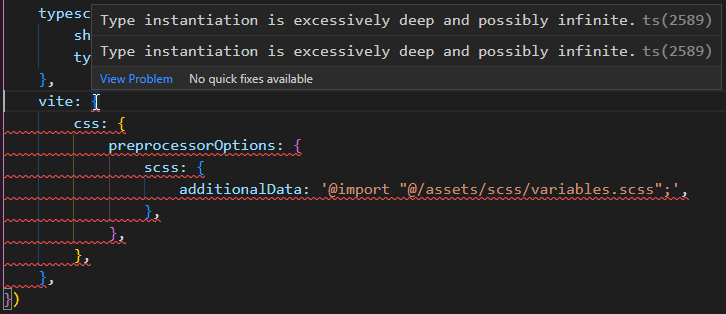

While the workaround works, I get a Typescript error in VScode:
Type instantiation is excessively deep and possibly infinite.
I got same error in vscode.


我们可以通过https://github.com/nuxt-community/style-resources-module或直接在 Nuxt 中实现。
还有以下解决方法:
export default defineNuxtConfig({
  vite: {
    css: {
      preprocessorOptions: {
        scss: {
          additionalData: '@import "@/assets/scss/global.scss";',
        },
      },
    },
  },
})
 I wrote that, but it didn't work
Using 3.0.0-rc.4 and this work around doesn't seem to work anymore. Still getting 'Undefined variable' in components that use global scss variables. Any suggestions?

@jdhillen For me it does work and I have the same version:
  vite: {
    css: {
      preprocessorOptions: {
          scss: {
              additionalData: '@import "@/assets/scss/global-vars.scss";',
          },
      },
    },
  },
