

 nuxt
nuxt
Local Debugg through cloudflare tunnel crashes
Environment
Environment Operating System: Mac Os Node Version: v22.14.0 Nuxt Version: nuxi v3.23.1 Package Manager: [email protected] User Config: modules, gtag, ui, devtools, css, routeRules, i18n, runtimeConfig, nitro, future, compatibilityDate, vite, eslint Runtime Modules: @nuxt/eslint@^9.23.0, @nuxt/image@^1.10.0, @nuxt/[email protected], @nuxt/content@^3.4.0, @vueuse/nuxt@^13.0.0, nuxt-og-image@^5.1.1 Build Modules: - Version 3.4.0
nuxt.config: // https://nuxt.com/docs/api/configuration/nuxt-config export default defineNuxtConfig({ modules: [ '@nuxt/eslint', '@nuxt/image', '@nuxt/ui-pro', '@nuxt/content', '@vueuse/nuxt', 'nuxt-og-image' ], components: true, devtools: { enabled: true },
css: ['~/assets/css/main.css'],
content: { preview: { dev: true, api: 'https://api.nuxt.studio', gitInfo: { name: 'alexphone-blog', owner: 'alex-phone', url: 'https://github.com/alex-phone/alexphone-blog'
future: { compatibilityVersion: 4
compatibilityDate: '2024-04-03',
eslint: { config: { stylistic: { commaDangle: 'never', braceStyle: '1tbs'
Version
v3
Reproduction
https://github.com/alex-phone/alexphone-blog
Description
local debugging through cloudflare tunnel crashes. With a starter template, and Nuxt Content v3 installed, trying to local debug on Nuxt Studiol, entering Preview Mode it crashes after a few seconds. Disabling devtools, only server side error (500) is showed.
Additional context
Logs
Client Error only with devtools: { enabled: true }: devtools.client.js?v=c2aa232d:19 SecurityError: Failed to read a named property 'NUXT_DEVTOOLS_DISABLE' from 'Window': Blocked a frame with origin "https://induced-explained-spencer-warren.trycloudflare.com" from accessing a cross-origin frame. at nuxt.js?v=c2aa232d:139:60 at fn (nuxt.js?v=c2aa232d:216:44) at Object.runWithContext (runtime-core.esm-bun…?v=c2aa232d:4013:18) at callWithNuxt (nuxt.js?v=c2aa232d:222:24) at nuxt.js?v=c2aa232d:38:41 at EffectScope.run (reactivity.esm-bundl…js?v=c2aa232d:66:16) at Object.runWithContext (nuxt.js?v=c2aa232d:38:31) at applyPlugin (nuxt.js?v=c2aa232d:139:39) at executePlugin (nuxt.js?v=c2aa232d:158:23) at applyPlugins (nuxt.js?v=c2aa232d:189:11) (anonymous) @ devtools.client.js?v=c2aa232d:19 (anonymous) @ nuxt.js?v=c2aa232d:139 fn @ nuxt.js?v=c2aa232d:216 runWithContext @ runtime-core.esm-bun….js?v=c2aa232d:4013 callWithNuxt @ nuxt.js?v=c2aa232d:222 (anonymous) @ nuxt.js?v=c2aa232d:38 run @ reactivity.esm-bundler.js?v=c2aa232d:66 runWithContext @ nuxt.js?v=c2aa232d:38 applyPlugin @ nuxt.js?v=c2aa232d:139 executePlugin @ nuxt.js?v=c2aa232d:158 applyPlugins @ nuxt.js?v=c2aa232d:189 await in applyPlugins initApp @ entry.js:58 (anonymous) @ entry.js:73
Server Error wiht or without devtools: { enabled: true }: 500 The requested module '/_nuxt/@fs/Users/saroca/proyectos/alexphone-blog-1/node_modules/.pnpm/[email protected]/node_modules/brace-expansion/index.js?v=8bcdf3b6' does not provide an export named 'default'

Can you try to add this to your nuxt.config.ts file:
vite: {
    optimizeDeps: {
      include: ['brace-expansion']
    }
  }

Hey, Baptiste,thank you!!!!
Now, doesn't crash, but when I apply changes in local, they appear momentaneusly in the preview but then, the preview rolls back to previous state.
It says: "Initializing the preview", and rolls back
I'll have a check, can you send me the repository you're using to reproduce please?
Morning Baptiste.
Here u have:
https://github.com/rgallegosAlexphone/blog-raul
Recap: I have a tunnel dev session in cloudflare. I copy the url in the "Deployed URL" input on Studio. Then I make some changes in my local, I save, then I recharge in preview. I can see de changes for a few seconds and then it says: "Initializing the preview" and it comes back to the previous state. Heres is a capture of the moment that it changes:
Thank you for your help!
Hey @alexphone-admin, I just tried to use local tunneling with your repository and it works as expected. I used this command: npx nuxt dev --tunnel. What browser are you using?
Morning @larbish !
Tried npx nuxt dev --tunnel and same... I'm using Arc browser.

Hey @rgallegosAlexphone, I tried once again with Arc and it looks all good... https://s3.fr-par.scw.cloud/volta/localtunnel_9067bc33b4.mp4
Can you open the console, check the network, and look for this websocket messages entry?
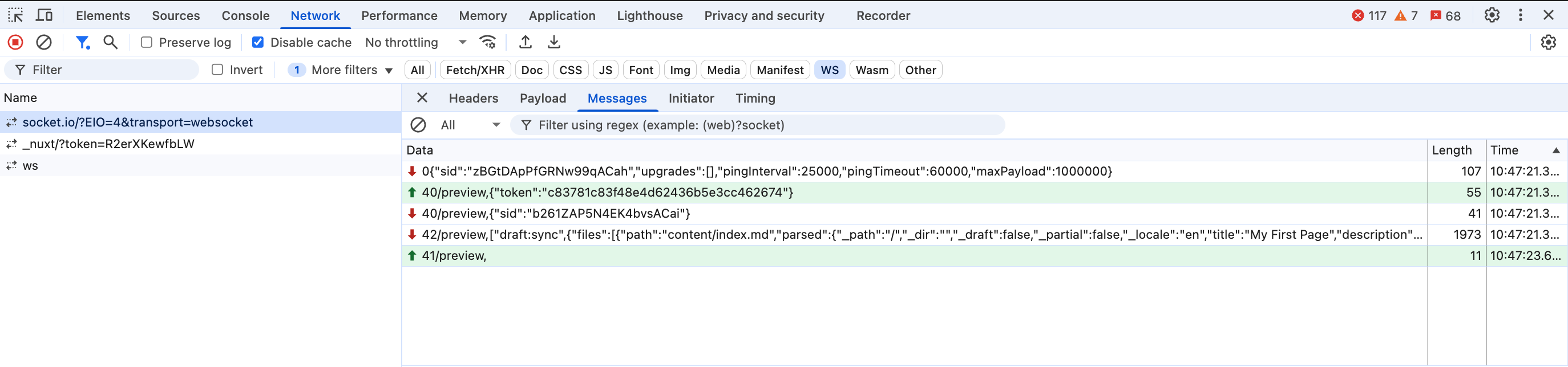
Morning @larbish !
Now I see the misunderstanding. The problem is not with the changes I make in the Studio, but with the changes I make locally in my VS Code —for example, when I try to add a new custom element to a post and need to test it live in the Studio.
Whenever I make any change in VS Code and refresh the preview, I see the update for a second, but then it rolls back, as I mentioned before.
Here a vídeo with the process:
https://vimeo.com/1078579059
Thank you!
This issue is stale because it has been open 60 days with no activity. Remove stale label or comment or this will be closed in 30 days.
![github-actions[bot] avatar](https://avatars.githubusercontent.com/in/15368?v=4 "Published by a pub.dev verified publisher")
This issue was closed because it has been stalled for 30 days with no activity.