
storybook
 storybook copied to clipboard
 nuxt-modules
MDX stories unclear doc and errors
I'm trying to switch from normal stories to MDX but I'm having quite a few problems, let's start from my code
Component
<template functional>
  <button
    v-bind="data.attrs"
    :class="[data.class, data.staticClass]"
    class="a-button bg-blue-500 hover:bg-blue-700 text-white font-bold py-2 px-4 rounded focus:outline-none focus:shadow-outline"
    :type="props.submit ? 'submit' : 'button'"
    v-on="listeners"
  >
    <slot />
  </button>
</template>

<script>
export default {
  name: 'AButton',
  functional: true,
  props: {
    /**
     * Boolean
     * true / false
     */
    submit: {
      type: Boolean,
      default: false
    }
  }
}
</script>
MDX story
import Vue from 'vue'
import { Meta, Story, Canvas, Props } from '@storybook/addon-docs/blocks'
import { action } from '@storybook/addon-actions'

import AButton from './a-button.vue'
Vue.component('AButton', AButton);

<Meta title='Atoms / a-button' component={AButton} />

# a-button

export const Template = (args, { argTypes }) => ({
  props: Object.keys(argTypes),
  components: { AButton },
  template: '<AButton :submit="true">Submit</AButton>',
});

<Canvas>
    <Story name='AButton' >
        {Template.bind({})}
    </Story>
</Canvas>

## Usage Example

\```javascript
<AButton>Click Me</AButton>

<AButton :submit="true">Submit</AButton>
\```

## Props

<Props of={AButton} />
- why do I need to use
Vue.component('AButton', AButton);while in your sandbox everything works OK without? I tried to use a nonfunctionalcomponents and I still have the same error about if I have registered the component correctly. - In order to use controls I had to research quite a bit, would be nice to mention in your documentation how to do it, even if I make it work they don't actually seem to work and I have this error
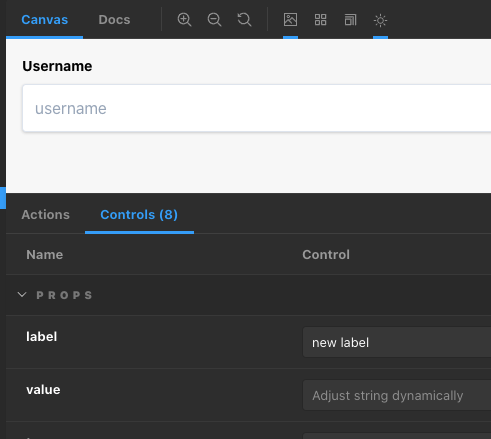
Failed to generate dynamic story source: TypeError: Cannot read property '_vnode' of nullthat seems to be a problem in storybook as well? how can I make the controls work?
here a screenshot in another story where you can see that controls doesn't works.
Thanks in advance for the help.

I'm trying to create a simple mdx documentation with 2 components but I didn't work with the given examples in documentation. It works with React Components in an React Stack but not with Vue (2 & Nuxt)

I'm trying to create a simple mdx documentation with 2 components but I didn't work with the given examples in documentation. It works with React Components in an React Stack but not with Vue (2 & Nuxt)
somehow their example works without problems but not in a real-life scenario.
I found a - quirky - solution to use components inside .mdx files.
import Vue from 'vue'
import { Meta, Story, Canvas } from '@storybook/addon-docs/blocks'

import Component from './Component'

<Meta title="Test/Component" />

# Component

Some information about the component

export const ComponentA = (args, { argTypes }) => ({
  props: Object.keys(argTypes),
  components: { Component },
  template: '<Component />',
})

<Story
  name="Component"
  parameters={{
    viewMode: 'docs',
  }}
>
  {ComponentA.bind({})}
</Story>
But this only works for one component because the story and the Meta title Name must be the same.
Better would be a simply integration like in React.
v4 of this module is no longer actively supported. Please try the newest version and open an new issue if the problem persists. Thank you for your understanding.
