
nusmods

nusmods copied to clipboard
 nusmodifications
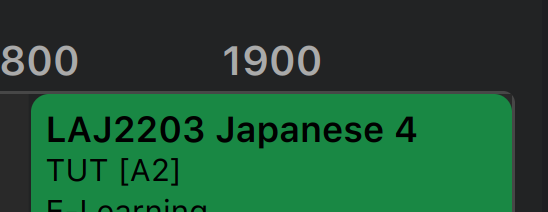
Timetable elements with rounded corners aren't displayed well at the corners
Describe the bug
If a "selectable" timetable button (with rounded corners) is at the corner of the timetable, there is a "hole" between the button and the timetable corner. It is very visible when you zoom it up, but at default zoom level it is still visible.
Look at the top right corner of the screenshot.
To Reproduce
Steps to reproduce the behavior:
- Go to the timetable.
- Add a module with has a selectable tutorial/lab slot in the evening of Monday. TUT [A2] of LAJ2203 for example.
- Look at the top right corner of the timetable. You will see something like the screenshot below.
Expected behavior
That black gap should not appear.
Screenshots
Desktop (please complete the following information):
- OS: Ubuntu 20.04
- Browser: Firefox
- Version: 90
Smartphone (please complete the following information):
- Device: iPhone 11
- OS: iOS 15
- Browser: Safari
- Version: the one that comes with iOS 15 (Safari 15 I think)
Additional context
N/A

