
reedline

reedline copied to clipboard
 nushell
Nushell prompt renders on wrong line
I finally have a repro for a glitch that I've been experiencing in Nushell for a long time. When the cursor is nearly at the bottom of the terminal, after running a command the new prompt renders on the wrong line. I think this is a Reedline issue but apologies if I've filed this in the wrong repo.
Steps to reproduce
-
Open Nushell in a very short terminal window, clear the screen, and press
enteruntil the cursor is just 1 row from the bottom: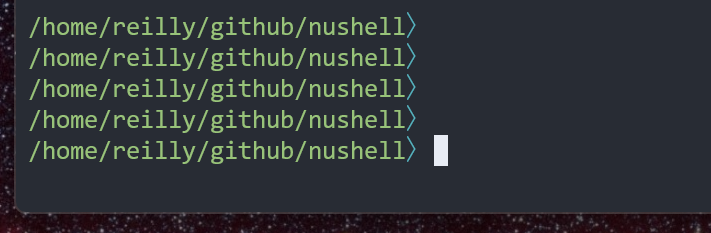
-
Type the command to
cdto a new directory (without pressingenter)
-
Press
enterand observe that the new prompt was rendered on the wrong line (1 line too high)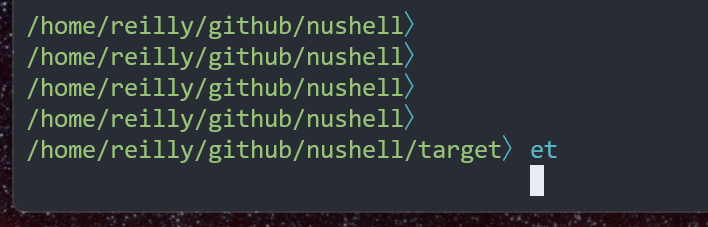
Version info
Terminal: Windows Terminal Preview v1.16.3464.0 OS: Linux (in WSL2) Nushell:
| key | value |
|---|---|
| version | 0.73.1 |
| branch | main |
| commit_hash | a9bdc655c1fdbad43e811db059bb502c86e16230 |
| build_os | linux-x86_64 |
| build_target | x86_64-unknown-linux-gnu |
| rust_version | rustc 1.65.0 (897e37553 2022-11-02) |
| rust_channel | 1.65.0-x86_64-unknown-linux-gnu |
| cargo_version | cargo 1.65.0 (4bc8f24d3 2022-10-20) |
| pkg_version | 0.73.1 |
| build_time | 2023-01-08 18:09:35 -08:00 |
| build_rust_channel | debug |
| features | database, default, trash, which, zip |
| installed_plugins |

