

 nteract
Update Python executable workflow for Windows [was: Nteract now requires python kernel]
Application or Package Used nteract desktop
Describe the bug I use nteract with nodejs and don't really use Python. Previously I was able to use nteract + nodejs without having any Python kernel installed. Now I get an error on startup that I don't have any kernels installed despite having a working Node kernel installed.
To Reproduce Steps to reproduce the behavior:
Start Nteract desktop after following the nodejs installation instructions on the site but without Python installed
Expected behavior Used to be able to use nodejs without Python
Screenshots
If applicable, add screenshots to help explain your problem.
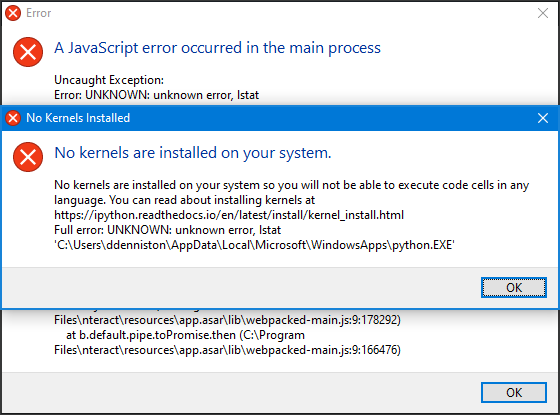
Desktop (please complete the following information):
- OS: Windows
- Client: Desktop
- Version: 0.15

Maybe my understanding of what's going on here is not quite right but this was my impression

If nteract is supposed to include a nodejs kernel I don't understand why we should ever get an error that no kernels are installed
Hello @dougleville! Let's see if we can sort out this problem.
Which version of nteract were you previously using with the bundled kernel? Do you know which upgrade caused it to fail?

So, I did some investigation, and it is stranger than I thought.
My experience was that nteract stopped working on my machine, without my having upgraded it explictily. I did not use my nteract for a couple of months, and it was working before, and does not now. My hypothesis is that this is due to a Windows update, not an nteract update. Read on....
So Windows 10 now has a file called python.exe in the folder C:\users\username\AppData\Local\Microsoft\WindowsApps\. This is a 0 byte special file. Executing that file opens up the Windows Store application, and takes you to the store entry for Python, wherein you can choose to download and install it.
The problem is that this file is now in path, and nteract sees a python executable, and tries to figure out it's path. The error occurs in https://github.com/nteract/nteract/blob/53c83076ea7cc3ae07b206db3767373837f9ef39/packages/fs-kernels/src/jupyter-paths.ts#L70 and the full error message is Error: UNKNOWN: unknown error, lstat C:\Users\username\AppData\Local\Microsoft\WindowsApps\python.EXE (The actual error message is partly hidden behind the first window in the screenshot above)
To end on a more positive note, this file can be deleted using administrative privileges. Once you do that, nteract starts working again 🎉
However, the first experience of anyone downloading nteract on a Windows10v1903+ is going to be terrible. So while this is the result of some very unfortuate decisions by Microsoft, I think this does need to be worked around by nteract. One solution maybe is to have better error checks around this code?

Sorry for disappearing - wow @aviks that was some awesome sleuthing.
@captainsafia the solution above fixed this issue for me - I'll leave it for you as to whether this should be closed or not
I couldn't delete the python.exe file, but the solution here worked for me: https://superuser.com/questions/1437590/typing-python-on-windows-10-version-1903-command-prompt-opens-microsoft-stor

I got some insight from @zooba about this. Pasting the contents of his email below.
I saw this issue https://github.com/nteract/nteract/issues/4637#issuecomment-551291345
Haven't looked too deep, but I think the fix you want is to not manually search PATH for Python but to just run it with either -V or a -c command and if it fails then ignore it. If you need the full path, use -c "import sys; print(sys.executable)"
Alternatively, PEP 514 will let you find all installations on Windows, but that'll be a much bigger change that is likely unnecessary.
We'll likely need to update the way we invoke the Python executable at the launch of the nteract desktop app to address this if possible.
Does anyone want to look into a code change solution for this?
I'd be up for that, I have some deadlines coming up at the moment but after that I'd like to help
This issue hasn't had any activity on it in the last 90 days. Unfortunately we don't get around to dealing with every issue that is opened. Instead of leaving issues open we're seeking to be transparent by closing issues that aren't being prioritized. If no other activity happens on this issue in one week, it will be closed. It's more than likely that just by me posting about this, the maintainers will take a closer look at these long forgotten issues to help evaluate what to do next. If you would like to see this issue get prioritized over others, there are multiple avenues 🗓:
- Ask how you can help with this issue 👩🏿💻👨🏻💻
- Help solve other issues the team is currently working on 👨🏾💻👩🏼💻
- Donate to nteract so we can support developers to work on these features and bugs more regularly 💰🕐
Thank you!
![stale[bot] avatar](https://avatars.githubusercontent.com/in/1724?v=4 "Published by a pub.dev verified publisher")