
livemarks
 livemarks copied to clipboard
 nt1m
nt1m
Livemarks not appearing Bookmarks Toolbar
just added the livemarks addin to Firefox and 4 feeds to Livemarks, I specified folder as 'bookmarks toolbar', yet these 4 feed sites do not appear on the toolbar

Can you please provide more precisions ? How did you add the feeds (via import, via the preview page ?) ? Can you share an OPML of your livemarks ?

I'm sorry, i do not know what opml is, please see attached screen shot
From: Tim Nguyen <[email protected]>
To: nt1m/livemarks [email protected] Cc: gartm [email protected]; Author [email protected] Sent: Friday, December 14, 2018 11:17 AM Subject: Re: [nt1m/livemarks] LIVEMARKS not appearing Bookmarks Toolbar (#97)
Can you please provide more precisions ? How did you add the feeds (via import, via the preview page ?) ? Can you share an OPML of your livemarks ?— You are receiving this because you authored the thread. Reply to this email directly, view it on GitHub, or mute the thread.
@gartm Have you tried editing each individual livemark and setting the folder to be "Bookmark Toolbar" ? Changing the "default folder" setting won't change the existing livemarks.
yes, I have done that
From: Tim Nguyen <[email protected]>
To: nt1m/livemarks [email protected] Cc: gartm [email protected]; Mention [email protected] Sent: Friday, December 14, 2018 12:59 PM Subject: Re: [nt1m/livemarks] LIVEMARKS not appearing Bookmarks Toolbar (#97)
@gartm Have you tried editing each individual livemark and setting the folder to be "Bookmark Toolbar" ? Changing the "default folder" setting won't change the existing livemarks.— You are receiving this because you were mentioned. Reply to this email directly, view it on GitHub, or mute the thread.
@gartm Can you try going to the add-on options, clicking on "More options", then "Export Feeds", then sharing the file that's downloaded ? (this will share the list of your feed URLs)
let me know if this is what you need
From: Tim Nguyen <[email protected]>
To: nt1m/livemarks [email protected] Cc: gartm [email protected]; Mention [email protected] Sent: Friday, December 14, 2018 1:32 PM Subject: Re: [nt1m/livemarks] LIVEMARKS not appearing Bookmarks Toolbar (#97)
@gartm Can you try going to the add-on options, clicking on "More options", then "Export Feeds", then sharing the file that's downloaded ? (this will share the list of your feed URLs)— You are receiving this because you were mentioned. Reply to this email directly, view it on GitHub, or mute the thread.
@gartm It seems like email replies remove the attached files :/ Can you use a different way of uploading (Github, external storage site) ? Thanks :)
I had the same problem and appear to have fixed it. The default folder name is "Bookmarks Tool Bar Folder."
I went to Bookmarks on the Menu Bar and found that I had a new folder, i.e. Bookmarks Tool Bar Folder. I opened it, selected the feed links, and moved them to Bookmarks Tool Bar, that is the Tool Bar itself, with a star icon, not the folder. I'm sure I could explain that better and there is probably an easier way to do it, but as I said, it works. Running FF 64.0 under W10.
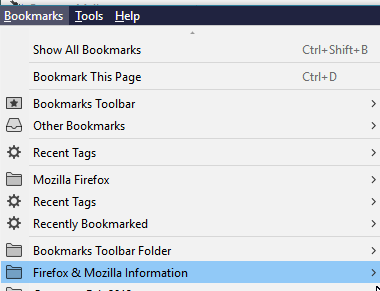

Huh, so there are two bookmarks toolbar folders ? weird...
Will ask around why this happens.
Hi, Tim--
Huh, so there are two bookmarks toolbar folders ? weird... Will ask why this happens. <<
I think Livelinks is creating an ordinary folder called "Bookmarks Toolbar Folder" while the Bookmarks Toolbar is not a "folder" as such, it is a Toolbar. Toolbars are of course folders but have some attributes that are unique to toolbars. When you bookmark a page, FF asks where to put it and gives you a list of folders, the first of which is actually the toolbar. I don't know where the "Bookmarks Toolbar Folder" came from but think it was in the import process.
Regards, Marshall (N1FN)

If it's as simple as that, cool! I had a couple of other feeds which I will track down and restore ti the tool bar. I really don't know why the basic functionality was taken out of Firefox-- completely missed the survey where they asked us users what we wanted :-(