

 nroduit
GSPS Text annotation scale issue
Text annotations in GSPS files do not seem to respect the specified bounding box. I am trying to render a table overlay via GSPS, limiiting the position/size of the text by setting the bounding box parameters of the Text Annotations.
When zooming in/out in Weasis, all the GSPS annotations seem to scale properly with the zoom, except for the text annotations; these maintain a single size irrespective of zoom level, breaking the rendering of the table.

Looking in the code, there is indeed a comment to say that the implementation diverges from the DICOM standard. It is the center of the rectangle surrounding the text that is used instead of the left edge (Otherwise, it is very difficult to have something centered).
Can you provide an example to understand the configuration as there are several modes to define the positions?

Note that I'm not talking about the position of the text, but the font size. Attached are twice the same slice where I render some colored rectangles and text next to them. When zooming, you can see that the text maintains its fixed size, while all other annotations scale correctly with the zoom. I would expect text to scale down to respect the scaled down bounding box while zooming in/out.


Without an example, it is difficult to draw a conclusion because there are many possibilities of transformation.
Apologies, I misread the request for an example. Attached a sample dicom + generated gsps which contains a simple circle & text annotation. Zooming in/out does not affect the text font size, while I would expect the specified bounding box to enforce this.
Disclaimer: I'm not an expert so both my expectations and my implementation could be off; if there's a different way of having text follow zoom I'm open to that. I will also try to verify the behavior with a different GSPS-capable viewer asap
In general, it is the expected behavior that the text size is invariant to zooming or rotation. This is the case with text annotations in drawing or measurement tools.
Currently in the text style part, only the color is taken into account. We should also take into account the fonts and have a preference to increase or decrease the size of the fonts.
According to the DICOM standard, it is not necessary that the bounding box includes the text. This does not seem very coherent to me.
C.10.5.1.1 Unformatted Text Value The text shall be displayed if any part of the bounding box or anchor point is within the Specified Display Area.
The text need not be confined to within the bounding box, but shall be rendered in a direction from the Top Left Hand Corner (TLHC) of the bounding box to the Bottom Right Hand Corner (BRHC) of the bounding box, even if these coordinates have been specified in an image relative space and then transformed (rotated, flipped or scaled).
Agreed, that's not very intuitive, and it means text can only be properly used for labels/annotations - I can add a table-like layout, but have no guarantees of how it will render on different viewers and zoom levels. But I agree this means my assumption on the behavior was wrong.
(I suppose I could render the font into a polyline and get more 'static' behavior, but that does not sound like an intended use case :) )
Two remarks related to this - no need to fix these afaic, just wanted to signal them:
- with regards to not having to respect the bounding box, C.10.5.1.1 Unformatted Text Value specifies when the bounding box may be violated in the subsequent Note:
`Note An implementation may render text outside the confines of the bounding box if necessary to display all the specified text.
Alternatively, an implementation may choose to render the text in a scrolling box, or a link to another fixed or popup window as appropriate.`
- I think the text in Weasis also does not respect the alignment specified in the Text Style sequence - C.10.5.1.3.12.1 . Eg in the picture attached I've requested center vertical alignment, which does not get applied (added a debug render of the specified bounding box in green)
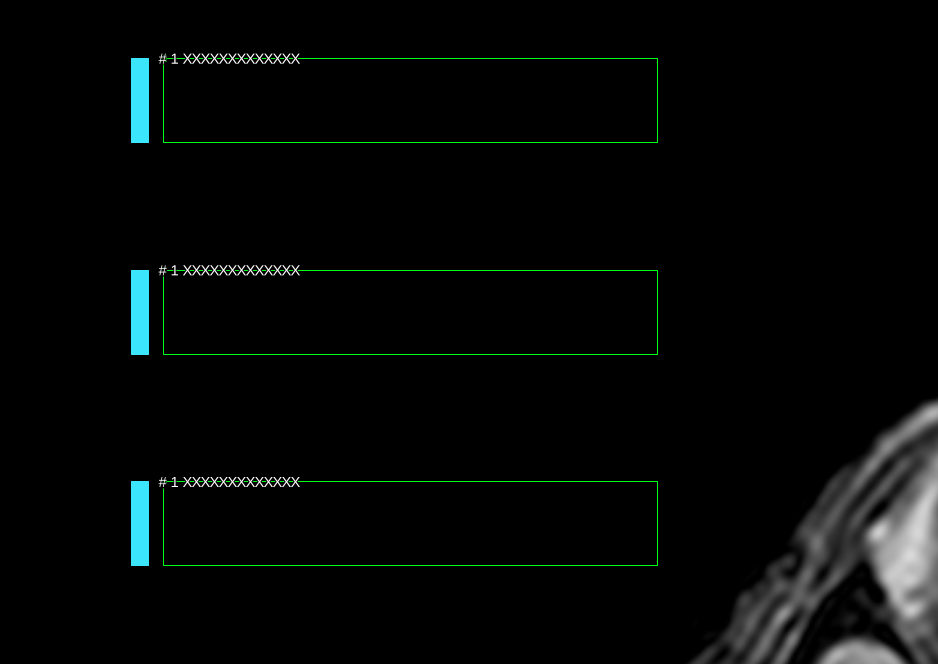
(Credit where credit is due though, I've tried a dozen freely available viewers in the mean time, Weasis has by far the best GSPS implementation!)
Thanks for your feedback. Text Style sequence is not implemented.
I don't necessarily want to implement all these properties because the size of the text already changes according to the size of the views, the size and resolution of the screen, and the dpi when printing.
In Weasis, all overlay text is white with a black outline to make the text fit any background. Applying shading with particular colors does not give a good result in most cases. Color and alignment could be implemented but this requires changing a tricky part.