

 notepad-plus-plus
Bookmark and hidden-lines margin symbols can overlap to bad visual effect
Description of the Issue
Bookmark and hidden lines margin marker symbols, when occurring on the same line, can overlap such that the effect is not good:
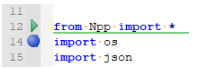
Mentioned first here: https://github.com/notepad-plus-plus/notepad-plus-plus/pull/12165#issuecomment-1245918299
Steps to Reproduce the Issue
Bookmark a line and then "strategically" hide some lines such that the closing hide line margin symbol and the bookmark marker symbol appear on the same line.
Expected Behavior
Well, something not so overlapping. :-)
Serious suggestion: Since it has never worked well and consistently, don't attempt to do margin marker symbols for hidden lines -- have another method for user making hidden lines visible again (the only function of the margin marker symbols). These margin markers aren't necessary to alert the user to where hidden lines are, because the green line drawn across the editing area does this. Of course, this implies that an alternative method for making hidden lines visible is created (not sure what that would be at the moment).
Actual Behavior
Overlap.
Debug Information
Notepad++ v8.4.5 (32-bit) Build time : Sep 3 2022 - 03:56:37 Path : C:\...\npp.8.4.5.portable\notepad++.exe Command Line : -titleAdd="8.4.5 32-bit" -multiInst Admin mode : OFF Local Conf mode : ON Cloud Config : OFF OS Name : Windows 10 Enterprise (64-bit) OS Version : 21H2 OS Build : 19044.1889 Current ANSI codepage : 1252 Plugins : mimeTools (2.8) NppConverter (4.4) NppExport (0.4) PythonScript (3.0.12)
@Yaron10

@alankilborn,
Thank you.
have another method for user making hidden lines visible again (the only function of the margin marker symbols).
👍

An unbaked suggestion:
Make the Hide Lines command toggleable.
On placing the caret above the green hidden-lines indicator and invoking that command - display the hidden lines.
On placing the caret above the green hidden-lines indicator and invoking that command - display the hidden lines.
Definitely reasonable.
So, for visual example, placing the caret on hello and invoking the command would make the hidden line visible again:
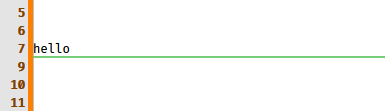
I presume selection-based unhide would work similarly:
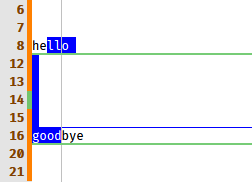
Make the
Hide Linescommand toggleable.
Perhaps there should be two commands:
Hide Lines(existing)Show Lines(new)
The reason for this is, what if, in the "hello on line 7" example above, you wanted to hide line 7 -- such that the end result would be lines 7 and 8 hidden -- another way to say it would be you wanted to add line 7 to the already hidden set of lines.
@alankilborn,
The reason for this is, what if, in the "hello on line 7" example above...
👍 That's a very good point.
I think I've never used "Hide Lines" in real life. Playing with it now I've encountered https://github.com/notepad-plus-plus/notepad-plus-plus/issues/12184. :)
Would correct terminology be Hide/Show or Hide/Unhide? :-)
You're the expert. :) Perhaps "Show Hidden Lines"?
I think I've never used "Hide Lines" in real life.
Well, maybe because as it currently exists, it isn't very useful.
In fact, it is so not-useful, it shouldn't even be there as a feature. :-)
But I am trying to force some change in that, with my recent "issues" regarding hidden lines. Maybe like trying to push a rope? :-)
The ultimate goal, if and when it becomes a reasonable feature on a base level, would be to put in feature request(s) such that it works with Find All to hide (or unhide) lines with search hits. But no point in that yet.
Playing with it now I've encountered 12184
I have never been able to make N++ crash due to hidden-lines experimentation, but I can replicate that. :-(
In fact, it is so not-useful, it shouldn't even be there as a feature.
That's quite a statement. :)
The ultimate goal, if and when it becomes a reasonable feature on a base level, would be to put in feature request(s) such that it works with Find All to hide (or unhide) lines with search hits.
That's a clever idea. 👍
Completely off-topic: I think the most important fix for the next release is https://github.com/notepad-plus-plus/notepad-plus-plus/issues/12023.
In fact, it is so not-useful, it shouldn't even be there as a feature.
That's quite a statement. :)
Well, of course no offense intended to our fine developers! :-)
I'll backpedal a bit and say maybe it is great for light usage for certain users. :-)
Completely off-topic
There's a few others open relating to that. What can we say? You and I know the entire history on it...
Perhaps there should be two commands:
Hide Lines (existing) Show Lines (new)
And if the margin markers are taken away from the user, mouse users would be disappointed...but we already have Hide Lines here on editor rclick context menu:
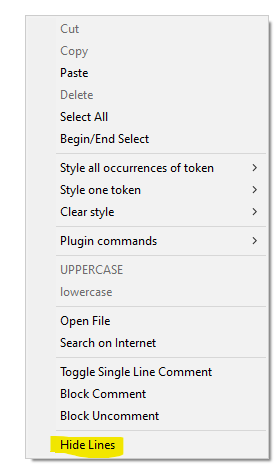
So a new "Show Lines" could be added there...
Another good point.
If double-clicking on the green indicator can be processed, it should be the ideal solution.
If double-clicking on the green indicator can be processed, it should be the ideal solution.
To clarify, I think you mean the green bar that stretches across the editing area. Yes, that is a good idea, if it could be made to work. TBH, right now I don't see a way to easy logic for it.
User might need a way to (in one action) show/unhide multiple "green-bar'd" sections. User would make a selection that touches all of these. Double-click wouldn't help in that situation.
To clarify, I think you mean the green bar that stretches across the editing area.
Correct.
TBH, right now I don't see a way to easy logic for it.
Right now I don't see anyone taking this issue. :)
User might need a way to (in one action) show/unhide multiple "green-bar'd" sections.
Is that currently possible?
Right now I don't see anyone taking this issue. :)
Well, that's why we have to campaign for it! :-) Seriously, though...you're right. :-(
User might need a way to (in one action) show/unhide multiple "green-bar'd" sections.
Is that currently possible?
I don't believe so, but I think it is reasonable thing for a user to want to do.
Possible new idea: Right-click on line number margin maybe needs its own rclick context menu, of which hide/show lines could be choices there...
Another idea: use a third image containing a smaller version of both "Bookmark" and "Show Hidden Lines". Left-click should remove the bookmark, and Ctrl+Left-click would show the hidden lines (and update the images accordingly).
And another one: use a new margin for "Show Hidden Lines" and display it only if there are hidden lines. Per tab or even per instance.
@alankilborn,
BTW: https://github.com/pnedev/comparePlus/commit/54c37ebcd52c4ecb2c3a0f5e6a1221b21f885909.
BTW: https://github.com/pnedev/comparePlus/commit/...
Hopefully in the future this gets squashed by Notepad++ usage of the hidden line thing. :-)
I'd like to see margin markers for hidden lines disappear entirely from Notepad++. They aren't really necessary and they seem to overcomplicate the code. The horizontal line seems sufficient.