

 nordtheme
Add more contrat to highlighting to improve readibility
I try to use Nord theme in VScode but I'm confused by lower constrast in conparaison of other theme like Night Owl (My previous theme).
In this example with Typescript, I find it's difficult to easily difference what are Builtin class/variable, what are local constant or variable, ...
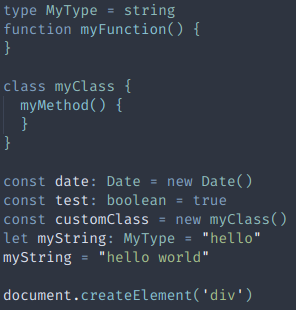
In comparison of Night Owl here different type use different color to be able to distinguish things more easily.
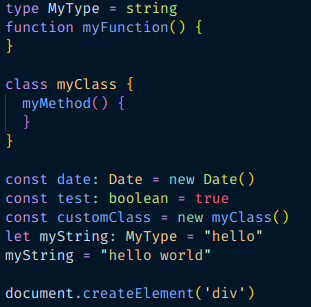
I appreciate the Nord theme, but this lower contrast ask me more effort to understand the code. I haven't really idea how to deal with it. I tried different variation from Nord palette, but for now I haven't found an "perfect" configuration.
Some one haved a suggestion ?

Hi @sebtiz13 :wave:
Basically you answered your question on your own in the first sentence:
[…] in conparaison of other theme […]
That is the reason why different themes exist: every theme has its own flavor, and that is good. Nord especially tries to reduce the “color noise“ by not trying to ue a different color for every syntax token. The more pastel and contrast reduced colors try to calm down eyes and help to minimize the diffusion your brain has to do for all these confusing colors instead of focusing for the important part: the code flow and the creation of its logic. I don‘t want to talk bad about other themes, but many of them look like what a ecstasy trip must look like with way too many colors and often times no logic which color is used for which specific syntax token.
Taking your example screenshot from the other theme the first thing I notice is that function calls and constants are colored the same, two completely different syntax types, which is the first disruption that your brain has to passively tell apart every time. Also a class is the same color as a string, again two types that have nothing in common at all. I guess all of this is part of the themes design and flavor, but Nord want to improve on this topic and therefore carefully tries to separate syntax tokens in a constant way, even across multiple ports. Even through you might think that the “color noise“ does not affect you at all, your brain is passively disturbed by it and in the end you'll notice that you often loose focus or get tired quickly when coding and trying to develop the code logic.
Regarding your problem of distinguishing some syntax elements: This sounds more like a problem of the capabilities of the application, in this case VS Code, rather than a theme problem. Detecting a class and local variable is always something the IDE must evaluate dynamically through active language syntax engines or parsers in the background by using the specific compiler or language executer since it always depends on the content where the variable is used. Simple regular expression, or better token based in case of VS Code, highlighting doesn‘t take context into account which limits the way how detailed elements can be distinguished a lot.
In the end all I can say is that you can always customize a theme like Nord to match your preferences by overriding styles and syntax token highlighting rules for your local setup. This is the perfect solution to serve for everyone when you don‘t agree with some styles of your favorite theme.

Hi @svengreb.
Thank you for your explanation, I understand your point of view and indeed vscode limits the possibility to distinguish tokens in some cases, that's why it's complicated to have a "perfect" theme.
Indeed I made a local configuration to overload the tokens which disturbed me the most, I only wanted to emphasize this lack of distinction / contrast of the tokens to try to help improve the theme