

 nodeSolidServer
Uploading files does not always respect "extensions" in Slug
I'm trying to upload an jpeg image file. In the Slug header I give it a name with a .jpg extension. However, the server appends another extension after that-- .jpeg.
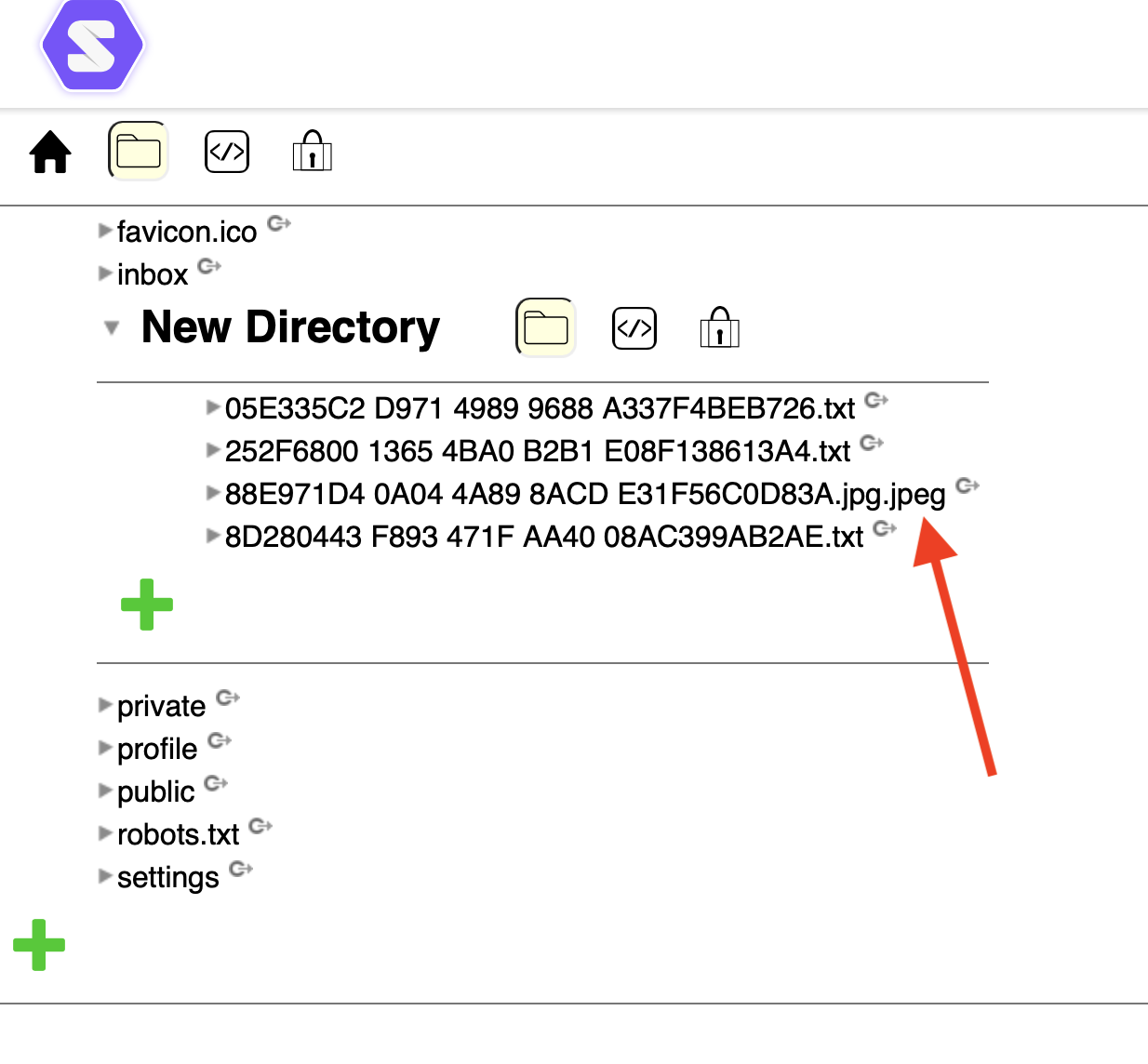
Is there some way I can get it to stop appending the additional extension? I really need to be able to supply my own extensions in my own application.
Thanks!

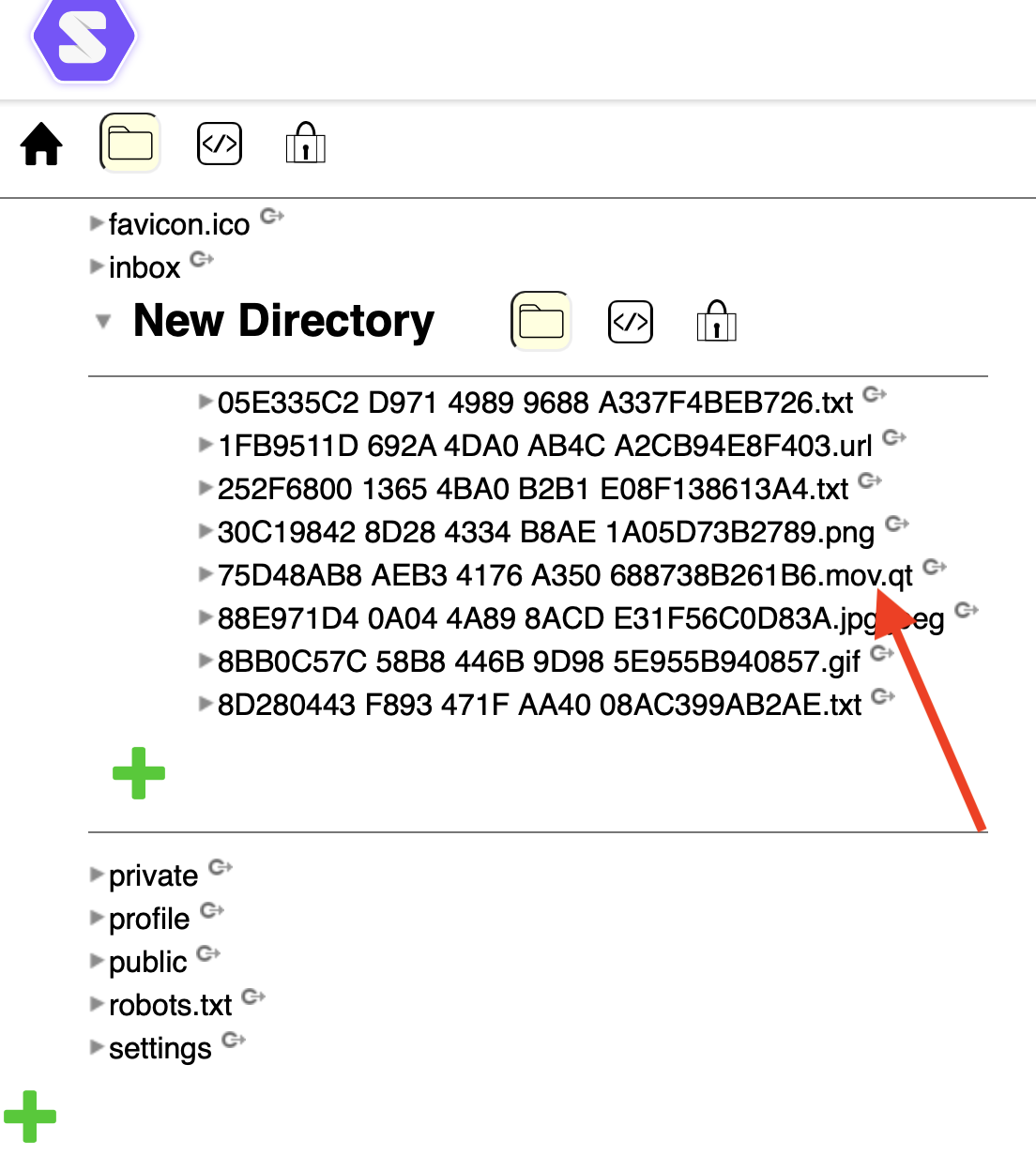
Here's another example. In the Slug, I gave an extension of .mov, but the server appended .qt:
Can you give a bit more information :
- pod name
- contentType used in each case
- library used
- if using a private server which NSS version
You seem to use POST where the server may choose a name, why not using PUT ?

pod name: https://crspybits.solidcommunity.net/profile/card#me
contentType: In my case this is directly related to the file extension. I'm passing the mime type I'm using as the content type. Here is the mapping in my case.
public enum MimeType: String, Codable, CaseIterable {
    case text = "text/plain"
    case jpeg = "image/jpeg"
    case png = "image/png"

    // A file with a .url extension with the format https://fileinfo.com/extension/url
    // A more standard url mime type is https://tools.ietf.org/html/rfc2483#section-5 but I want to use a file format that can easily be launched in Windows and Mac OS.
    case url = "application/x-url"

    case mov = "video/quicktime"

    case gif = "image/gif"

    // This is really an error state. Use it with care.
    case unknown = "unknown"

    public var fileNameExtension: String {
        switch self {
        case .text:
            return "txt"
        case .jpeg:
            return "jpg"
        case .png:
            return "png"
        case .url:
            return "url"
        case .mov:
            return "mov"
        case .gif:
            return "gif"

        case .unknown:
            return Self.unknownExtension
        }
    }

    static let unknownExtension = "dat"
}
(See also https://github.com/SyncServerII/ServerShared/blob/master/Sources/ServerShared/Filenaming.swift).
library used: Also a factor I should have mentioned :). I'm integrating Solid with my Swift server and this is a library I'm developing. See https://github.com/SyncServerII/ServerSolidAccount
On You seem to use POST where the server may choose a name, why not using PUT ? -- I wasn't aware of this. Thanks. Can you please pass me a reference to some docs on this? The only difference between POST and PUT I was understanding before was PUT would replace existing content. E.g., https://www.w3.org/TR/ldp-primer
Though, this is suggestive:
An alternative (though not common) way of creating new resources is to use HTTP PUT. Although HTTP PUT is commonly used to overwrite resources, this way is usually preferred when creating new non-RDF resources (i.e. using a mime type different than text/turtle).
(https://github.com/solid/solid-spec/blob/master/api-rest.md)
Thanks!
https://solidproject.org/TR/protocol says, among other things :
Clients can use PUT and PATCH requests to assign a URI to a resource. Clients can use POST requests to have the server assign a URI to a resource.

Thanks! I'll update to using a PUT in my case.
On Sun, Aug 22, 2021 at 11:30 AM Jeff Zucker @.***> wrote:
https://solidproject.org/TR/protocol says, among other things :
Clients can use PUT and PATCH requests to assign a URI to a resource. Clients can use POST requests to have the server assign a URI to a resource.
— You are receiving this because you authored the thread. Reply to this email directly, view it on GitHub https://github.com/solid/node-solid-server/issues/1612#issuecomment-903302929, or unsubscribe https://github.com/notifications/unsubscribe-auth/ABL56KRB5747KE2HQHB6BCLT6EXZZANCNFSM5CSULZ5Q . Triage notifications on the go with GitHub Mobile for iOS https://apps.apple.com/app/apple-store/id1477376905?ct=notification-email&mt=8&pt=524675 or Android https://play.google.com/store/apps/details?id=com.github.android&utm_campaign=notification-email .
Thanks @jeff-zucker May I add this. Solid data is a duopole dataContent/contentType. It can on filesystem be represented as file with mime type extension for compatibility.
Here's my current understanding. @bourgeoa - does this seem right?
https://solidproject.org/TR/protocol, 2021-07-07
2.1
- PUT & POST & PATCH without content-type MUST return 400
5.1
- PUT & PATCH MUST use the client's requested URI
- POST MUST assign a new URI
- POST MAY support client suggested URI in the Slug
5.3
- PUT & PATCH MUST create intermediate containers
- POST MUST return 404 if intermediate containers don't exist
- POST MUST create resources and containers using the Link rel="type" header
- PUT MUST create resources and containers using slash semantics (trailing slash=container)
- PUT & POST & PATCH MUST return 409 on attempt to alter a container's triples
- PUT & PATCH MUST be able to create or update auxiliary resources
- POST MUST return 403 if it trys to create or update an auxiliary resource
Also, though I can't find it specifically stated anywhere :
- PUT requires acl:Write access
- POST requires acl:Append access
- PATCH (not sure, maybe depends on what the patch does???)
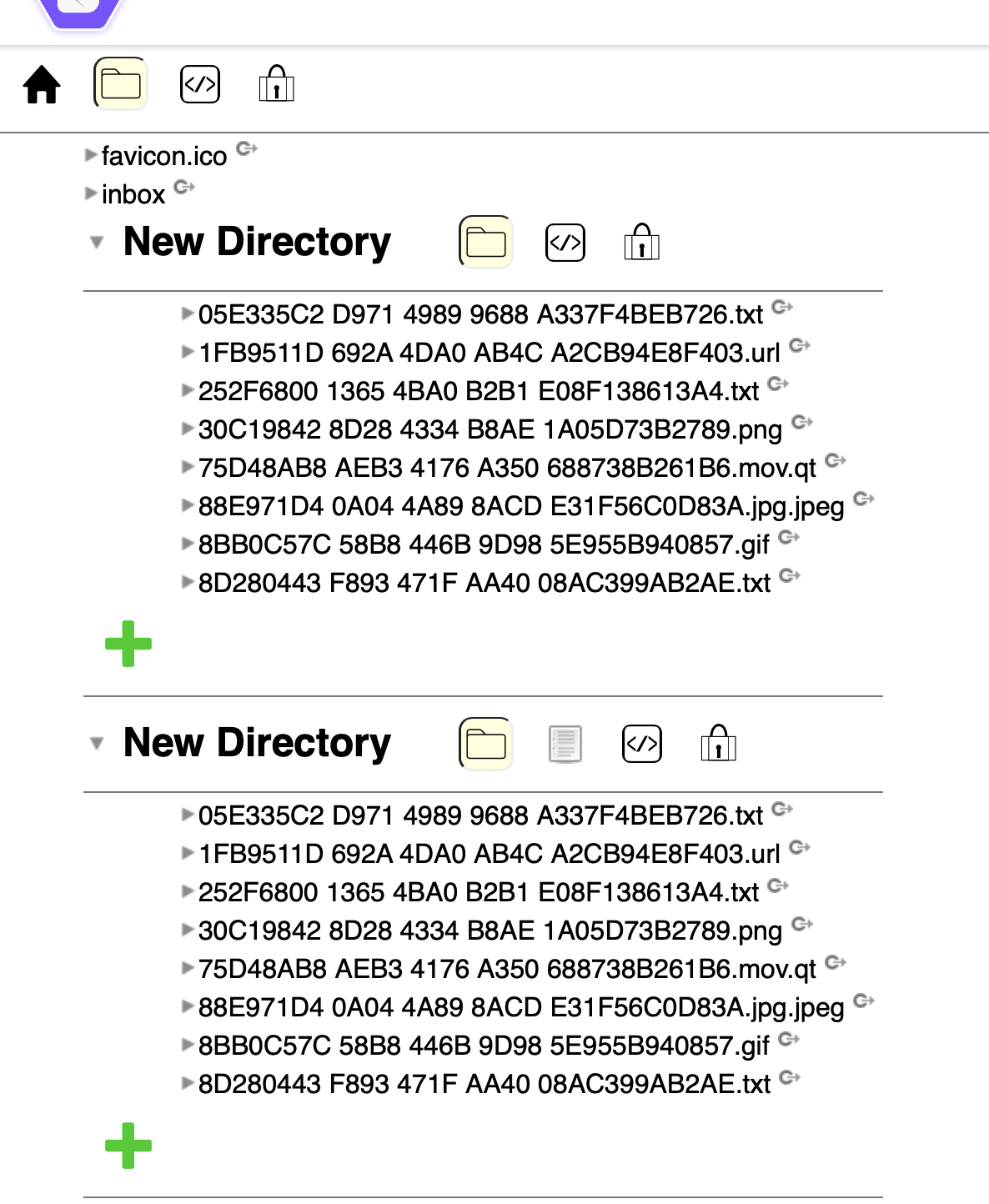
Hmmm. I just tried the upload of a JPEG file again, and am getting something odd looking. The new file wasn't uploaded (it should have the URI: https://crspybits.inrupt.net/NewDirectory/40C6B441-70C2-4EFC-9A9F-A691F6F9FC9F.jpg) but instead, I get:
I have saved my logs from this. I did the following to them: I removed some tokens (they use a testing public/private key but might as well :) ). I added some annotation lines as my debug output was not very complete.
root@0b7d9b20cb90:~/Apps/ServerSolidAccount# swift test --enable-test-discovery --filter ServerSolidAccountTests.CloudStorageMimeTypeTests/testUploadAndDownloadJPEG
[19/19] Linking ServerSolidAccountPackageTests.xctest
Test Suite 'Selected tests' started at 2021-08-22 17:41:51.840
Test Suite 'CloudStorageMimeTypeTests' started at 2021-08-22 17:41:51.841
Test Case 'CloudStorageMimeTypeTests.testUploadAndDownloadJPEG' started at 2021-08-22 17:41:51.841
Body: grant_type=refresh_token&refresh_token=<SNIP>&client_id=aae32815f1c5a449d007ef8375832353
String: Optional("{\"access_token\":\"<SNIP>\",\"token_type\":\"Bearer\",\"expires_in\":1209600,\"id_token\":\"<SNIP>\"}")
[2021-08-22T17:41:52.558Z] [WARNING] [SolidCreds.swift:349 refresh(completion:)] No SolidCreds delegate.
[2021-08-22T17:41:52.575Z] [DEBUG] [SolidCreds+CloudStorage+Requests.swift:119 createAuthenticationHeaders(url:httpMethod:)] htu: https://crspybits.inrupt.net/NewDirectory
[2021-08-22T17:41:52.589Z] [DEBUG] [SolidCreds+CloudStorage+Requests.swift:208 request(path:httpMethod:body:headers:completion:)] url.host: crspybits.inrupt.net

**** The following request is a directory lookup. It uses a HEAD method. *****

[2021-08-22T17:41:52.589Z] [DEBUG] [SolidCreds+CloudStorage+Requests.swift:209 request(path:httpMethod:body:headers:completion:)] Headers: Optional(["Accept": "text/turtle", "Authorization": "DPoP <SNIP>", "Host": "crspybits.inrupt.net", "Dpop": "<SNIP>"])
[2021-08-22T17:41:52.591Z] [DEBUG] [SolidCreds+CloudStorage+Requests.swift:210 request(path:httpMethod:body:headers:completion:)] URL: https://crspybits.inrupt.net/NewDirectory
[2021-08-22T17:41:53.234Z] [DEBUG] [SolidCreds+CloudStorage+Extras.swift:113 lookupDirectory(named:completion:)] Success Response: [AnyHashable("Updates-Via"): "wss://crspybits.inrupt.net", AnyHashable("Date"): "Sun, 22 Aug 2021 17:41:54 GMT", AnyHashable("Connection"): "keep-alive", AnyHashable("Link"): "<.acl>; rel=\"acl\", <.meta>; rel=\"describedBy\", <http://www.w3.org/ns/ldp#Container>; rel=\"type\", <http://www.w3.org/ns/ldp#BasicContainer>; rel=\"type\"", AnyHashable("Access-Control-Expose-Headers"): "Authorization, User, Location, Link, Vary, Last-Modified, ETag, Accept-Patch, Accept-Post, Updates-Via, Allow, WAC-Allow, Content-Length, WWW-Authenticate, MS-Author-Via, X-Powered-By", AnyHashable("Set-Cookie"): "nssidp.sid=s%3ATjbyywaDDwntXIrRxIc6Nx5LKe5nDoF1.LF1VQ%2Bm6Lgx%2FjeWxg1wFQwksGztUr0gwzVlGz2uf%2F1A; Domain=.inrupt.net; Path=/; Expires=Mon, 23 Aug 2021 17:41:54 GMT; HttpOnly; Secure", AnyHashable("Content-Length"): "2", AnyHashable("Www-Authenticate"): "Bearer realm=\"https://inrupt.net\", error=\"invalid_token\", error_description=\"htu https://crspybits.inrupt.net/NewDirectory does not match https://crspybits.inrupt.net/NewDirectory/\"", AnyHashable("Wac-Allow"): "user=\"read write append control\",public=\"\"", AnyHashable("Etag"): "W/\"2-nOO9QiTIwXgNtWtBJezz8kv3SLc\"", AnyHashable("Vary"): "Accept, Authorization, Origin", AnyHashable("Allow"): "OPTIONS, HEAD, GET, PATCH, POST, PUT, DELETE", AnyHashable("Access-Control-Allow-Credentials"): "true", AnyHashable("Ms-Author-Via"): "SPARQL", AnyHashable("Content-Type"): "application/octet-stream; charset=utf-8", AnyHashable("X-Powered-By"): "solid-server/5.6.8"]200

**** Looks like that directory lookup succeeded: It got a 200 response ****

**** The following request is lookup (GET) to see if the file already exists. You can tell that because there is no Content-Type in the request headers. *****

[2021-08-22T17:41:53.234Z] [DEBUG] [SolidCreds+CloudStorage+Requests.swift:119 createAuthenticationHeaders(url:httpMethod:)] htu: https://crspybits.inrupt.net/NewDirectory/40C6B441-70C2-4EFC-9A9F-A691F6F9FC9F.jpg
[2021-08-22T17:41:53.247Z] [DEBUG] [SolidCreds+CloudStorage+Requests.swift:208 request(path:httpMethod:body:headers:completion:)] url.host: crspybits.inrupt.net
[2021-08-22T17:41:53.247Z] [DEBUG] [SolidCreds+CloudStorage+Requests.swift:209 request(path:httpMethod:body:headers:completion:)] Headers: Optional(["Authorization": "DPoP <SNIP>", "Dpop": "<SNIP>", "Host": "crspybits.inrupt.net"])
[2021-08-22T17:41:53.248Z] [DEBUG] [SolidCreds+CloudStorage+Requests.swift:210 request(path:httpMethod:body:headers:completion:)] URL: https://crspybits.inrupt.net/NewDirectory/40C6B441-70C2-4EFC-9A9F-A691F6F9FC9F.jpg
[2021-08-22T17:41:53.548Z] [DEBUG] [SolidCreds+CloudStorage+Extras.swift:208 lookupFile(named:inDirectory:completion:)] Failure Response: [AnyHashable("Access-Control-Expose-Headers"): "Authorization, User, Location, Link, Vary, Last-Modified, ETag, Accept-Patch, Accept-Post, Updates-Via, Allow, WAC-Allow, Content-Length, WWW-Authenticate, MS-Author-Via, X-Powered-By", AnyHashable("Vary"): "Accept, Authorization, Origin", AnyHashable("Allow"): "OPTIONS, HEAD, GET, PATCH, POST, PUT, DELETE", AnyHashable("Access-Control-Allow-Credentials"): "true", AnyHashable("X-Powered-By"): "solid-server/5.6.8", AnyHashable("Content-Type"): "text/plain; charset=utf-8", AnyHashable("Content-Length"): "43", AnyHashable("Etag"): "W/\"2b-H6NjrTKSAkMKbVuqVhy+thadD0w\"", AnyHashable("Date"): "Sun, 22 Aug 2021 17:41:54 GMT", AnyHashable("Wac-Allow"): "user=\"read write append control\",public=\"\"", AnyHashable("Set-Cookie"): "nssidp.sid=s%3ATjbyywaDDwntXIrRxIc6Nx5LKe5nDoF1.LF1VQ%2Bm6Lgx%2FjeWxg1wFQwksGztUr0gwzVlGz2uf%2F1A; Domain=.inrupt.net; Path=/; Expires=Mon, 23 Aug 2021 17:41:54 GMT; HttpOnly; Secure", AnyHashable("Updates-Via"): "wss://crspybits.inrupt.net", AnyHashable("Ms-Author-Via"): "SPARQL", AnyHashable("Connection"): "keep-alive"]404; error: badStatusCode

**** This request got a 404 response-- the file didn't already exist. ****

**** The following request is a PUT to upload the file. You can tell that because there is a Content-Type in the request headers. *****

[2021-08-22T17:41:53.551Z] [DEBUG] [SolidCreds+CloudStorage+Requests.swift:119 createAuthenticationHeaders(url:httpMethod:)] htu: https://crspybits.inrupt.net/NewDirectory
[2021-08-22T17:41:53.563Z] [DEBUG] [SolidCreds+CloudStorage+Requests.swift:208 request(path:httpMethod:body:headers:completion:)] url.host: crspybits.inrupt.net
[2021-08-22T17:41:53.563Z] [DEBUG] [SolidCreds+CloudStorage+Requests.swift:209 request(path:httpMethod:body:headers:completion:)] Headers: Optional(["Slug": "40C6B441-70C2-4EFC-9A9F-A691F6F9FC9F.jpg", "Authorization": "DPoP <SNIP>", "Link": "<http://www.w3.org/ns/ldp#Resource>; rel=\"type\"", "Dpop": "<SNIP>", "Host": "crspybits.inrupt.net", "Content-Type": "image/jpeg"])
[2021-08-22T17:41:53.564Z] [DEBUG] [SolidCreds+CloudStorage+Requests.swift:210 request(path:httpMethod:body:headers:completion:)] URL: https://crspybits.inrupt.net/NewDirectory
[2021-08-22T17:42:01.044Z] [DEBUG] [SolidCreds+CloudStorage+Extras.swift:168 uploadFile(named:inDirectory:data:mimeType:completion:)] Success Response: Created[AnyHashable("Etag"): "W/\"7-rM9AyJuqT6iOan/xHh+AW+7K/T8\"", AnyHashable("Connection"): "keep-alive", AnyHashable("Date"): "Sun, 22 Aug 2021 17:42:02 GMT", AnyHashable("Ms-Author-Via"): "SPARQL", AnyHashable("Set-Cookie"): "nssidp.sid=s%3ATjbyywaDDwntXIrRxIc6Nx5LKe5nDoF1.LF1VQ%2Bm6Lgx%2FjeWxg1wFQwksGztUr0gwzVlGz2uf%2F1A; Domain=.inrupt.net; Path=/; Expires=Mon, 23 Aug 2021 17:42:02 GMT; HttpOnly; Secure", AnyHashable("Content-Length"): "7", AnyHashable("Vary"): "Accept, Authorization, Origin", AnyHashable("Access-Control-Allow-Credentials"): "true", AnyHashable("Allow"): "OPTIONS, HEAD, GET, PATCH, POST, PUT, DELETE", AnyHashable("X-Powered-By"): "solid-server/5.6.8", AnyHashable("Link"): "<NewDirectory.acl>; rel=\"acl\", <NewDirectory.meta>; rel=\"describedBy\", <http://www.w3.org/ns/ldp#Resource>; rel=\"type\"", AnyHashable("Content-Type"): "text/plain; charset=utf-8", AnyHashable("Access-Control-Expose-Headers"): "Authorization, User, Location, Link, Vary, Last-Modified, ETag, Accept-Patch, Accept-Post, Updates-Via, Allow, WAC-Allow, Content-Length, WWW-Authenticate, MS-Author-Via, X-Powered-By"]201

**** This request got a 201 response-- It looks like it succeeded. ****

**** The following request is a HEAD to test to see if the upload worked. *****

[2021-08-22T17:42:01.044Z] [DEBUG] [SolidCreds+CloudStorage+Requests.swift:119 createAuthenticationHeaders(url:httpMethod:)] htu: https://crspybits.inrupt.net/NewDirectory/40C6B441-70C2-4EFC-9A9F-A691F6F9FC9F.jpg
[2021-08-22T17:42:01.056Z] [DEBUG] [SolidCreds+CloudStorage+Requests.swift:208 request(path:httpMethod:body:headers:completion:)] url.host: crspybits.inrupt.net
[2021-08-22T17:42:01.056Z] [DEBUG] [SolidCreds+CloudStorage+Requests.swift:209 request(path:httpMethod:body:headers:completion:)] Headers: Optional(["Host": "crspybits.inrupt.net", "Dpop": "<SNIP>", "Authorization": "DPoP <SNIP>"])
[2021-08-22T17:42:01.056Z] [DEBUG] [SolidCreds+CloudStorage+Requests.swift:210 request(path:httpMethod:body:headers:completion:)] URL: https://crspybits.inrupt.net/NewDirectory/40C6B441-70C2-4EFC-9A9F-A691F6F9FC9F.jpg
[2021-08-22T17:42:01.485Z] [DEBUG] [SolidCreds+CloudStorage+Extras.swift:272 downloadFile(named:inDirectory:completion:)] Failure Response: Can't find file requested: [object Object]
[AnyHashable("Content-Type"): "text/plain; charset=utf-8", AnyHashable("Date"): "Sun, 22 Aug 2021 17:42:02 GMT", AnyHashable("Access-Control-Expose-Headers"): "Authorization, User, Location, Link, Vary, Last-Modified, ETag, Accept-Patch, Accept-Post, Updates-Via, Allow, WAC-Allow, Content-Length, WWW-Authenticate, MS-Author-Via, X-Powered-By", AnyHashable("Etag"): "W/\"2b-H6NjrTKSAkMKbVuqVhy+thadD0w\"", AnyHashable("X-Powered-By"): "solid-server/5.6.8", AnyHashable("Content-Length"): "43", AnyHashable("Connection"): "keep-alive", AnyHashable("Set-Cookie"): "nssidp.sid=s%3ATjbyywaDDwntXIrRxIc6Nx5LKe5nDoF1.LF1VQ%2Bm6Lgx%2FjeWxg1wFQwksGztUr0gwzVlGz2uf%2F1A; Domain=.inrupt.net; Path=/; Expires=Mon, 23 Aug 2021 17:42:02 GMT; HttpOnly; Secure", AnyHashable("Wac-Allow"): "user=\"read write append control\",public=\"\"", AnyHashable("Access-Control-Allow-Credentials"): "true", AnyHashable("Updates-Via"): "wss://crspybits.inrupt.net", AnyHashable("Ms-Author-Via"): "SPARQL", AnyHashable("Vary"): "Accept, Authorization, Origin", AnyHashable("Allow"): "OPTIONS, HEAD, GET, PATCH, POST, PUT, DELETE"]404; error: badStatusCode

**** That request got a 404 response-- It couldn't find the file. ****

/root/Apps/ServerSolidAccount/Tests/ServerSolidAccountTests/CloudStorageMimeTypeTests.swift:49: error: CloudStorageMimeTypeTests.testUploadAndDownloadJPEG : failed -
Test Case 'CloudStorageMimeTypeTests.testUploadAndDownloadJPEG' failed (9.644 seconds)
Test Suite 'CloudStorageMimeTypeTests' failed at 2021-08-22 17:42:01.485
	 Executed 1 test, with 1 failure (0 unexpected) in 9.644 (9.644) seconds
Test Suite 'Selected tests' failed at 2021-08-22 17:42:01.486
	 Executed 1 test, with 1 failure (0 unexpected) in 9.644 (9.644) seconds
Just wanted to ping on this to see if you folks had ideas. I just checked https://crspybits.inrupt.net again and still have what looks like two "New Directory" entries as above. That seems like some kind of corruption. I didn't intend to have two same named directories. And I didn't upload the same named files into each of them. And the file I intended to upload isn't evident ( https://crspybits.inrupt.net/NewDirectory/40C6B441-70C2-4EFC-9A9F-A691F6F9FC9F.jpg). Any ideas? Thanks!
Without access it is difficult to understand the problem.
- either you give me access
- or you can try to see what a solid ide does show. you can try penny, solid-ide or ... and curl request
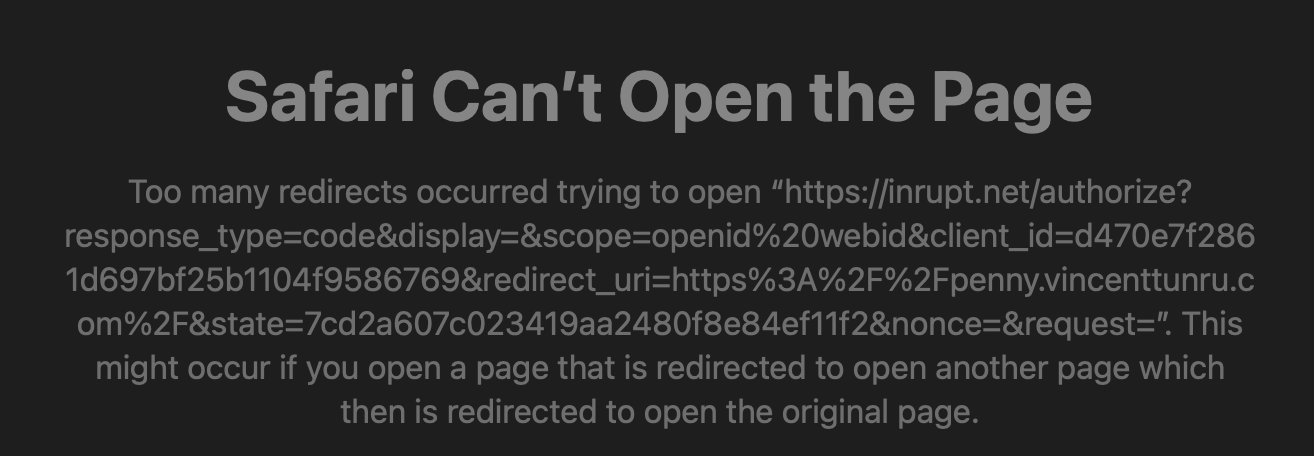
I tried penny and it has problems connecting to https://inrupt.net:
Happy to give you access. I gave it a shot. I have this setup now:
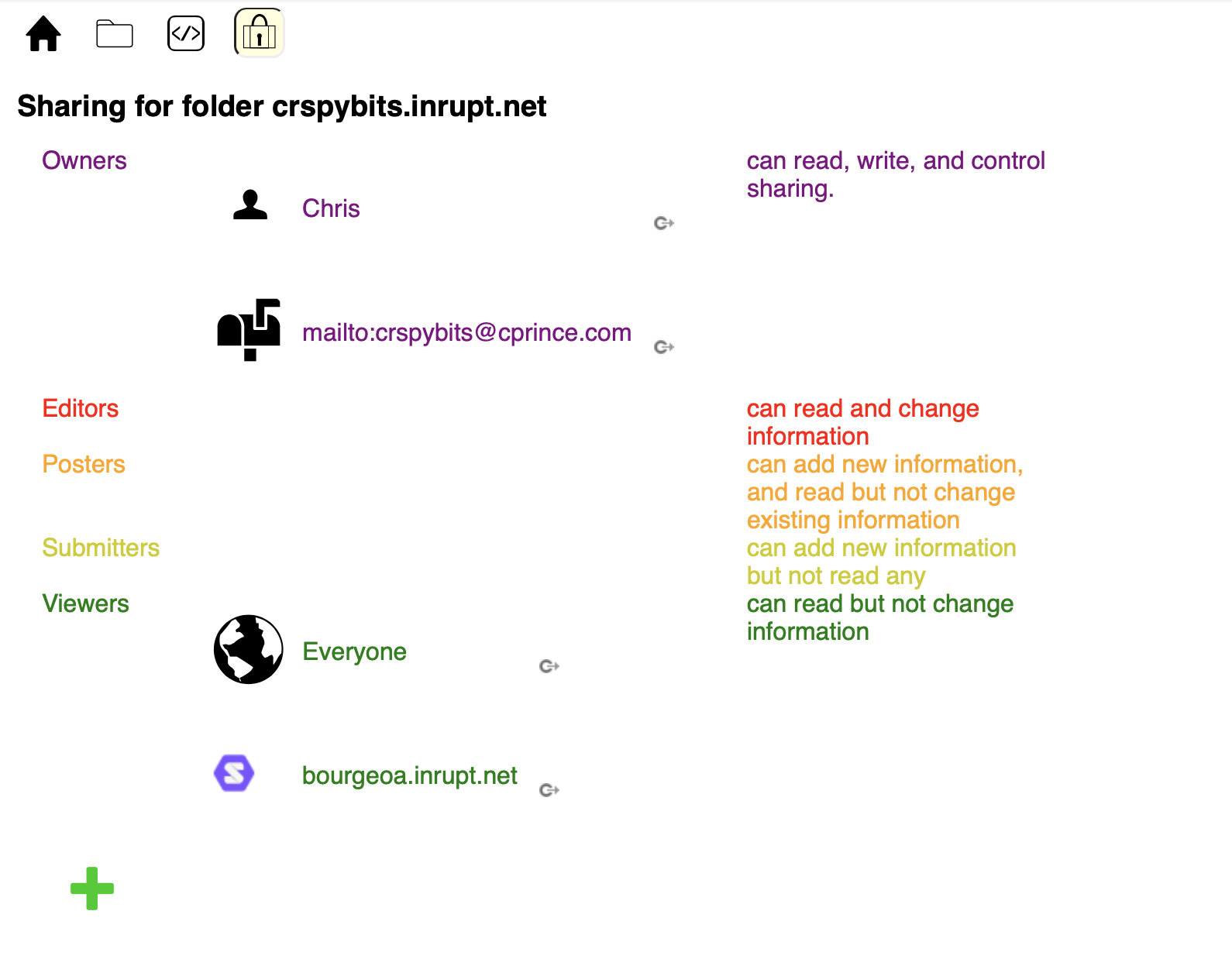
Not sure if that's you :) or if it's sufficient. Please let me know. Thanks!
Thanks. No it is not enough. You gave me same access as to everyone. Try to give me owners access. And also for https://bourgeoa.solidcommunity.net/profile/card#me this will allow to check for origin.
It is easier for me when you raise your problems on solidcommunity.net pod where I have admin access
After a bit of poking around, I think I gave https://bourgeoa.solidcommunity.net/profile/card#me owner access on everything. I didn't initially expect to drag and drop on this interface :) Thanks!
Thanks. I shall check more in details tomorrow. You apparently created a container and a document resource with the same name. I am very surprised this bug should have been resolved.
Thank you very much for looking into this. It sounds like there was an error at my end that wasn't caught at the server end. I look forward to knowing how I can fix my setup.
I think there are 3 issues :
- on your side there is a folder NewDirectory and a document resource with the same name with a turtle content (strangely it is the folder representation) but with contentType = image/jpeg (1)
- on server side this should not be allowed
- on the dataBrowser with a wrong display on folder-pane.
I am interested to have more information on your side :
- operations order
- PUT or POST
- ..
The repair is simple, if I remember well, delete the file resource.
(1) NSS uses a filesystem to store the resources. There is a folder NewDirectory and a file NewDirectory$.jpeg To have a better understanding your can try the http://jeff-zucker.github.io/solid-ide
In terms of more information, the last step I took (which resulted in this issue), was to run testUploadAndDownloadJPEG. That test has logs above. I have annotations in that about the http methods, though it's not all that clear, I realize.
The (Swift) code for this test is here, but the real body of the method is here.
That test operates in the following manner:
-
It does a credentials refresh. This doesn't reference the file/folder resources so don't think it's involved.
-
It starts a file upload. Thats the method of interest.
2.1) That uploadFile is here.
2.2) That uploadFile first calls createDirectoryIfDoesNotExist, which
2.3) Looks up the directory with lookupDirectory, which uses a HEAD. From the logs above, this got a 200 response-- i.e, the directory existed.
2.4) Creating the directory createDirectory using a POST if it doesn't already exist. (This step didn't happen b/c the directory already existed.)
2.5) uploadFile then checks to see if the specific file already exists before it tries to upload it, using lookupFile. lookupFile also uses a HEAD. (This got a 404 response-- the file didn't already exist)
2.6) If the file doesn't yet exist (which it didn't in this case), uploadFile calls a different method named uploadFile which uses a PUT.
Memory serving, the test I ran which ended us in the current state was the first time I'd tried this specific variant of uploadFile. In earlier tests I'd run it had been using POST (earlier tests were with different file names, generated using random UUID's).
Note that the comment for that method hasn't been updated to reflect the use of a PUT. It is also not using a Content-Type: text/turtle. The Content-Type: is actually the mime type of the data of the file being uploaded. You can see this mime type is image/jpeg from the log entry above, which I'll copy here:
**** The following request is a PUT to upload the file. You can tell that because there is a Content-Type in the request headers. *****
[2021-08-22T17:41:53.551Z] [DEBUG] [SolidCreds+CloudStorage+Requests.swift:119 createAuthenticationHeaders(url:httpMethod:)] htu: https://crspybits.inrupt.net/NewDirectory [2021-08-22T17:41:53.563Z] [DEBUG] [SolidCreds+CloudStorage+Requests.swift:208 request(path:httpMethod:body:headers:completion:)] url.host: crspybits.inrupt.net [2021-08-22T17:41:53.563Z] [DEBUG] [SolidCreds+CloudStorage+Requests.swift:209 request(path:httpMethod:body:headers:completion:)] Headers: Optional(["Slug": "40C6B441-70C2-4EFC-9A9F-A691F6F9FC9F.jpg", "Authorization": "DPoP <SNIP>", "Link": "http://www.w3.org/ns/ldp#Resource; rel="type"", "Dpop": "<SNIP>", "Host": "crspybits.inrupt.net", "Content-Type": "image/jpeg"]) [2021-08-22T17:41:53.564Z] [DEBUG] [SolidCreds+CloudStorage+Requests.swift:210 request(path:httpMethod:body:headers:completion:)] URL: https://crspybits.inrupt.net/NewDirectory [2021-08-22T17:42:01.044Z] [DEBUG] [SolidCreds+CloudStorage+Extras.swift:168 uploadFile(named:inDirectory:data:mimeType:completion:)] Success Response: Created[AnyHashable("Etag"): "W/"7-rM9AyJuqT6iOan/xHh+AW+7K/T8"", AnyHashable("Connection"): "keep-alive", AnyHashable("Date"): "Sun, 22 Aug 2021 17:42:02 GMT", AnyHashable("Ms-Author-Via"): "SPARQL", AnyHashable("Set-Cookie"): "nssidp.sid=s%3ATjbyywaDDwntXIrRxIc6Nx5LKe5nDoF1.LF1VQ%2Bm6Lgx%2FjeWxg1wFQwksGztUr0gwzVlGz2uf%2F1A; Domain=.inrupt.net; Path=/; Expires=Mon, 23 Aug 2021 17:42:02 GMT; HttpOnly; Secure", AnyHashable("Content-Length"): "7", AnyHashable("Vary"): "Accept, Authorization, Origin", AnyHashable("Access-Control-Allow-Credentials"): "true", AnyHashable("Allow"): "OPTIONS, HEAD, GET, PATCH, POST, PUT, DELETE", AnyHashable("X-Powered-By"): "solid-server/5.6.8", AnyHashable("Link"): "<NewDirectory.acl>; rel="acl", <NewDirectory.meta>; rel="describedBy", http://www.w3.org/ns/ldp#Resource; rel="type"", AnyHashable("Content-Type"): "text/plain; charset=utf-8", AnyHashable("Access-Control-Expose-Headers"): "Authorization, User, Location, Link, Vary, Last-Modified, ETag, Accept-Patch, Accept-Post, Updates-Via, Allow, WAC-Allow, Content-Length, WWW-Authenticate, MS-Author-Via, X-Powered-By"]201
I'm wondering if the upload file in 2.6) above using a PUT is somehow also attempting to create the directory NewDirectory. That directory had previously been created using a POST (i.e., with my createDirectory).
PUT does create intermediate directories. There is no need to check if they exist.
But you have an other problem that I suppose is due to the fact that to create folder with POST there is the link parameter to add. And also your contentType seems to exist with a value of image/jpeg.
I did not go to your code
PUT does create intermediate directories. There is no need to check if they exist.
Thanks. I'll be making that change going forward.
It does seem strange to me that the PUT created (or attempted to create) the NewDirectory directory when it existed. Or maybe this is the bug at hand.
But you have an other problem that I suppose is due to the fact that to create folder with POST there is the link parameter to add.
This is my createDirectory:
    func createDirectory(named name: String, completion: @escaping (Error?) -> ()) {
        Log.debug("Request: Attempting to create directory...")

        guard name.count > 0 else {
            completion(CloudStorageExtrasError.nameIsZeroLength)
            return
        }

        let headers:  [Header: String] = [
            .contentType: "text/turtle",
            .link: basicContainer,
            .slug: name
        ]

        request(httpMethod: .POST, headers: headers) { result in
            switch result {
            case .success(let success):
                Log.debug("Success Response: \(success.debug(.all))")
                completion(nil)
            case .failure(let failure):
                Log.debug("Failure Response: \(failure.debug(.all)); error: \(failure.error)")
                completion(failure.error)
            }
        }
    }
The link header is basicContainer, which is defined as:
<http://www.w3.org/ns/ldp#BasicContainer>; rel="type"
And also your contentType seems to exist with a value of image/jpeg.
I'm not sure what you mean here. Content-Type for my file uploads has the mime type (e.g., image/jpeg). For directory creation is as immediately above: "text/turtle". Is there a problem with that usage?