

 nmwsharp
How to create submenus (or multiple command UIs)
I have some UI
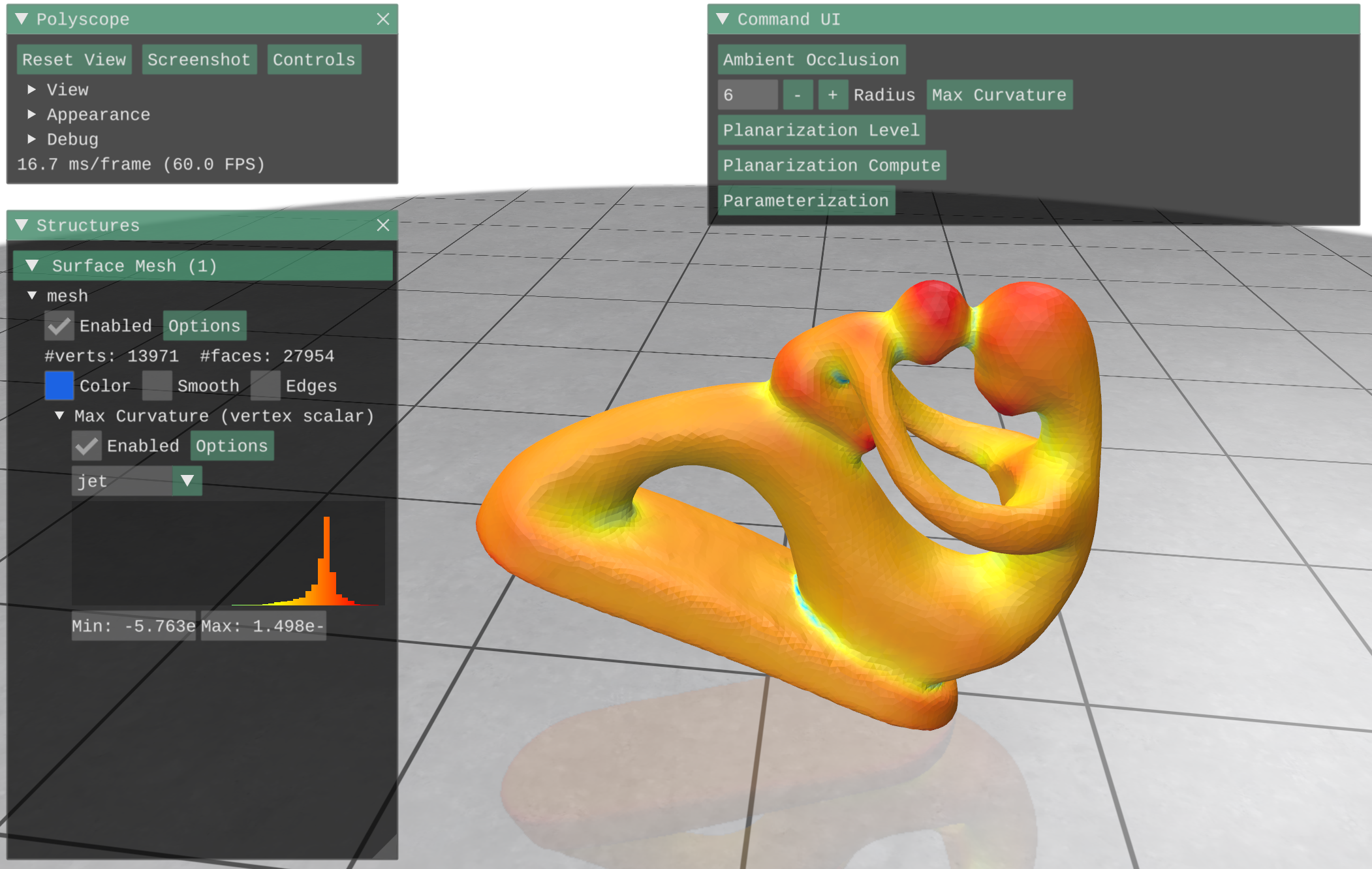
Everything into the Command UI is a Imgui::Button inside the callback
    ImGui::InputInt("Radius", &radius);

    ImGui::SameLine();

    //
    // Button
    if (ImGui::Button("Max Curvature"))
    {
        // get mesh
        polyscope::registerSurfaceMesh("mesh", V, F);

        // Compute curvature directions via quadric fitting
        MatrixXd PD1, PD2;
        VectorXd PV1, PV2;
        std::vector<Index> bv = {};

        igl::principal_curvature(V, F, PD1, PD2, PV1, PV2, bv, radius);

        polyscope::getSurfaceMesh("mesh")
            ->addVertexScalarQuantity("Max Curvature", PV1,
                                      polyscope::DataType::SYMMETRIC);

    }
pretty standard. Now I'd like to add the "radius" input inside the button scope, so that when I press the button all the relevant data is presented to the user. Of course, if I simply put the input widget code inside the button one the input widget is just show for an instant then deleted, as the callback runs over and over. The best option would be to create a separate sub-UI, possibly opening down below the command UI itself. Or to create multiple command UIs. Is there a way? Thank you

Hi!
For what it's worth, this is really an ImGUI question, and you might find good info searching general ImGUI resources. By default, the Polyscope callback opens up a single nicely-situated ImGUI window, but if you unset this option you can really write any arbitrary ImGUI logic you would like, and even open other windows etc.
One way I might handle something like your case is to have an additional boolean flag which controls whether the extra data is shown. Something like:
static bool showStuff = false;
if(ImGui::Button("do a thing")) {
 // do the thing
 showStuff = true; // show the extra info below only after the button is clicked
}
if(showStuff) {
  ImGui::TextUnformatted("some info...");
  // etc
}

You can do sth like this in the user-callback function (remember to turn off the default one, otherwise, menus map overlap)
    ImGui::SetNextWindowPos(ImVec2(0.0f, 0.0f), ImGuiCond_Always); // change the first param to the position you want
    ImGui::SetNextWindowSize(ImVec2(0.0f, 0.0f), ImGuiCond_Always);
    ImGui::SetNextWindowSizeConstraints(ImVec2(360, -1.0f), ImVec2(360, -1.0f));

    bool _viewer_menu_visible = true;

    ImGui::PushStyleVar(ImGuiStyleVar_FramePadding,
                        ImVec2(ImGui::GetStyle().FramePadding.x * 2,
                               ImGui::GetStyle().FramePadding.y * 2));
    ImGui::Begin(" Your Window Name", &_viewer_menu_visible,
                 ImGuiWindowFlags_NoSavedSettings |
                     ImGuiWindowFlags_AlwaysAutoResize |
                     ImGuiWindowFlags_NoMove | ImGuiWindowFlags_NoScrollbar |
                     ImGuiWindowFlags_NoCollapse);
    ImGui::PopStyleVar();

// -------------------------------
// put your menu option here
  auto [w, p, buttonSize] = initMenuParam(); // a customised func to get default params of my menu, you can do your own.
  // !Mesh Group
  if (ImGui::CollapsingHeader("Mesh IO", ImGuiTreeNodeFlags_DefaultOpen)) {
    if (ImGui::Button("Load Mesh##Mesh", buttonSize)) {
      const char* filters[] = {"*.obj"};
      auto fname = openFileDialog("Select Model", data_path.c_str(), 1, filters,
                                  "obj model (*.obj)", false);
      // ! load the mesh obj and register to the viewer
      igl::readOBJ(fname.string(), optMeshV, optMeshF);
      polyscope::registerSurfaceMesh("opt mesh", optMeshV, optMeshF);
    }

// end customized window
// -------------------------------

    curWinPosH += ImGui::GetWindowHeight() + menu_padding;
    ImGui::End();
