

 nmap
nmap
Npcap install error 0x8007000d - Failed to create npcap service
Platform: Microsoft Windows Server 2008 R2 Datacenter
NPcap version: 0.94
The logs and diagnostic report log uploaded.
install.log
NPFInstall.log
DiagReport-20171018-105504.txt


@dmiller-nmap
Thanks for your confirmation.
Actually, I have checked the ticket you post there. but I didn't find the similar error message in the nmap/nmap#875. and the first error I found in the NPFInstall.log is
Error 0x8007000d: Couldn't install the network component.
I'm not sure whether this is same with nmap/nmap#875
Reopening, since this might be a new issue. If the next Npcap release (planned version number 0.95) solves it, then it was likely the same as nmap/nmap#875.
Thanks, @dmiller-nmap I test with the latest version and I still got that error. The latest related logs uploaded. install.log NPFInstall.log DiagReport-20171023-130148.txt
@dmiller-nmap This seems always reproduced in windows 2008 R2 32 bit platform.
Ok, we have some progress. I asked a question over at MSDN Forums and got some suggestions.
First, I would like a copy of the event log file at %windir%\inf\netcfg*.etl, which you can email to me via the Nmap Support address. This should give us some indication of what is going wrong.
Second, can you identify any reason why the Windows Registry might be inconsistent or corrupted? Possible reasons for corruption of the netcfg registry given by Jeffrey Tippet in his answer are:
- 3rd-party applications (or NIC drivers) which write directly to the registry
- Sudden power loss
He suggests that uninstalling & reinstalling all the NICs from devmgmt.msc may fix the problem, but that it is not guaranteed.
Just to add the me too but I'm having the same issue with Windows R2 64bit (SBS 2011)
j

@tegeus Just to confirm, does your NPFInstall.log file contain Error 0x8007000d: InstallSpecifiedComponent? Can you attach the latest C:\Windows\INF\NetCfg*.etl event log or email it to [email protected]? Thanks!
@dmiller-nmap Sorry I can't find the file named netcfg*.etl under the matched directory - C:\Windows\INF. May I need to enable some functions to generate such file?
I am provisionally closing this issue since we have made significant changes since Npcap 0.95. If the original reporters are still having this problem with Npcap 0.99-r6 or later, please reopen or ask us to reopen this issue. If you are experiencing a similar issue for the first time with Npcap 0.99-r6 or later, please open a new issue.
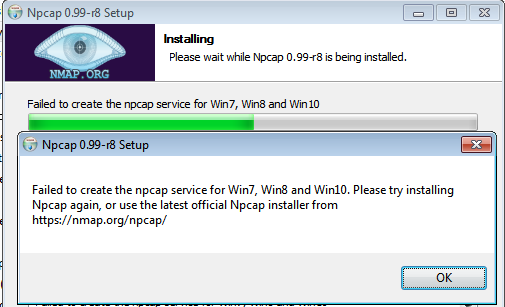 Same issue with 0.99-r8 on Win7 pro

Reopened due to new information posted by @dufourgilles that it still happens with 0.99-r8


Stopping the npcap driver Output folder: C:\Program Files\Npcap Extract: LICENSE Extract: DiagReport.bat Extract: DiagReport.ps1 Extract: FixInstall.bat Extract: NPFInstall.exe Output folder: C:\Program Files\Npcap Extract: npcap.sys Extract: npcap.cat Extract: npcap.inf Extract: npcap_wfp.inf Output folder: C:\Program Files\Npcap Extract: Uninstall.exe Installing NDIS6.x x64 driver for Win7, Win8 and Win10 Output folder: C:\Windows\system32\Npcap Extract: wpcap.dll Extract: Packet.dll Extract: NpcapHelper.exe Extract: WlanHelper.exe Output folder: C:\Windows\system32\Npcap Extract: wpcap.dll Extract: Packet.dll Extract: NpcapHelper.exe Extract: WlanHelper.exe Output folder: C:\Users\ADMINI~1\AppData\Local\Temp\nsf51A1.tmp Extract: Insecure-SHA1.cer TrustedPublisher "Trusted Publishers" Related Certificates:
Exact match: Element 1: Serial Number: 09a62d3bec2c603652d5cb46a1a1ebab Issuer: CN=DigiCert EV Code Signing CA, OU=www.digicert.com, O=DigiCert Inc, C=US NotBefore: 4/11/2018 8:00 AM NotAfter: 11/7/2019 8:00 PM Subject: CN=Insecure.Com LLC, O=Insecure.Com LLC, L=Seattle, S=Washington, C=US, SERIALNUMBER=200010310013, OID.2.5.4.15=Private Organization, OID.1.3.6.1.4.1.311.60.2.1.2=California, OID.1.3.6.1.4.1.311.60.2.1.3=US Non-root Certificate Cert Hash(sha1): 83 b2 dd fe f9 f7 00 44 38 d7 aa 66 c5 24 34 4f 71 a7 0b 48
Certificate "Insecure.Com LLC" already in store. CertUtil: -addstore command completed successfully. Delete file: C:\Users\ADMINI~1\AppData\Local\Temp\nsf51A1.tmp\Insecure-SHA1.cer Extract: Insecure-EV.cer TrustedPublisher "Trusted Publishers" Related Certificates:
Exact match: Element 0: Serial Number: 033b0a4dc1797373e6efec07fc63ba34 Issuer: CN=DigiCert EV Code Signing CA (SHA2), OU=www.digicert.com, O=DigiCert Inc, C=US NotBefore: 11/3/2016 8:00 AM NotAfter: 11/7/2019 8:00 PM Subject: CN=Insecure.Com LLC, O=Insecure.Com LLC, L=Seattle, S=Washington, C=US, PostalCode=98104, STREET=113 Cherry St nmap/nmap#1337, SERIALNUMBER=200010310013, OID.1.3.6.1.4.1.311.60.2.1.2=California, OID.1.3.6.1.4.1.311.60.2.1.3=US, OID.2.5.4.15=Private Organization Non-root Certificate Cert Hash(sha1): ec 2a e5 17 75 f3 25 25 41 b2 66 c4 05 28 da a7 7b aa 07 2f
Certificate "Insecure.Com LLC" already in store. CertUtil: -addstore command completed successfully. Delete file: C:\Users\ADMINI~1\AppData\Local\Temp\nsf51A1.tmp\Insecure-EV.cer Npcap driver cache in Driver Store has been successfully cleaned up! The cache in driver store was cleared Npcap WFP callout driver has been successfully installed! Unknown error! 8007000d Npcap LWF driver has failed to be installed. Failed to create the npcap service for Win7, Win8 and Win10
Installing it on Windows 2012 R2 with hardening applied.

PS C:\Users\Administrator> Get-Service
Status Name DisplayName
Running AeLookupSvc Application Experience Stopped ALG Application Layer Gateway Service Stopped AppIDSvc Application Identity Running Appinfo Application Information Stopped AppMgmt Application Management Stopped AppReadiness App Readiness Stopped AppXSvc AppX Deployment Service (AppXSVC) Stopped AudioEndpointBu... Windows Audio Endpoint Builder Stopped Audiosrv Windows Audio Running BFE Base Filtering Engine Stopped BITS Background Intelligent Transfer Ser... Running BrokerInfrastru... Background Tasks Infrastructure Ser... Stopped Browser Computer Browser Stopped CAInvokerService CAInvokerService Stopped CertPropSvc Certificate Propagation Stopped COMSysApp COM+ System Application Running CryptSvc Cryptographic Services Stopped Cyber-Ark Event... Cyber-Ark Event Notification Engine Running CyberArk Logic ... CyberArk Logic Container Running DcomLaunch DCOM Server Process Launcher Stopped defragsvc Optimize drives Stopped DeviceAssociati... Device Association Service Stopped DeviceInstall Device Install Service Running Dhcp DHCP Client Running Dnscache DNS Client Stopped dot3svc Wired AutoConfig Stopped DPS Diagnostic Policy Service Stopped DsmSvc Device Setup Manager Stopped Eaphost Extensible Authentication Protocol Stopped EFS Encrypting File System (EFS) Running EventLog Windows Event Log Running EventSystem COM+ Event System Stopped fdPHost Function Discovery Provider Host Stopped FDResPub Function Discovery Resource Publica... Stopped FontCache Windows Font Cache Service Running gpsvc Group Policy Client Stopped hidserv Human Interface Device Service Stopped hkmsvc Health Key and Certificate Management Stopped IEEtwCollectorS... Internet Explorer ETW Collector Ser... Stopped IKEEXT IKE and AuthIP IPsec Keying Modules Stopped iphlpsvc IP Helper Stopped KeyIso CNG Key Isolation Stopped KPSSVC KDC Proxy Server service (KPS) Stopped KtmRm KtmRm for Distributed Transaction C... Stopped LanmanServer Server Stopped LanmanWorkstation Workstation Stopped lltdsvc Link-Layer Topology Discovery Mapper Stopped lmhosts TCP/IP NetBIOS Helper Running LSM Local Session Manager Stopped MMCSS Multimedia Class Scheduler Running MpsSvc Cyber-Ark Hardened Windows Firewall Stopped MSDTC Distributed Transaction Coordinator Stopped MSiSCSI Microsoft iSCSI Initiator Service Stopped msiserver Windows Installer Stopped napagent Network Access Protection Agent Stopped NcaSvc Network Connectivity Assistant Stopped Netlogon Netlogon Stopped Netman Network Connections Running netprofm Network List Service Stopped NetTcpPortSharing Net.Tcp Port Sharing Service Running NlaSvc Network Location Awareness Running nsi Network Store Interface Service Stopped PerfHost Performance Counter DLL Host Stopped pla Performance Logs & Alerts Running PlugPlay Plug and Play Stopped PolicyAgent IPsec Policy Agent Running Power Power Stopped PrintNotify Printer Extensions and Notifications Running PrivateArk Data... PrivateArk Database Stopped PrivateArk Remo... PrivateArk Remote Control Agent Running PrivateArk Server PrivateArk Server Running ProfSvc User Profile Service Stopped RasAuto Remote Access Auto Connection Manager Stopped RasMan Remote Access Connection Manager Stopped RemoteAccess Routing and Remote Access Stopped RemoteRegistry Remote Registry Running RpcEptMapper RPC Endpoint Mapper Stopped RpcLocator Remote Procedure Call (RPC) Locator Running RpcSs Remote Procedure Call (RPC) Stopped RSoPProv Resultant Set of Policy Provider Stopped sacsvr Special Administration Console Helper Running SamSs Security Accounts Manager Stopped SCardSvr Smart Card Stopped ScDeviceEnum Smart Card Device Enumeration Service Running Schedule Task Scheduler Stopped SCPolicySvc Smart Card Removal Policy Stopped seclogon Secondary Logon Running SENS System Event Notification Service Stopped SessionEnv Remote Desktop Configuration Stopped SharedAccess Internet Connection Sharing (ICS) Stopped ShellHWDetection Shell Hardware Detection Stopped smphost Microsoft Storage Spaces SMP Stopped SNMPTRAP SNMP Trap Stopped Spooler Print Spooler Stopped sppsvc Software Protection Stopped SSDPSRV SSDP Discovery Stopped SstpSvc Secure Socket Tunneling Protocol Se... Stopped svsvc Spot Verifier Stopped swprv Microsoft Software Shadow Copy Prov... Stopped SysMain Superfetch Running SystemEventsBroker System Events Broker Stopped TapiSrv Telephony Running TermService Remote Desktop Services Stopped Themes Themes Stopped THREADORDER Thread Ordering Server Stopped TieringEngineSe... Storage Tiers Management Stopped TPAutoConnSvc TP AutoConnect Service Stopped TPVCGateway TP VC Gateway Service Stopped TrkWks Distributed Link Tracking Client Stopped TrustedInstaller Windows Modules Installer Stopped UALSVC User Access Logging Service Stopped UI0Detect Interactive Services Detection Running UmRdpService Remote Desktop Services UserMode Po... Stopped upnphost UPnP Device Host Stopped VaultSvc Credential Manager Stopped vds Virtual Disk Running VGAuthService VMware Alias Manager and Ticket Ser... Stopped vmicguestinterface Hyper-V Guest Service Interface Stopped vmicheartbeat Hyper-V Heartbeat Service Stopped vmickvpexchange Hyper-V Data Exchange Service Stopped vmicrdv Hyper-V Remote Desktop Virtualizati... Stopped vmicshutdown Hyper-V Guest Shutdown Service Stopped vmictimesync Hyper-V Time Synchronization Service Stopped vmicvss Hyper-V Volume Shadow Copy Requestor Running VMTools VMware Tools Stopped vmvss VMware Snapshot Provider Running VMware Physical... VMware Physical Disk Helper Service Stopped VMwareCAFCommAm... VMware CAF AMQP Communication Service Running VMwareCAFManage... VMware CAF Management Agent Service Stopped VSS Volume Shadow Copy Stopped W32Time Windows Time Stopped Wcmsvc Windows Connection Manager Stopped WcsPlugInService Windows Color System Stopped WdiServiceHost Diagnostic Service Host Stopped WdiSystemHost Diagnostic System Host Stopped Wecsvc Windows Event Collector Stopped WEPHOSTSVC Windows Encryption Provider Host Se... Stopped wercplsupport Problem Reports and Solutions Contr... Stopped WerSvc Windows Error Reporting Service Stopped WinHttpAutoProx... WinHTTP Web Proxy Auto-Discovery Se... Running Winmgmt Windows Management Instrumentation Stopped WinRM Windows Remote Management (WS-Manag... Stopped wmiApSrv WMI Performance Adapter Stopped WPDBusEnum Portable Device Enumerator Service Stopped WSService Windows Store Service (WSService) Running wuauserv Windows Update Stopped wudfsvc Windows Driver Foundation - User-mo...
PS C:\Users\Administrator>
I had the same problem. I'm not an expert, but I think the cause was due to the certificate. I was able to complete the installation after installing the certificate.

@mircoca I'm having this error on a Windows 10 system. Trying to install version 1.0.0 of npcap. I'm trying to use the self-installer, since I don't have the know-how to use straight up source code. My ultimate goal is to be able to use Wireshark and Nmap for my networking classes.
What certificate are you talking about needing to install?

@kobijet @mircoca same issue, was it resolved for you? what certificate is to be installed

I am facing this problem....please help me for solution. operating system: windows 10 npcap version: 1.78

@tahsin9777 - your screen shot looks more like #135 given the error code. I'm closing this stale issue as it seems to have been addressed (no reports here since July 2021).