

 nmap
nmap
Npcap driver service fails to start with System error 2: The system cannot find the file specified
I am running the latest version of Wireshark under Windows 10 64bit Home Edition
I am getting an Error whenever running the Capture Interface:
Adapter for Loopback Traffic Capture.
Error = The capture session could not be initiated on interface '\Device\NPF_Loopback' (Error opening adapter: A device which does not exist was specified. (433)). I uninstalled NPCAP, Wireshark and re-installed them with the latest versions.
- npcap version 0.9987
- USBPCAP 1.5.3
- Wireshark version Wireshark-win64-3.2.2
However, I am still getting the same above error. Under Windows PowerShell, prompt I typed: Get-Service npcap. Status Name DisplayName
Stopped npcap Npcap Packet Driver (NPCAP)
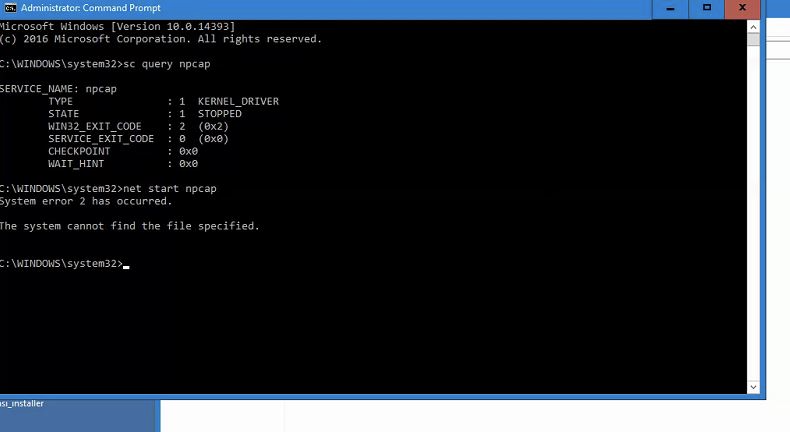
I also ran the following steps: Step 1: Run the command prompt as administrator (right click -> run as administrator) Step 2: type the following in the cmd: net start npcap Error = System error 2 has occurred. The system cannot find the file specified.
What ncap file extension is it looking for and which directory should it be located?
I also attached a copy of the ncap diagnostic report:
DiagReport-20200304-144430.txt

I may have found the issue. The laptop only has wifi as a network connection (does not have a built-in Ethernet socket connector). As such, I had to use a USB to Ethernet adapter. And will require a USBPcap interface to Wireshark in order to capture data. More testing forthcoming to confirm latest discovery.
Thanks for this report. The Loopback device isn't actually there, since the npcap driver service is not running. Npcap 0.9988 will not report it if the driver isn't running, so that behavior is fixed. However, you still have something preventing the driver from running, so I would like to diagnose that.
Please provide the following information:
- Does the npcap driver exist on your system? Check
%SYSTEMROOT%\system32\DRIVERS\npcap.sys - Please provide the installation logs:
C:\Program Files\Npcap\install.logandC:\Program Files\NPFInstall.log - Is there any antivirus, endpoint security, or other antimalware software on the system?

I encountered an issues that seemes to be pretty much alike. A 'file not found'error when trying to start the npcap driver. In my case the issue is gone after deinstalling 'AVG Internet Security'.

I am getting the same error while installing NPCAP. The below event is seen in System event log:
Description: The Npcap Packet Driver (NPCAP) service failed to start due to the following error: The system cannot find the file specified.
When running command "net start npcap", it throws below error:
System error 2 has occurred. The system cannot find the file specified.

@abhinku6 Which version of Npcap are you trying to install? It looks like this was an upgrade installation; have you tried uninstalling and then installing a recent version of Npcap? We just released Npcap 1.10, though Npcap 1.00 is also stable for most users.
Hi Daniel,
I am using Npcap .9990. Earlier the server had npcap .995 which was uninstalled and then .9990 was installed which never got installed successfully. I have tried uninstallation and reinstallation multiple times but I get the same issue.
@abhinku6 Npcap 0.9985 through 0.9990 is signed with a certificate issued by Sectigo which was causing problems on some systems. Npcap 0.9991 and later have an updated certificate from DigiCert which does not have those issues. Apart from that, prior to Npcap 0.9994 there was a bug in the installer which would fail to remove some old versions of the Npcap driver from the Windows driver store. The combination of these 2 bugs may result in a mismatch between the cached version of the driver that Windows prefers and the version which we are attempting to install. We do not recommend using older Npcap releases, since each new release fixes known issues. If you experience this same problem with Npcap 1.10, please let us know.
@dmiller-nmap Thank you for the info. Our software uses .9990 npcap and hence we need to fix the issue with this version itself. Can you please point me to the solution to the below issue mentioned by you:
prior to Npcap 0.9994 there was a bug in the installer which would fail to remove some old versions of the Npcap driver from the Windows driver store.
This might be the cause of the issue I am facing. How can I clean them up?
try copying the file npcap.sys from the program folder to the system32/driver folder, it worked for me

@albertom65: Thanks for forwarding your suggestion in response to my issue npcap v1.10 blocks VM network (VNET1) on Windows 10 until 2nd tracing with Wireshark is started #278. I verified and found npcap.sys is already present in system32/drivers folder, so it doesn't help my problem. (I tried to reply directly from the mail I received, but that response doesn't seem to have arrived here).

@phunsoft check if the file under system32 is the same you find under programs/npcap, it may belong to an old installation. I installed 1.10 from scratch and no npcap.sys was copied under system32
@phunsoft check if the file under system32 is the same you find under programs/npcap, it may belong to an old installation.
I did using the attributes dialog, but to mak sure, I just did a binary compare: They are the same.
try copying the file npcap.sys from the program folder to the system32/driver folder, it worked for me
Thanks, it worked for me

copy npcap.sys File from C:\Program Files\Npcap to C:\Windows\System32\drivers.
