
colour-mysql-console
 colour-mysql-console copied to clipboard
 nitso
nitso
Sample config files showing how to colorize linux console mysql client
colour-mysql-console
Sample config files showing how to colorize linux console mysql client using grc
How to use it
- Install grc (for debian systems:
apt-get install grc) - Copy both config files into your home directory: .grcat and .my.cnf
- Run mysql client
mysql -u <user> -p -h <hostname> - Enjoy!
How does it work
Mysql client supports using predefined pager for data output.
So we can set grcat (Generic Colouriser) for processing mysql output.
grcat reads supplied config file, parses output according to regexp's and adds colours.
grc manual can be founded via man grc or here: http://kassiopeia.juls.savba.sk/~garabik/software/grc/README.txt
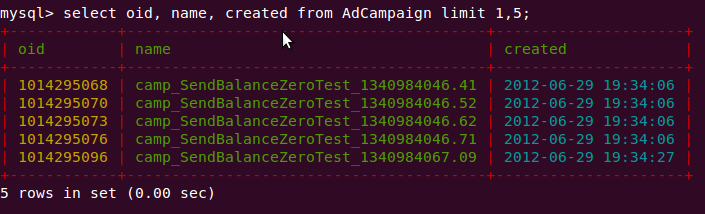
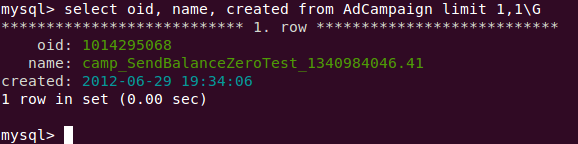
Sample screenshots
Another one nice hack
You can also use less in pager to have some features like scrolling, search, line numbers etc.
pager = grcat ~/.grcat | less -RSFXin
Just type man less to read about less parameters.
LICENSE
Project distributes with standard MIT license
 nitso
nitso