

 nipkownix
Post-processing issues
Mentioned at https://github.com/nipkownix/re4_tweaks/issues/4#issuecomment-953395397, the PC version may have some broken post-processing effects.
Seems there's a GXDoPostProcess func at 0x94AC20 in 1.1.0 EXE, that calls into PrepareBloom (0x9495E0), which then eventually calls DrawBloom (0x9374E0)
I tried nopping out the main call to these funcs at 0x6E9F81 (part of Render function), but didn't notice any change in the image, but maybe the area I was in didn't make use of it or something
Looking at the PS2/GC versions it seemed they didn't have any GXDoPostProcess function at all, is it that X360 first added the bloom but then it got broken during PC port? (I'm not really even sure how the bloom is broken atm...)
The game does have some other blurring effects called Filters, eg. Filter09 etc. haven't tried messing with those at all yet, but those were in PS2/GC too, could be that one of those was broken during the port.
btw I found that the GC debug build also included symbols in some weird format, much more than PS2 version, managed to dump them & get them loaded into IDA, I've upped the IDB for GC & PS2 here, along with 1.1.0 with some func names copied over: re4_ps2_gc_symbols+pc_incomplete_idb.7z.zip (remove zip extension) (for anyone just finding this, updated IDBs can be found in the posts below)
E: found a little more about the GC symbols, there's files for other things besides the main GC exe like Bio4.wep09.sym, which contain even more funcs that aren't in the main GC exe.
These seem to be for rel type files, which are kinda like windows DLLs, game only loads in code for what's actually being played, old game consoles were pretty big on "overlay" files like this, looks like the PC build has all these build into the EXEs though thankfully.
Some of the sym files do have rel files that go with them, like Tools.rel, but wep09 only has a drs file for it...
This confused me for a while, but turned out the drs actually contains the rel inside it - had to dig pretty far to find a tool that'd extract drs, since this was only used on GC it seems most didn't really care about them, not a whole lot of surviving info/tools for them...
Eventually found "BioHazard 4 File Archive Tool" inside a 400MB+ zip of RE modding tools, EXE name is bio4fat.exe, seems to work fine for extracting the debug build drs files, none of the extracted files have names though, but the last file extracted seems to usually be the .rel.
With that you can just use something like https://github.com/heinermann/ida-wii-loaders to load the rel into IDA properly, then apply the .sym for it on top (and I'd suggest making an IDA script for labelling the imports from the main EXE too)

Some misc things I've found, will update as I go, offsets are for 1.1.0:
-
0x94B8B4 - flags given to IDirect3D9::CreateDevice, default is 0x44 (D3DCREATE_HARDWARE_VERTEXPROCESSING | D3DCREATE_MULTITHREADED) The D3DCREATE_MULTITHREADED flag makes D3D9 do some extra thread-safety checks which costs performance, changing this to 0x40 made me go from 220FPS to 270FPS (after patching out frametime stuff so I could see full FPS), so I guess it'd probably help anyone that's having FPS issues. I noticed steam overlay would sometimes cause it to crash/hang on startup after this though, but only happened first few times I ran it, after 3 or 4 times it's stopped now and seems to work fine. not sure what was up with that. Other game patches like SilentPatch remove this flag on some D3D9 games already, but maybe in those cases they didn't have any threading to worry about, not really sure if RE4 uses much multithreading around the renderer at all.
-
0x654A41 - loop that limits game to 60FPS, this prevents variableframerate 120 from working properly (making the game go half-speed since it's trying to run everything at 120FPS but is being limited to drawing at 60FPS) Modifying the double it checks against for the frametime (at 0xB1D180) can change the limiter, eg changing that double to 0.0083333333333333 (1 / 120) makes variableframetime 120 work much better A few things like menu selectors run much faster though, likely some other things might still be tied to framerate too, I haven't really tested it much yet. (for checking games full framerate I just patched that to 0.002 and set variableframerate to 500, game runs at around ~270FPS for me)
-
0x94B205 - this seems to force vsync to 1 even if you set it to 0 in the INI, annoying when I was trying to get game to render at full FPS >.>, nopping that should let INI value take effect instead
I was about to open an issue to track these. Nice!
btw I found that the GC debug build also included symbols in some weird format, much more than PS2 version, managed to dump them & get them loaded into IDA, I've upped the IDB for GC & PS2 here, along with 1.1.0 with some func names copied over: re4_ps2_gc_symbols+pc_incomplete_idb.7z.zip (remove zip extension)
There's a debug build for GC? Nice. Thanks for the zip.
Looking at the PS2/GC versions it seemed they didn't have any GXDoPostProcess function at all, is it that X360 first added the bloom but then it got broken during PC port? (I'm not really even sure how the bloom is broken atm...)
Not sure what actually happened during porting, but I do know that this particular broken effect was working in the GC/Wii versions, and was broken when the game was ported to X360.
Heres some info albert provided me about many issues with the game:
https://www.dropbox.com/sh/gr9u3dab0tmlnv8/AAB9Le2n7wUlS07OFEh6-d9Ra/BIOBROKEN.pdf?dl=0
(hopefuly he doesn't mind me sharing this)
He describes what we're talking about as "Intensity Effect" in this document.
The game does have some other blurring effects called Filters, eg. Filter09 etc. haven't tried messing with those at all yet, but those were in PS2/GC too, could be that one of those was broken during the port.
Ah, maybe this is the filter I'm trying to disable using the DisableFXAA option in re4_tweaks. I couldn't properly disable it though, because graphics programming is still new to me, and as you said.. render doc doens't work with dx9 games, sadly.
My solution is very hacky though, hooking around GXDoPostProcess with some crazy conditionals. If you can find a better way to disable that, it would be awesome!
0x94B8B4 - flags given to IDirect3D9::CreateDevice, default is 0x44 (D3DCREATE_HARDWARE_VERTEXPROCESSING | D3DCREATE_MULTITHREADED) The D3DCREATE_MULTITHREADED flag makes D3D9 do some extra thread-safety checks which costs performance, changing this to 0x40 made me go from 220FPS to 270FPS (after patching out frametime stuff so I could see full FPS), so I guess it'd probably help anyone that's having FPS issues. I noticed steam overlay would sometimes cause it to crash/hang on startup after this though, but only happened first few times I ran it, after 3 or 4 times it's stopped now and seems to work fine. not sure what was up with that. Other game patches like SilentPatch remove this flag on some D3D9 games already, but maybe in those cases they didn't have any threading to worry about, not really sure if RE4 uses much multithreading around the renderer at all.
This is a great find! This could help people having slowmotion issues and the like. We should definitely experiment with it.
0x654A41 - loop that limits game to 60FPS, this prevents variableframerate 120 from working properly (making the game go half-speed since it's trying to run everything at 120FPS but is being limited to drawing at 60FPS) Modifying the double it checks against for the frametime (at 0xB1D180) can change the limiter, eg changing that double to 0.0083333333333333 ((1000 / 120) / 1000) makes variableframetime 120 work much better A few things like menu selectors run much faster though, likely some other things might still be tied to framerate too, I haven't really tested it much yet. (for checking games full framerate I just patched that to 0.002 and set variableframerate to 500, game runs at around ~270FPS for me)
Very interesting. I wonder if it is possible to add a 144 fps mode breaking the game as little as possible.
0x94B205 - this seems to force vsync to 1 even if you set it to 0 in the INI, annoying when I was trying to get game to render at full FPS >.>, nopping that should let INI value take effect instead
Amazing stuff. I noticed since day 1 of this port being released that changing that value to 0 didn't do anything, so I've always forced it off using AMD's control panel. I'll add an option to fix that for sure! Thanks!

So it looks like their code already mostly handles framerate changes properly, but some reason they added in code to force 30/60FPS frametimes, so dipping under those will change game speed, and higher framerates will get limited to those also causing game to slow down.
Luckily it's not too hard to bypass that code, and then the rest of the game code mostly seems to handle framerate changes fine:
void FramerateFix()
{
  LONGLONG* prevTime = (LONGLONG*)(GameAddress + 0x865A30);
  LARGE_INTEGER* g_PerformanceFrequency = (LARGE_INTEGER*)(GameAddress + 0x865A50);

  LARGE_INTEGER perfCount;
  QueryPerformanceCounter(&perfCount);
  double deltaTime = ((double)perfCount.QuadPart - (double)*prevTime) / g_PerformanceFrequency->QuadPart;

  uint8_t* pG = *(uint8_t**)(GameAddress + 0x806F3C);
  *(float*)(pG + 0x70) = deltaTime * 30.0; // game code does * 30, probably because game was made for 30FPS?

  *prevTime = perfCount.QuadPart;
}

void Plugin_Attach()
{
  GameModule = GetModuleHandleA(nullptr);
  GameAddress = reinterpret_cast<uintptr_t>(GameModule);

  SafeWrite(GameAddress + 0x254A7D, uint8_t(0x90), 0x18); // nop sleep code
  SafeWrite(GameAddress + 0x254ABC, uint8_t(0x90), 2); // nop some part of 30/60 checking code
  SafeWrite(GameAddress + 0x254AF9, uint8_t(0x90), 12); // nop code that sets prevTime, as we're setting it ourselves

  PatchCall((void*)(GameAddress + 0x254B05), FramerateFix);
}
A quick test, with this it seems to handle 500FPS+ fine, even uncapped with menu at 1000FPS+ the game speed mostly all seems normal, changing variableFramerate at runtime (int at 0xC2B7A0) doesn't seem to break anything neither.
Menu selectors that I mentioned before are massively sped up though, and probably other things could be broken too.
I think there might be a way to patch this without needing a hook for it tho, their limiter code (~0x654A3A) already has all the parts of that hook in place (QueryPerformanceCounter, minus prevTime etc), just need to find a way to skip past the 30/60 limiting parts...
E: ah think I've found a better solution:
SafeWrite(GameAddress + 0x254A59, uint8_t(0x90), 0x7C); // nop 30/60fps sleep code
Maybe it'd be better to jmp over it instead of nopping 0x7c bytes though, but not sure if it's the same number between 1.0.6 & 1.1.0 (E: seems that's stopping variableframerate from being used at all though, hmm...)
E2: aight got it to keep the variableframerate stuff working now:
  SafeWrite(GameAddress + 0x254A6E, uint16_t(0x25EB)); // jmp over first 60FPS check
  SafeWrite(GameAddress + 0x254A9E, uint8_t(0x90), 0x35); // skip second 60FPS/30FPS check
AFAIK this should let it go up to variableframerate, but if it dips below then gamespeed should get adjusted for it fine. Using just those two patches & the vsync patch seems to work good for me, but haven't tested it out that much yet.
btw with latest code VS complains of some heap corruption in Init(), around the ResArray var, not sure if you're aware of it already
Changing it to
char* ResString[] = {SFD_DisplayResolution.data()};
char* ResArray[2], *next_token;

ResArray[0] = strtok_s(*ResString, "x", &ResArray[1]);

int MovPosX;
int MovPosY;
assert(sscanf_s(ResArray[0], "%d", &MovPosX) > 0);
assert(sscanf_s(ResArray[1], "%d", &MovPosY) > 0);
Seemed to fix it, but I had to remove the strtok_s(NULL, "/", &next_token); part, I guess that's probably checking for comments? Maybe could just search ResString for / before using strtok & set the first one found to \0.
I had a try at making signatures for those patches above too, could probably be improved, haven't tried against 1.0.6 yet but seems to work with 1.1.0:
auto pattern_vsync = hook::pattern("50 E8 ? ? ? ? C7 07 01 00 00 00 E9");
injector::MakeNOP(pattern_vsync.get_first(6), 6);

// skip over 60FPS busy-loop
auto pattern_fps_1 = hook::pattern("DD 05 ? ? ? ? D8 DA DF E0 F6 C4 41 75 ?");
auto pattern_fps_1_addr = (uintptr_t)pattern_fps_1.get_first(0);
auto pattern_fps_1_dest = hook::pattern(pattern_fps_1_addr, pattern_fps_1_addr + 0x80, "D8 D1 DF E0 F6 C4 41 74 ? DD 05 ? ? ? ?");
injector::MakeJMP(pattern_fps_1_addr, pattern_fps_1_dest.get_first(0));

// skip over 60FPS loop & 30FPS frametime-lock
auto pattern_fps_2 = (uintptr_t)pattern_fps_1_dest.get_first(0) + 9;
auto pattern_fps_2_dest = hook::pattern(pattern_fps_2, pattern_fps_2 + 0x80, "DD D8 DC 0D ? ? ? ? A1 ? ? ? ? 56 D9 58 70");
injector::MakeJMP(pattern_fps_2, pattern_fps_2_dest.get_first());
Nice progress! I didn't think it would be possible to play this game at a higher FPS. I'll test it right now to see if I can spot the usual FPS-related bugs.
btw with latest code VS complains of some heap corruption in Init(), around the ResArray var, not sure if you're aware of it already
Ah, thanks for the fix. I didn't notice VS's complains, lol
I had a try at making signatures for those patches above too, could probably be improved, haven't tried against 1.0.6 yet but seems to work with 1.1.0
Great! I'll test those.
I was about to ask for help with the vsync offset, because it was pointing to some random location in memory for me, with both v1.0.6 and v1.1.0, but you're already one step ahead :p
Since you've cloned the repo, I've pushed a fix for a lighting issue that was happening with RestorePickupTransparency.
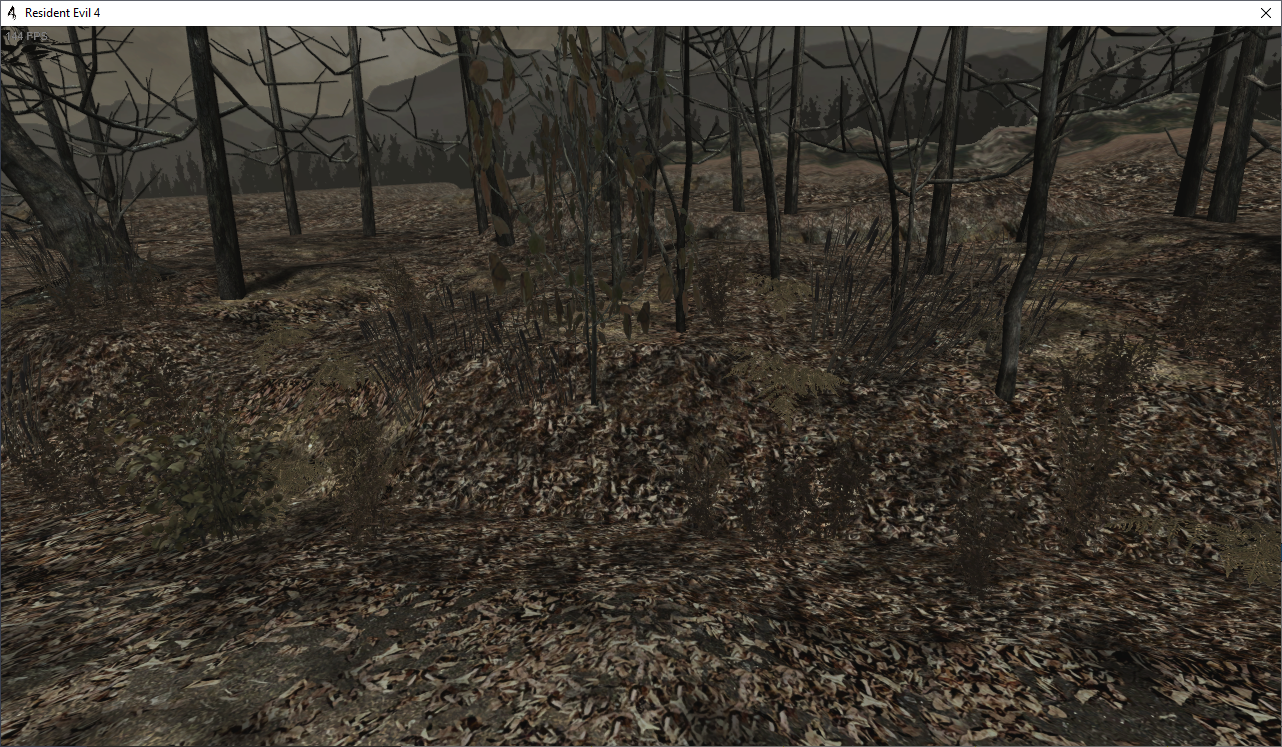
Edit: Tried setting the fps to 144 with the patch, but this happened when I start a new game:
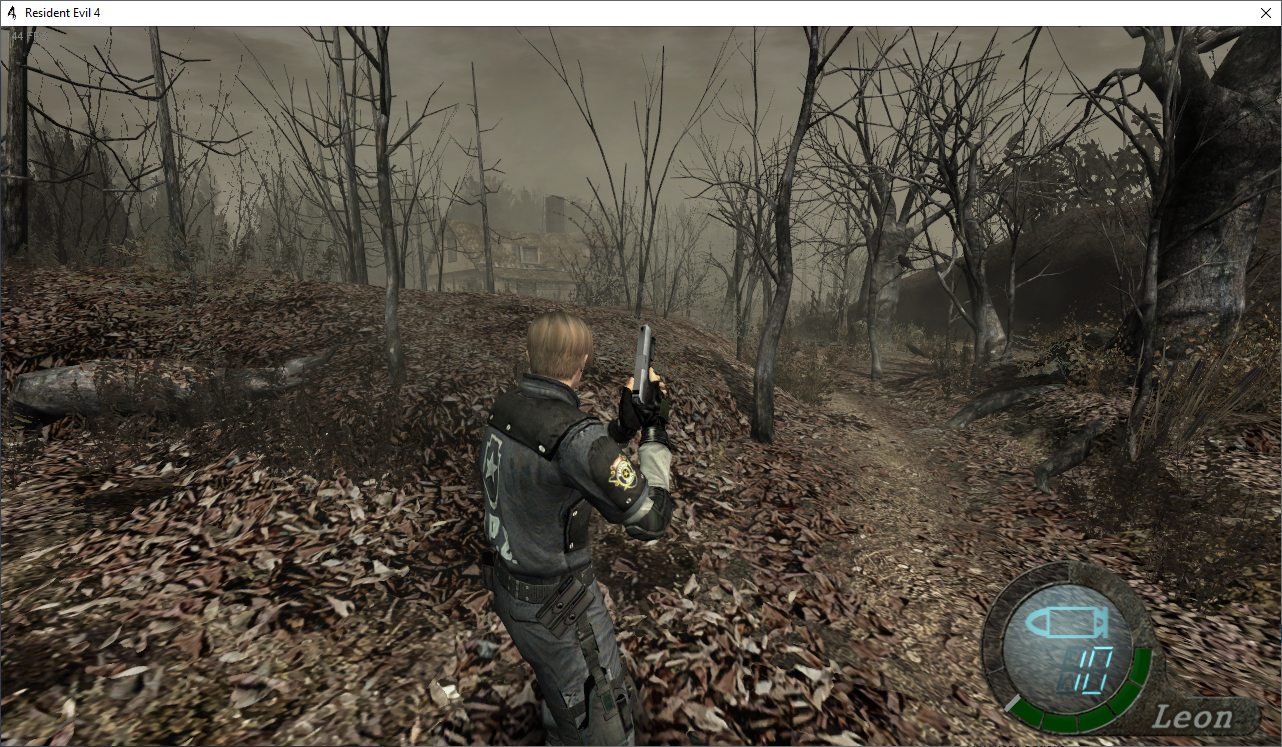
Then I tried to start a new game with 60 fps, and then change the fps to 144. Everything worked until I opened the inventory to change weapons. After I closed it, Leon got completely frozen, even though the game is still running:
I guess there are too many timing issues, considering the developers of the era used to rely on fps for that. (heck, even nowadays, sadly)
Ah that's too bad, didn't realize it was so easy to break.. I tried having a look at fixing a small thing like the menu issues too and even that seemed pretty complicated, so not sure how much of a chance there is to fix the rest of the framerate bugs :/
Hopefully that patch might still come in useful to help with the slowdowns when FPS dips though, I tested going down to 10FPS and game speed seemed to stay the same (though was a slideshow of course lol) (a better way to test this is set variableframerate to 60, then use nvidia control panel to set max framerate to 30 or lower, to simulate GPU not being able to get up to variableframerate, with that the unpatched game runs half speed or slower, but patched should still mostly run full speed)
I'm not sure if it could have any bad effects even when staying at 60FPS though, there was code there to make game run at 30 for something, but not sure what that was for.
Hopefully that patch might still come in useful to help with the slowdowns when FPS dips though, I tested going down to 10FPS and game speed seemed to stay the same (though was a slideshow of course lol) (a better way to test this is set variableframerate to 60, then use nvidia control panel to set max framerate to 30 or lower, to simulate GPU not being able to get up to variableframerate, with that the unpatched game runs half speed or slower, but patched should still mostly run full speed)
Awesome! Surely some people will be happy with the results.
there was code there to make game run at 30 for something, but not sure what that was for.
You mean code to change the fps to 30 on the fly and then change it back? I do know of a very weird quirk with this game: If you reload any sniper rifle, the animation plays at 30 fps. I always though it was an issue with the animation, but maybe the actual game run at 30 fps during those for some reason?
You mean code to change the fps to 30 on the fly and then change it back? I do know of a very weid quirk with this game: If you reload any sniper rifle, the animation plays at 30 fps. I always though it was an issue with the animation, but maybe the actual game run at 30 fps during those for some reason?
Yep, game seems to check for some "event" and then forces it to run at 30, but those patches I posted remove that. I know the sniper issue you mean, noticed that a few times too... just had a look and it actually seems fine now? Didn't notice it stuttering anymore :o
Maybe it's just placebo effect messing with me though lol, I'll have to try playing through with it some more. (E: yeah I'm not totally sure if it's fixed or not, still seems like it's a little choppy, need to play through it so I can compare against actual 60FPS anims)
I know the sniper issue you mean, noticed that a few times too... just had a look and it actually seems fine now? Didn't notice it stuttering anymore :o
oooh! I'll check it too.
Edit:
yeah I'm not totally sure if it's fixed or not, still seems like it's a little choppy
Same here.
Also, something else that is puzzling: they don't let you change the FPS using the options menu after the game has started, even though changing the value in memory at any time appears to work just fine. Maybe there's some check they do when starting a game that would enable the code you mentioned? Hmm
Hmm darn, seems the bug you mentioned on starting a new game happens for me even if variableframerate is set to 60, guess the code that was patched over was important for something.
Tried patching it so the 30FPS stuff stayed in place which seemed to let it start properly, but haven't got everything fully working yet, x87 float instructions are awful to work with >.>
It's looking like the 30FPS code gets used when an "event" is active (loading screen/start cutscene?) and a frame takes more than 33ms to render (which I guess might happen when game is loading data in), in that case it lies to the rest of the game that the frame took 33ms exactly.
Maybe load screen/cutscene logic is still tied to the 30FPS/33ms cap somehow, and taking longer than 33ms breaks it in some way, not sure.
Hopefully can find a way to work around it since slowdown fix would be sweet...
Ah, that's too bad. This engine really is full of hacks, apparently.
Also, just to make sure, were you able to read the pdf I mentioned earlier?
Yeah I got the pdf, been trying to look into DoF stuff too but haven't had much luck yet though.
Pretty sure Filter01 is responsible for it since it has near & far parameters tied to it, and the Filter01Render funcs seem to get used when binoculars are active, all the GX gamecube-api-layer stuff for it seem to be called too, not sure why it wouldn't render.
Maybe worth trying the debug GC build out and nopping filters there to see what happens, hmm... (E: well nopping the Filter01Trans call does remove the blur filter when zooming with binoculars, making it pretty much match PC. It looks like the code calls into a bunch of gamecube-APIs that are just nullsubs on PC, maybe however they implemented it with gamecube API wasn't transferrable to DX9... I guess maybe there'd be some way to make the Filter01Trans code call into a DX9 shader instead, don't really know enough about graphics APIs to try that though)
BTW I found the IDA database for GC was missing a bunch of stuff, new one names 2000+ more things, and fixes data refs, the PC database has a couple more things named too: re4_ps2_gc_symbols+pc_incomplete_idb-v2.7z.zip (rename to 7z)
E: seems the blur effect when zooming might actually still be there, if you edit float at 0xB12070 (1.1.0) at runtime to 5 you can see the blur starts being more apparent, default for that is 0.25 Unfortunately that float gets used by a bunch of things, I think it's also used to tell where the blur effect is drawn too, so setting it higher than 10 or so starts making it offset from the actual image. Probably possible to patch the stuff in Filter01Render that reads that float to use our own instead though.
I'm not sure how much that could restore it to match with GC though, the code in Filter01Render that decides where to draw the blur is pretty crazy, seems it's still based on original 640x448 resolution but uses some float scalar to multiply it up to the actual screen res, likely something to do with that could be broken, not sure though.
Been looking into GC ver more, the Filter01Render code is pretty much identical between them in terms of gamecube-API being used, even uses the same 0.25 constant I mentioned above.
On GC it seems changing that constant to a large number gives same effect as PC, offsetting the blurs position, but it looks like GC also has other blur effects being used besides the one that used 0.25 (in the same Filter01Render function), which PC is missing.
If I patch the do-while loop at 0x8013FB94 to branch to the 0.25 section this seems to make GC look exactly the same as PC, makes me think it's this loop that PC has issues with... the equivalent section on PC is the do-while at 0x062F5C2
Can't really see much difference in that loop block between GC & PC though... main thing changed is PC adds a call to sub_40DEC7, which seems to be for running a shader (at 0x9426B0), the 0.25 block seems to use same shader though and looks like it works fine...
That do-while is ran 4 times, on GC it seems to cause 4 different copies to render, making the blur effect. Only thing changed on each loop is the Z param for GXPosition3f32, but the 0.25 block offsets the X/Y params for it instead. Could be that whatever shader they're using just ignores Z param, making the game write 4 copies to exact same position, hm..
So, wait, most of the code is there, it just doesn't render properly? I thought they intentionally removed the effect for some reason. Huh.
Maybe the transparent item pickup screen is the same situation, then.
I've been trying to tweak it to look like the GC version, but I havent had much luck. When the pickup screen renders, the game draws a black screen and changes the stage lighting to be much brighter. It also appears to mess with the FOG, draw distance and geometry. Looks quite jarring at some places.
Yep the render code all seems to match up with GC's, at least for Filter01Render function, only difference I can see is that some call was added to run a pixel/vertex shader after each set of GX commands.
Seems either the issue is something up with their GX-to-DX9 layer, something up with how they scale resolution (seems game mostly acts like it's 640x448, with GX layer scaling it up to chosen res), or maybe something wrong with the shader they use (tried taking a look at it, not sure if I disassembled the correct one, but the one I looked at seemed pretty simple to me, just multiplying vertex with the world-view-projection params)
Tried modding the do-while loop that I mentioned before, made it add an offset to X and Y which increases with each loop, afaik that should have made it draw 4 different copies at slightly different positions but after all that it seemed only 1 copy got drawn... might be that their DX9 stuff is only drawing whatever the last call to the shader provided, ignoring the calls before the last one (all 4 loops called into the same 0xE shader)
I tried having a look at the transparent screen too, seems its the flags you patch over at 0x6BBBCF which is mostly responsible for making it hidden:
mov dword ptr [eax+58h], 0FFFFFFFFh and dword ptr [eax+58h], 0FFFEFFFFh and dword ptr [eax+58h], 0FBFFFFFFh
Seems like that's setting DISP flags up to hide everything, then the next few ands clear some things from being hidden.
(GC does the exact same thing here, except it looks like PC ver added two extra flags, DPF_TEX_RENDER & DPF_EFFECT_VU1 that I guess this will also make hidden too)
Your patch got around it by replacing the mov with a call to DrawPickupScrnTransparency func, but that would stop the hiding flags from being set at all, maybe that's what causes lighting issues?
Did you try changing the 0xFFFFFFFF that it sets there? Seems changing that to 0xF7FFFFFF (so the 0x8000000 flag isn't set) fixes the transparency too, but I can't tell if the lighting issue is there or not.
From what I can see that 0x8000000 flag is also used by GC, so probably isn't one of the added ones I mentioned, looks like GC & PC both have the same funcs checking it too, so not really sure why PC hides it while GC doesn't... could be worth trying to patch the PC flag checks out so we can find what func is actually responsible for rendering it, maybe whatever func that is has some difference there. (E: seems the Trans function is responsible, looks pretty much identical between PC & GC though...)
E: looks like GC takes a snapshot of the game just before showing it (at ItemExamine::setup), and then ItemExamine::move uses AddOtDirect to pretty much add a render-pass that draws that snapshot out before drawing the UI etc - so I guess the flag changing is just a workaround to make the game keep rendering stuff behind the transparency.
If you disable those funcs then GC acts pretty much the same as PC, transparency will be gone, and changing those DISP flags can make it render behind instead (with the same lighting issues I'd guess), so this makes me think the issue is with this snapshotting stuff.
Just like the DOF blur PC seems to have all the code intact for this, but again it's using a bunch of gamecube GX calls to handle it, good chance there's some issue there with the way they handle it there :/
Here's updated PC IDB with those ItemExamine funcs labelled if you want to look into it at all: pc-1.1.0.7z.zip (remove zip extension)
E: hm, was looking into the gxDraw func (called by item screen to draw the background), on PC this has a GXCopyTex call at the start, which didn't make sense to me since GXCopyTex is meant to start the copy from EFB into a texture, and the ItemExamine::setup func already did this, so couldn't see why it'd want to copy again after item screen is shown.
Had a look at GC version again and seems the GXCopyTex call is actually absent from there - now it makes sense, at least the GC version does anyway.
Tried removing the call from PC but that just made it crash - but before it crashed out, it did display "Do you want to pick up..." on top of the screen :o
I guess the devs had the same crash, and GXCopyTex fixed it, but in the process broke the saved-snapshot, since calling GXCopyTex every frame would just blank it out afaik (GXCopyTex is meant to have GXSetTexCopySrc & GXSetTexCopyDst calls beforehand to tell it where to copy, I think this added call to gxDraw is the only one in the whole EXE that doesn't have them...)
Not really sure why it's crashing though, something inside the ExecOt function afaik, will try looking at it some more.
Oh crap, it works!
Just had to nop the call to GXCopyTex, I was trying to be smart before and nop the push insns for it too, but I guess the funcs stack is setup to have them or something.
So just nop the call at 0x62A60D/0x62A4DD (1.1.0/1.0.6), and with that the item screen transparency should work like on GC, hopefully should help with the lighting too :)
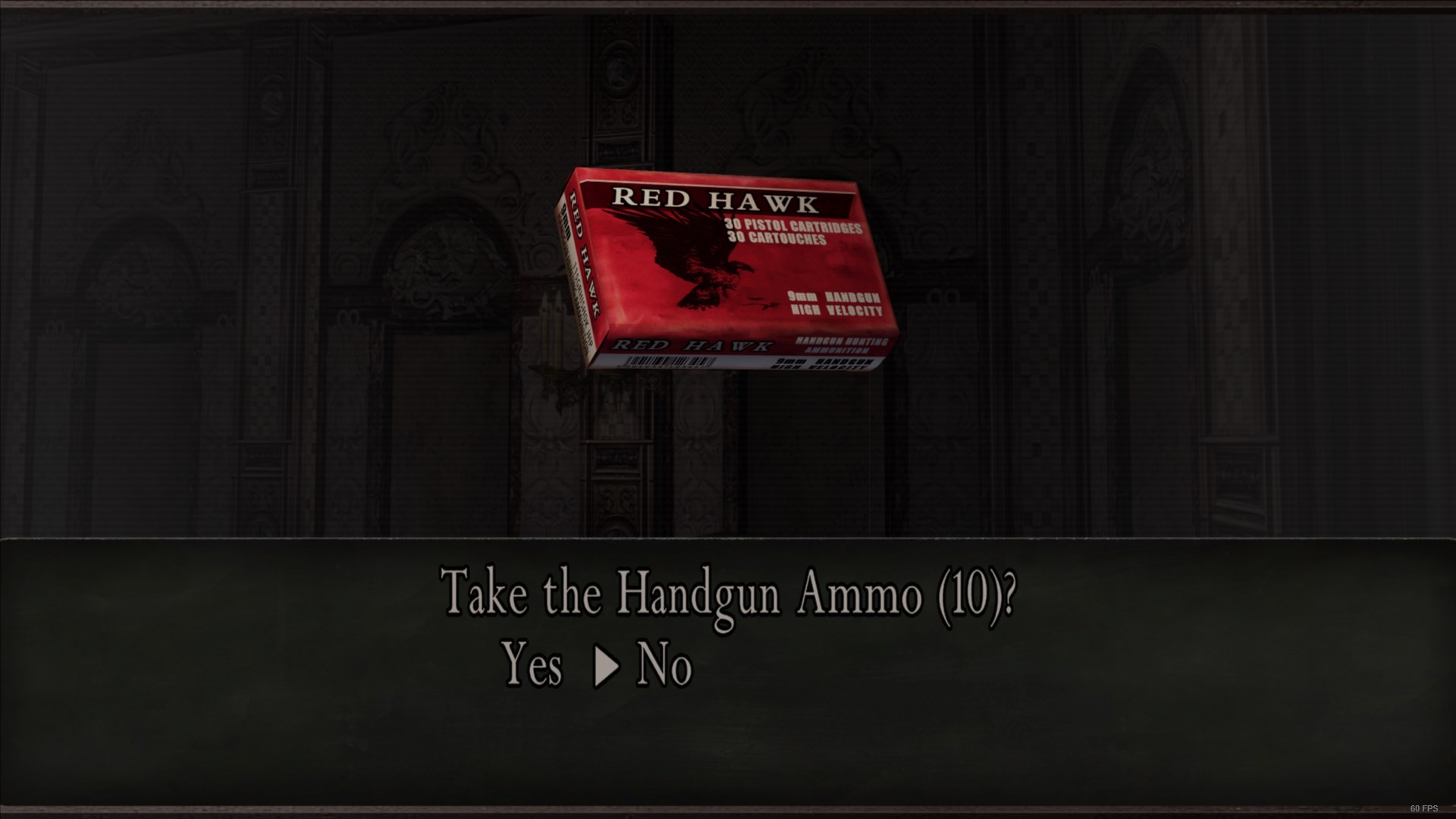
I wonder why that GXCopyTex call was even added, I guess background was made non-transparent on purpose?
looks like GC takes a snapshot of the game just before showing it (at ItemExamine::setup), and then ItemExamine::move uses AddOtDirect to pretty much add a render-pass that draws that snapshot out before drawing the UI etc - so I guess the flag changing is just a workaround to make the game keep rendering stuff behind the transparency.
Aha! After examining what happens with the lighting when the pickup screen is drawn, I knew it had to be taking a snapshot. The lighting is changed on purpose, so the item you're picking up can be lit properly, regardless of what stage you're playing. The light change couldn't be a bug.
So just nop the call at 0x62A60D/0x62A4DD (1.1.0/1.0.6), and with that the item screen transparency should work like on GC, hopefully should help with the lighting too :)
Incredible find, really! We finally have a 1:1 match for this screen. Thank you!
I wonder why that GXCopyTex call was even added, I guess background was made non-transparent on purpose?
There would be cleaner ways to do it on purpose, though. They most likely did it on accident :p
Hmm, I'm confused about something that I previously thought was FXAA, but it actually seems like just an.. unnecessary downscaling/upscaling process?
The game renders the image at whatever resolution you configured it to, but at some point, it downscales the image and then upscales it again using a shader before drawing the image on screen, resulting in loss of quality/blurriness. The shader that does the upscaling is loaded and compiled at 0x94C6EE (1.1.0). This is really confusing for me, as I dont know much about shaders. My current implementation for DisableFXAA just tries to avoid calling a function that uses this shader, but it causes other problems. I've been bashing my head against this one for a while. Perhaps you have encountered something about this during your time in ida?
Not really sure how that all works myself, looks like that vertex shader is used in PrepareBloom/DrawBloom/DrawMotionblur/GXDrawScreenQuad funcs, but all those usages seem to be using scale = 1...
Does enabling the color filter setting in-game change anything about the scaling? Looks like that skips a GXDrawScreenQuad call if used.
Do you know what the downscaled res is? I've been testing at 1080p, if that's the res it downscales to maybe that'd explain why I was seeing scale = 1...
Do you know what the downscaled res is?
I haven't been able to figure that out, sadly.
I've been testing at 1080p, if that's the res it downscales to maybe that'd explain why I was seeing scale = 1...
I've been testing at 1080p as well. I'm pretty sure it downscales lower than that.
Here's what I've noticed:
The function that blurs the game is called both at 0x9526C5 and 0x952723.
The game calls IDirect3DDevice9::Clear before eventually calling that function.
Noping these calls results in a proper, non-blurry screen, but two other post processing effects are broken by this: motion blur and color filter, so that's not an option.
Something strange I've noticed is that, if we enable the color filter and go in game, then go into the function that blurs the game and change the push 00 instruction at 0x937257 to push 01, the blurriness is gone. But it only works while the color filter is active, so pausing the game or opening the inventory shows a black screen.
Hmm, that part you mention changing push 00 is a call to SetStreamSource, with a pointer to some vertex data:
g_D3DDevice->lpVtbl->SetStreamSource(g_D3DDevice, 0, dword_10ED61C, 0, 0x10u);
If you follow the vertex data refs it seems to get inited at 0x9393E0, that func does some weird stuff, first sets up a vertex buffer with stuff like -1, 1, 0, 0, 1, 1, 0, 0, then two other buffers with numbers just slightly off from 1 -0.9993, 0.945, 1.0003, -1.0444.
One of the slightly-off buffers seems to get the numbers calculated based on screen res, while the other is hardcoded
I tried breakpointing that func and editing the values of both buffers so they're always either 1 or -1, and with that it seemed to stop the push 00 -> push 01 trick from making any difference, not sure if it's good or bad though, still seems kinda blurry to me.
Still, interesting that it stopped push 01 from changing anything, maybe should try only changing 1 of the buffers instead of both...
E: oh hm, comparing screencaps it seems like changing both of those actually made it even more blurry, damn: https://imgsli.com/ODA0NjA At least it had an effect though, so I guess that vertex func must be involved somehow
~~Hmm, seems like the instruction at 0x643940 is downscaling the image by half. So at some point before that, some upscale must be going on.~~
Not related?
Aha, seems if you set 0x10ED61C to same value as 0x10ED620 after the 0x9393E0 vertex init func has ran, that seems to disable it, I just set a breakpoint at 0x939751 and copied the value over after the 2nd breakpoint hit (func seems to get called twice)
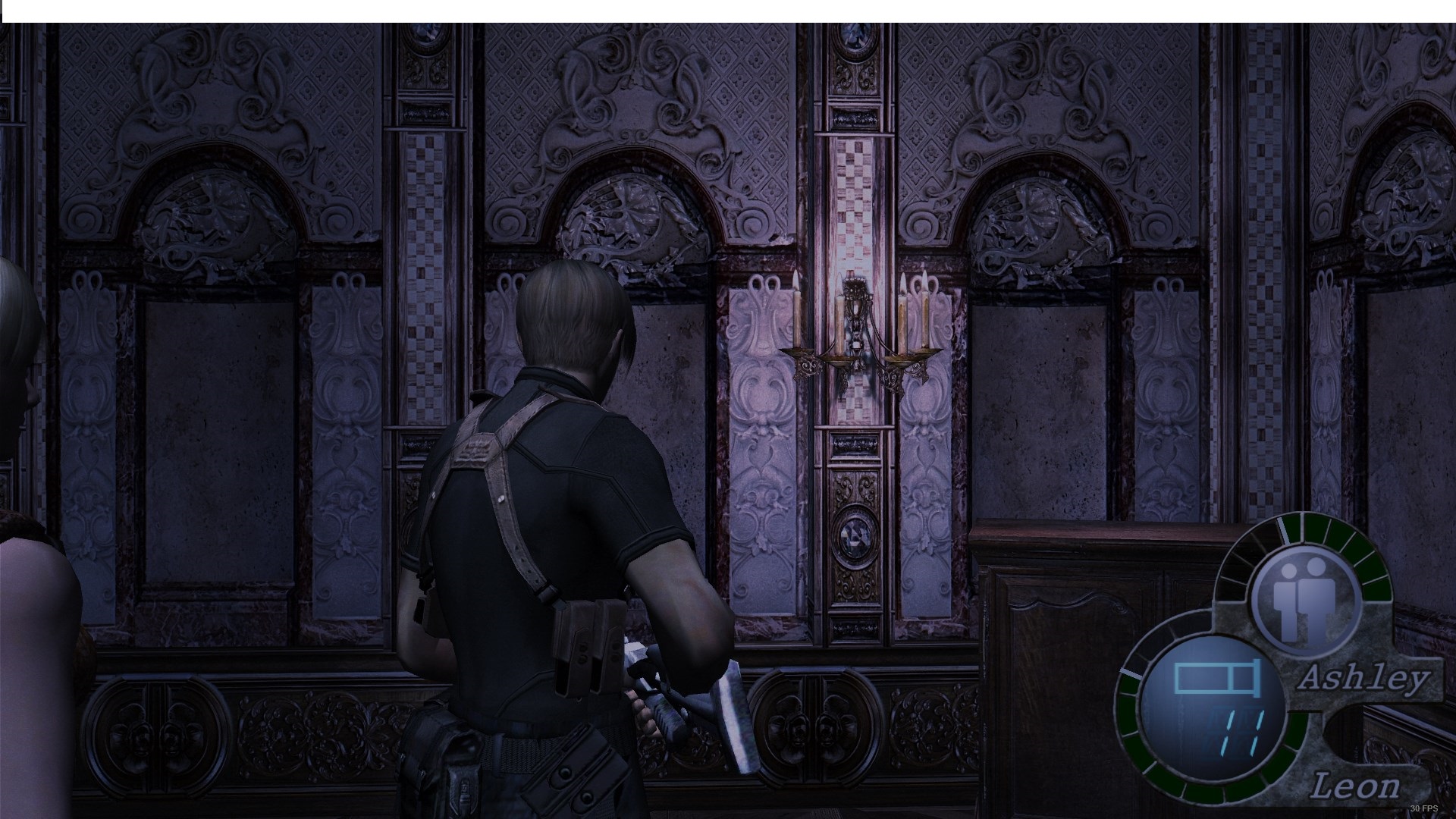
AFAIK this is pretty much changing the pointer to the first buffer I mentioned with -1, 1, 0, 0, 1, 1, 0, 0, to point at the one with slightly-off values based on screen res instead, not sure if its fully getting rid of the scaling though, or if anything could be broken with this.
My guess is the scaling might happen because the values between those two buffers are different, even just slightly, causing it to scale up & end up blurring everything.. swapping pointers like this probably isn't a great idea though, would be better if the values themselves could be copied.
My guess is the scaling might happen because the values between those two buffers are different, even just slightly, causing it to scale up & end up blurring everything
I wonder how long this bug has been around. Probably ever since this game was first ported from GC to whatever platform came next. Huh.
swapping pointers like this probably isn't a great idea though, would be better if the values themselves could be copied.
True. I got a crash after testing it for a bit and toggling the color filter on and off.
Luckily there's only two uses of that first buffer, could probably just patch them to point at the second one instead:
  SafeWrite(GameAddress + 0x537243 + 2, uint8_t(0x20)); // only patching last part of addr since relocations might change the rest?
  SafeWrite(GameAddress + 0x549290 + 2, uint8_t(0x20));
Not sure about how to make it work on all versions though, maybe can read the pointer from it first and just add +0x4.
I think the first one there is the only real important one (inside GXDrawScreenQuad), can actually change that with CE to see the difference with the blur too, pretty neat.
Ah, nice!
Not sure about how to make it work on all versions though, maybe can read the pointer from it first and just add +0x4.
I have an idea for that. Let me see if it works.
can actually change that with CE to see the difference with the blur too, pretty neat.
Yep, that kind of how I found this issue even exists. I was messing with some je and jne instructions and found one that skipped this call and the blur went away.
I was like "wait, huh?" lol
Done. Latest commit seems to finally fix this properly, and seems to be working with all 3 EXEs.
I've also change some stuff in the .ini.
Here's a test build: Bin32.zip
Huge thanks for all your help so far, btw!
No problem, thanks for finding that bit with the push 00 too, wouldn't have thought to look into that vertex buffer stuff.
Still don't really get why that messed up the image, don't think I'll ever understand how 3D graphics works 😄
BTW I noticed the Seperate Ways campaign has some weird blur filter applied to it, do you know if that's intentional, or could it be another thing broken in this port? Couldn't find many other mentions of it on the net, maybe it's something only added in the recent ports. E: hm, maybe it's just some effect applied in that village area, almost seems like image ghosting, not sure if that was in the main RE4 campaign at all though.
don't think I'll ever understand how 3D graphics works 😄
Same to be honest xD
Seperate Ways campaign has some weird blur filter applied to it maybe it's just some effect applied in that village area, almost seems like image ghosting
Can't say I ever noticed anything like that, but I've played Separate Ways only on release back in 2014.
Do you have any screenshots of that? Might be something related to that older release of the HD project too, since it only affects one stage?