

 nilsteampassnet
Adapting encryption key after LDAP password change does not work
Steps to reproduce
- create entry in personal folder
- change LDAP password
- open entry in personal folder
Expected behaviour
After the user has entered both previous and current passwort the encryption key is adopted
Actual behaviour
After entering previous and current password the error "Caution Bad password" occures
Server configuration
Operating system: Ubuntu 20.04.5 LTS
Web server: nginx1.18.0 (docker-compose)
Database: mariadb:10.5.17 (docker-compose)
Teampass version: 3.0.0.20 (docker-compose)
Teampass configuration file:
    'max_latest_items' => '10',
    'enable_favourites' => '1',
    'show_last_items' => '1',
    'enable_pf_feature' => '1',
    'log_connections' => '1',
    'log_accessed' => '1',
    'time_format' => 'H:i:s',
    'date_format' => 'd/m/Y',
    'duplicate_folder' => '1',
    'item_duplicate_in_same_folder' => '0',
    'duplicate_item' => '1',
    'number_of_used_pw' => '3',
    'manager_edit' => '1',
    'cpassman_dir' => '/var/www/html',
    'cpassman_url' => 'https://teampass.removed/',
    'favicon' => 'https://teampass.removed/favicon.ico',
    'path_to_upload_folder' => '/teampass/upload',
    'path_to_files_folder' => '/teampass/files',
    'url_to_files_folder' => 'https://teampass.removed/files',
    'activate_expiration' => '0',
    'pw_life_duration' => '0',
    'maintenance_mode' => '0',
    'enable_sts' => '0',
    'encryptClientServer' => '1',
    'cpassman_version' => '3.0.0.20',
    'ldap_mode' => '1',
    'ldap_type' => 'ActiveDirectory',
    'ldap_suffix' => '0',
    'ldap_domain_dn' => '0',
    'ldap_domain_controler' => '0',
    'ldap_user_attribute' => 'userprincipalname',
    'ldap_ssl' => '0',
    'ldap_tls' => '0',
    'ldap_elusers' => '0',
    'ldap_search_base' => '0',
    'ldap_port' => '389',
    'richtext' => '0',
    'allow_print' => '0',
    'roles_allowed_to_print' => '0',
    'show_description' => '1',
    'anyone_can_modify' => '0',
    'anyone_can_modify_bydefault' => '0',
    'nb_bad_authentication' => '0',
    'utf8_enabled' => '1',
    'restricted_to' => '0',
    'restricted_to_roles' => '0',
    'enable_send_email_on_user_login' => '0',
    'enable_user_can_create_folders' => '0',
    'insert_manual_entry_item_history' => '0',
    'enable_kb' => '0',
    'enable_email_notification_on_item_shown' => '0',
    'enable_email_notification_on_user_pw_change' => '0',
    'custom_logo' => '',
    'custom_login_text' => '',
    'default_language' => 'english',
    'send_stats' => '0',
    'send_statistics_items' => 'stat_country;stat_users;stat_items;stat_items_s>
    'send_stats_time' => '1665418454',
    'get_tp_info' => '1',
    'send_mail_on_user_login' => '0',
    'nb_items_by_query' => 'auto',
    'enable_delete_after_consultation' => '0',
    'enable_personal_saltkey_cookie' => '0',
    'personal_saltkey_cookie_duration' => '31',
    'email_smtp_server' => '',
    'email_smtp_auth' => '',
    'email_auth_username' => '',
    'email_auth_pwd' => '',
    'email_port' => '',
    'email_security' => '',
    'email_server_url' => '',
    'email_from' => '',
    'email_from_name' => '',
    'pwd_maximum_length' => '40',
    'google_authentication' => '0',
    'delay_item_edition' => '0',
    'allow_import' => '1',
    'proxy_ip' => '',
    'proxy_port' => '',
    'upload_maxfilesize' => '10mb',
    'upload_docext' => 'doc,docx,dotx,xls,xlsx,xltx,rtf,csv,txt,pdf,ppt,pptx,po>
    'upload_imagesext' => 'jpg,jpeg,gif,png',
    'upload_pkgext' => '7z,rar,tar,zip',
    'upload_otherext' => 'sql,xml',
    'upload_imageresize_options' => '1',
    'upload_imageresize_width' => '800',
    'upload_imageresize_height' => '600',
    'upload_imageresize_quality' => '90',
    'use_md5_password_as_salt' => '0',
    'ga_website_name' => 'TeamPass for ChangeMe',
    'api' => '0',
    'subfolder_rights_as_parent' => '0',
    'show_only_accessible_folders' => '1',
    'enable_suggestion' => '0',
    'otv_expiration_period' => '7',
    'default_session_expiration_time' => '60',
    'duo' => '0',
    'enable_server_password_change' => '0',
    'ldap_object_class' => '0',
    'bck_script_path' => '/var/www/html/backups',
    'bck_script_filename' => 'bck_teampass',
    'syslog_enable' => '0',
    'syslog_host' => 'localhost',
    'syslog_port' => '514',
    'manager_move_item' => '0',
    'create_item_without_password' => '0',
    'otv_is_enabled' => '0',
    'agses_authentication_enabled' => '0',
    'item_extra_fields' => '0',
    'saltkey_ante_2127' => 'none',
    'migration_to_2127' => 'done',
    'files_with_defuse' => 'done',
    'timezone' => 'Europe/Berlin',
    'enable_attachment_encryption' => '1',
    'personal_saltkey_security_level' => '50',
    'ldap_new_user_is_administrated_by' => '0',
    'disable_show_forgot_pwd_link' => '1',
    'offline_key_level' => '0',
    'enable_http_request_login' => '0',
    'ldap_and_local_authentication' => '0',
    'secure_display_image' => '1',
    'upload_zero_byte_file' => '0',
    'upload_all_extensions_file' => '0',
    'bck_script_passkey' => 'removed',
    'admin_2fa_required' => '1',
    'password_overview_delay' => '4',
    'copy_to_clipboard_small_icons' => '1',
    'duo_ikey' => '',
    'duo_skey' => '',
    'duo_host' => '',
    'duo_failmode' => 'secure',
    'teampass_version' => '',
    'roles_allowed_to_print_select' => '',
    'clipboard_life_duration' => '30',
    'mfa_for_roles' => '',
    'tree_counters' => '0',
    'settings_offline_mode' => '0',
    'settings_tree_counters' => '0',
    'enable_massive_move_delete' => '0',
    'email_debug_level' => '0',
    'ga_reset_by_user' => '',
    'onthefly-backup-key' => '',
    'onthefly-restore-key' => '',
    'ldap_user_dn_attribute' => 'distinguishedname',
    'ldap_dn_additional_user_dn' => 'ou=removed,ou=removed',
    'ldap_user_object_filter' => '',
    'ldap_bdn' => 'dc=removed,dc=removed',
    'ldap_hosts' => 'removed',
    'ldap_password' => 'removed',
    'ldap_username' => 'CN=teampass,OU=User,OU=removed,DC=removed,DC=removed',
    'api_token_duration' => '60',
    'enable_tasks_manager' => '0',
    'task_maximum_run_time' => '300',
    'tasks_manager_refreshing_period' => '20',
    'maximum_number_of_items_to_treat' => '100',
    'ldap_tls_certifacte_check' => 'LDAP_OPT_X_TLS_NEVER',
    'ldap_new_user_role' => '1',
Updated from an older Teampass or fresh install: fresh install (docker-compose), repository cloned on 04.11.
Client configuration
Browser: Tested Chrome and Firefox
Operating system: Windows 11
Logs
Log from the web-browser developer console (CTRL + SHIFT + i)
Reencryption based upon user auth password changed in LDAP [index.php:2605:21](http://REMOVED/index.php?page=items)
Object { user_id: 10000005, previous_password: "REMOVED", current_password: "REMOVED" }
[index.php:2622:51](http://REMOVED/index.php?page=items)
Object { error: true, message: "Bad password" }

Just tested and I cannot reproduce. If you get this message then it indicates that the previous password is wrong.
I did this and in this case, the message is
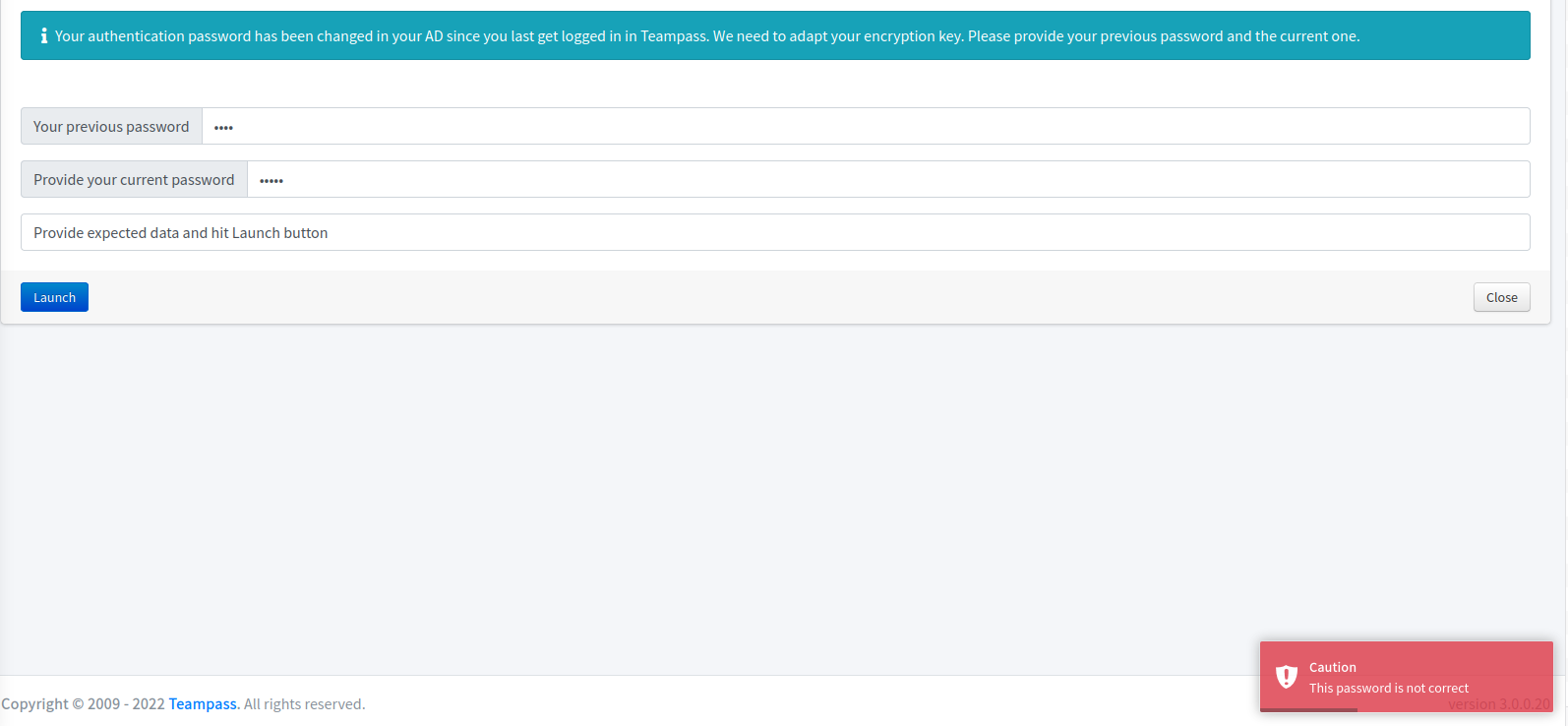

Thank you for your answer. I just tested it again with a new user and I am still getting the error. I am 100% sure that both passwords are right...
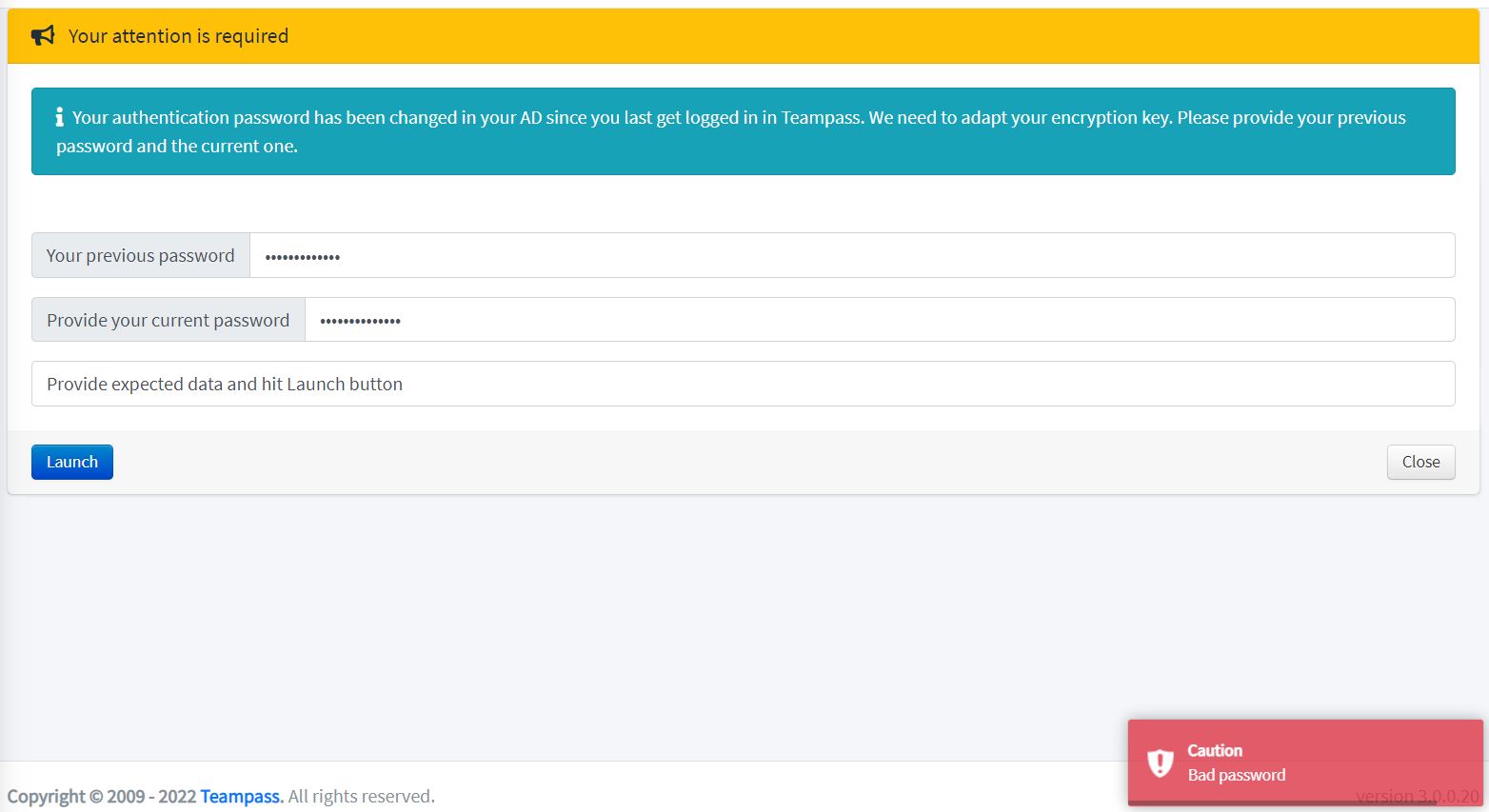 LDAP server type is Active Directory, user name attribute is "samaccountname" (also tried "userprincipalname"), no SSL, no TLS.
Do you have any idea what could be wrong?
Thank you
LDAP server type is Active Directory, user name attribute is "samaccountname" (also tried "userprincipalname"), no SSL, no TLS.
Do you have any idea what could be wrong?
Thank you
We have the same issue with several users. They can access the web but when they try to see a password, it asks for their previous and current AD passwords. If you type a wrong password it gives you the following error:
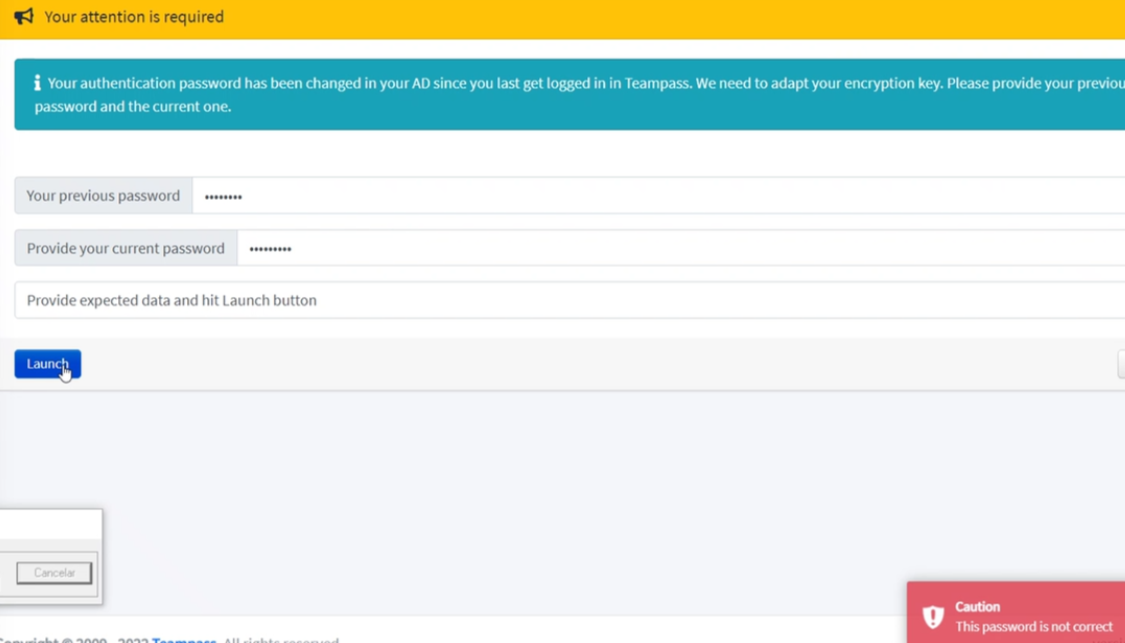
If you type the correct passwords it gives you the following error:
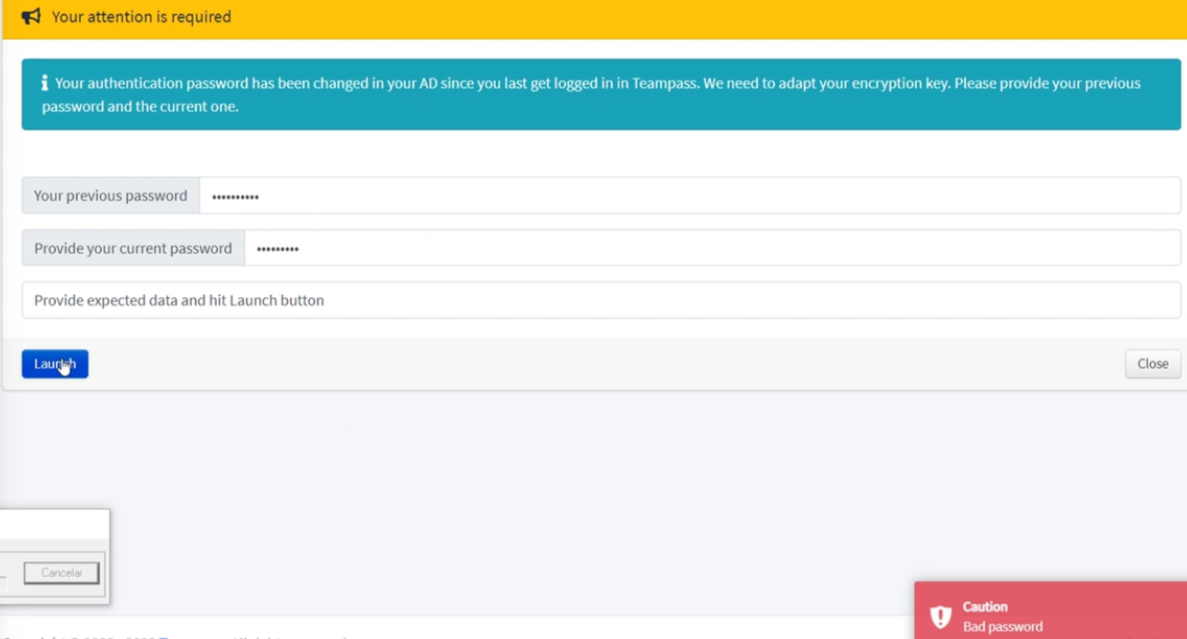
This has happened to us in both version 3.0.0.20 and version 3.0.0.21. Has anyone been able to fix this issue? Thanks.
Server configuration Operating system: Windows 2019 Standard
Web server: Apache 2.4.51
Database: Mysql 5.7.36
Teampass version: 3.0.0.21
LDAP server type is Active Directory, user name attribute is samaccountname, no SSL, no TLS. Same setup as @Pat-Bru

Hello, Hum I would need to have a work session with one of you using TeamViewer. Indeed I cannot reproduce and need to "see" in order to reproduce and understand. One of you have sent me an email, I will answer.
Hi Nils, Could you meet next Monday morning? Give me a time and I create a call
we are having the same problem. Steps to have the problem:
- Change a user's LDAP password
- In teampass admin account "Generate new OTP code"
- Enter the user account with the new password, when the code is introduced:
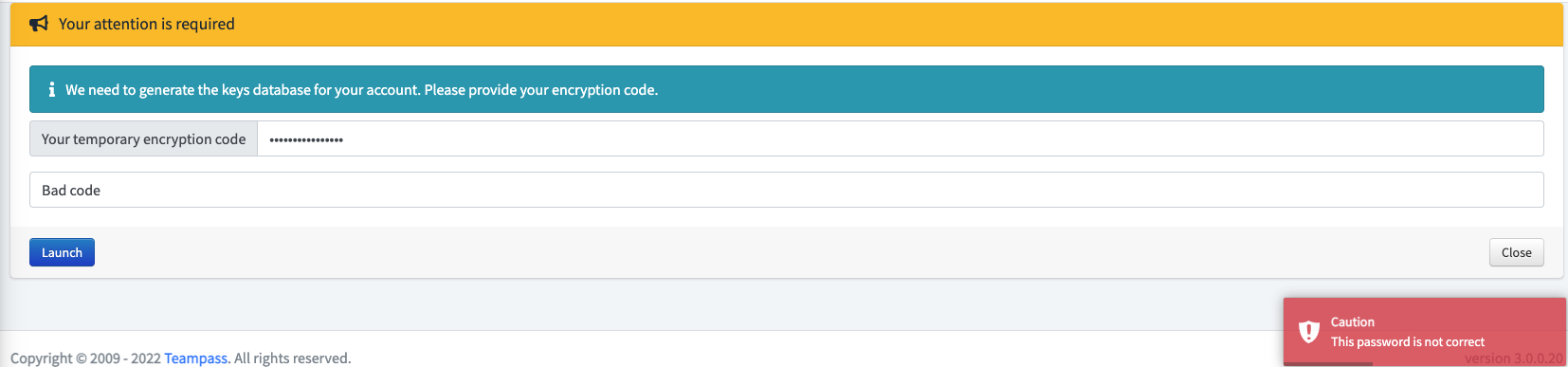

Hello Nils, I sent you two mails last month, but did not get a response yet. Are there any news regarding this issue?
hmmm, having the same problem. Software is not usable like this. Just installed tho so it's not the end of the world :)

Hello, I'm having the same problem. Any fixes ? @nilsteampassnet I can give you remote access any time.

Hello I really can't reproduce. Have you upgraded to latest version? @wldlkh yes please share the information by email, I will try tonight
I have last version. Before sending you an email, I tried reinstalling everything from scratch, and now I don't have the bug anymore. I said I would send you access, and now it works... I'm sorry, you will have to test in another environment. Almost sad that it's working :')
For the sake of my predecessors here's what I did:
- Delete Database, recreate, grant access to teampass
- Delete /var/www/html/teampass, redownload, redo access rights, and reinstall.
- Instead of configuring Settings>Options like the 1st time, went directly to LDAP configuration
- This time no User Object Filter in ldap config.
- Users > LDAP synchronization, activate one user, and directly connect to it afterwards.
The first time, I had activated multiple LDAP accounts without noticing the bottom right pop-up giving me OTP. I had not changed the password of my LDAP user, yet when I logged in and then tried accessing a password, it prompted me for old and new password. After that first login, every time I connected to homepage after login, I got prompt.
That's about all I can say. Sorry I couldn't be of more help. Good luck
@wldlkh did you create an entry in the personal folder before changing the LDAP password as mentioned in the first post?
I just tried it with the latest version (dormancygrace/teampass:latest) and I get a different error now. I also cloned the git but I get "Extension gd is not loaded!" during installation. When I provide old and new password it just says "In progress" and nothing else is happening. In Dev-Tools I see "500 Internal Server Error" for "sources/items.queries.php" when loading the "Your attention is required" site (BEFORE entering old and new password). Error in log:
f367d0314c7c_teampass_teampass-web_1 | 2023/03/01 11:43:29 [error] 20#20: *113 FastCGI sent in stderr: "PHP message: PHP Deprecated: Constant FILTER_SANITIZE_STRING is deprecated in /var/www/html/sources/items.queries.php on line 2301PHP message: PHP Deprecated: Constant FILTER_SANITIZE_STRING is deprecated in /var/www/html/sources/items.queries.php on line 2303" while reading response header from upstream, client: REMOVED, server: _, request: "POST /sources/items.queries.php HTTP/1.1", upstream: "fastcgi://unix:/var/run/php-fpm.sock:", host: "teampass.DELETED.de", referrer: "http://teampass.REMOVED.de/index.php?page=items"
Error AFTER entering old and new password:
f367d0314c7c_teampass_teampass-web_1 | [01-Mar-2023 11:45:43] WARNING: [pool www] child 21 said into stderr: "NOTICE: PHP message: PHP Deprecated:  Constant FILTER_SANITIZE_STRING is deprecated in /var/www/html/sources/main.queries.php on line 53"
f367d0314c7c_teampass_teampass-web_1 | [01-Mar-2023 11:45:43] WARNING: [pool www] child 21 said into stderr: "NOTICE: PHP message: PHP Fatal error:  Uncaught TypeError: count(): Argument #1 ($value) must be of type Countable|array, null given in /var/www/html/sources/main.queries.php:2992"
f367d0314c7c_teampass_teampass-web_1 | [01-Mar-2023 11:45:43] WARNING: [pool www] child 21 said into stderr: "Stack trace:"
f367d0314c7c_teampass_teampass-web_1 | [01-Mar-2023 11:45:43] WARNING: [pool www] child 21 said into stderr: "#0 /var/www/html/sources/main.queries.php(230): changeUserLDAPAuthenticationPassword(10000002, 'DELETED', 'DELETED', Array)"
f367d0314c7c_teampass_teampass-web_1 | [01-Mar-2023 11:45:43] WARNING: [pool www] child 21 said into stderr: "#1 /var/www/html/sources/main.queries.php(143): passwordHandler('change_user_lda...', Array, Array)"
f367d0314c7c_teampass_teampass-web_1 | [01-Mar-2023 11:45:43] WARNING: [pool www] child 21 said into stderr: "#2 /var/www/html/sources/main.queries.php(77): mainQuery(Array)"
f367d0314c7c_teampass_teampass-web_1 | [01-Mar-2023 11:45:43] WARNING: [pool www] child 21 said into stderr: "#3 {main}"
f367d0314c7c_teampass_teampass-web_1 | [01-Mar-2023 11:45:43] WARNING: [pool www] child 21 said into stderr: "  thrown in /var/www/html/sources/main.queries.php on line 2992"
f367d0314c7c_teampass_teampass-web_1 | 2023/03/01 11:45:43 [error] 20#20: *116 FastCGI sent in stderr: "PHP message: PHP Deprecated:  Constant FILTER_SANITIZE_STRING is deprecated in /var/www/html/sources/main.queries.php on line 53PHP message: PHP Fatal error:  Uncaught TypeError: count(): Argument #1 ($value) must be of type Countable|array, null given in /var/www/html/sources/main.queries.php:2992
f367d0314c7c_teampass_teampass-web_1 | Stack trace:
f367d0314c7c_teampass_teampass-web_1 | #0 /var/www/html/sources/main.queries.php(230): changeUserLDAPAuthenticationPassword(10000002, 'DELETED', 'DELETED', Array)
f367d0314c7c_teampass_teampass-web_1 | #1 /var/www/html/sources/main.queries.php(143): passwordHandler('change_user_lda...', Array, Array)
f367d0314c7c_teampass_teampass-web_1 | #2 /var/www/html/sources/main.queries.php(77): mainQuery(Array)
f367d0314c7c_teampass_teampass-web_1 | #3 {main}
f367d0314c7c_teampass_teampass-web_1 |   thrown in /var/www/html/sources/main.queries.php on line 2992" while reading response header from upstream, client: 172.16.x.x, server: _, request: "POST /sources/main.queries.php HTTP/1.1", upstream: "fastcgi://unix:/var/run/php-fpm.sock:", host: "teampass.DELETED.de", referrer: "http://teampass.DELETED.de/index.php?page=items"
@nilsteampassnet I already sent you two mails but did not get an answer yet...
Sorry for closing and repoening the issue, I misclicked
I got docker compose running with local files after adding "gd libxslt-dev" in the Dockerfile. Similar error like the version dormancygrace/teampass:latest:
teampass-web_1  | [01-Mar-2023 13:17:02] WARNING: [pool www] child 41 said into stderr: "NOTICE: PHP message: PHP Deprecated:  Constant FILTER_SANITIZE_STRING is deprecated in /var/www/html/sources/main.queries.php on line 53"
teampass-web_1  | [01-Mar-2023 13:17:02] WARNING: [pool www] child 41 said into stderr: "NOTICE: PHP message: PHP Stack trace:"
teampass-web_1  | [01-Mar-2023 13:17:02] WARNING: [pool www] child 41 said into stderr: "NOTICE: PHP message: PHP   1. {main}() /var/www/html/sources/main.queries.php:0"
teampass-web_1  | 172.16.x.x - - [01/Mar/2023:13:17:02 +0000] "POST /sources/main.queries.php HTTP/1.1" 200 847 "http://teampass.REMOVED.de/index.php?page=items" "Mozilla/5.0 (Windows NT 10.0; Win64; x64) AppleWebKit/537.36 (KHTML, like Gecko) Chrome/110.0.0.0 Safari/537.36"
 teampass-web_1  | [01-Mar-2023 13:20:55] WARNING: [pool www] child 39 said into stderr: "NOTICE: PHP message: PHP Deprecated:  Constant FILTER_SANITIZE_STRING is deprecated in /var/www/html/sources/main.queries.php on line 53"
teampass-web_1  | [01-Mar-2023 13:20:55] WARNING: [pool www] child 39 said into stderr: "NOTICE: PHP message: PHP Stack trace:"
teampass-web_1  | [01-Mar-2023 13:20:55] WARNING: [pool www] child 39 said into stderr: "NOTICE: PHP message: PHP   1. {main}() /var/www/html/sources/main.queries.php:0"
teampass-web_1  | [01-Mar-2023 13:20:55] WARNING: [pool www] child 39 said into stderr: "NOTICE: PHP message: PHP Fatal error:  Uncaught TypeError: count(): Argument #1 ($value) must be of type Countable|array, null given in /var/www/html/sources/main.queries.php:2992"
teampass-web_1  | [01-Mar-2023 13:20:55] WARNING: [pool www] child 39 said into stderr: "Stack trace:"
teampass-web_1  | [01-Mar-2023 13:20:55] WARNING: [pool www] child 39 said into stderr: "#0 /var/www/html/sources/main.queries.php(229): changeUserLDAPAuthenticationPassword(10000000, 'REMOVED', 'REMOVED', Array)"
teampass-web_1  | [01-Mar-2023 13:20:55] WARNING: [pool www] child 39 said into stderr: "#1 /var/www/html/sources/main.queries.php(143): passwordHandler('change_user_lda...', Array, Array)"
teampass-web_1  | [01-Mar-2023 13:20:55] WARNING: [pool www] child 39 said into stderr: "#2 /var/www/html/sources/main.queries.php(77): mainQuery(Array)"
teampass-web_1  | [01-Mar-2023 13:20:55] WARNING: [pool www] child 39 said into stderr: "#3 {main}"
teampass-web_1  | [01-Mar-2023 13:20:55] WARNING: [pool www] child 39 said into stderr: "  thrown in /var/www/html/sources/main.queries.php on line 2992"
I have last version. Before sending you an email, I tried reinstalling everything from scratch, and now I don't have the bug anymore. I said I would send you access, and now it works... I'm sorry, you will have to test in another environment. Almost sad that it's working :')
For the sake of my predecessors here's what I did:
- Delete Database, recreate, grant access to teampass
- Delete /var/www/html/teampass, redownload, redo access rights, and reinstall.
- Instead of configuring Settings>Options like the 1st time, went directly to LDAP configuration
- This time no User Object Filter in ldap config.
- Users > LDAP synchronization, activate one user, and directly connect to it afterwards.
The first time, I had activated multiple LDAP accounts without noticing the bottom right pop-up giving me OTP. I had not changed the password of my LDAP user, yet when I logged in and then tried accessing a password, it prompted me for old and new password. After that first login, every time I connected to homepage after login, I got prompt.
That's about all I can say. Sorry I couldn't be of more help. Good luck
Same behaviour on my installation. I tried use combination of PHP 7.4, PHP 8.1, Rocky Linux 9.1, Debian 11 (VirtualBox) ....no luck :( Always fresh installation (3.0.0.22), sometime I tried 3.0.0.23...

@nilsteampassnet got same error after upgrade from TeamPass 2.1.27.36. trying upgrade 2.1.27.36 -> 3.0.0.[18,19,20,21,22,23] when I login in teampass as user, and trying view object, i got this error. LDAP turned off in database, in config file and in admin panel. i have not LDAP.

on clear install this error is gone. But i cant use fresh install) our team needs upgrade) too much passwords)
Hello,
I have the same issue. It looks like once you change your AD password, the Security key becomes invalid. I tried also regenerating the security key and it gave out the same problem.

Any updates about issue? Had 3.1.4.30 version and still have this bug. Even using any docker images and clean install
