

 nilsteampassnet
Incorrect Password when reencrypt keys after user first login Teampass 3.0.0.20
Steps to reproduce
- Create account
- Login to new account
- Fill in password and temporary encryption code with correct information
- Clik Launch
Expected behaviour
It should proceed successfully and done, then show item list
Actual behaviour
Showing "Caution: This password is not correct" even though the password and encryption code are correct.
It's affected some user while others not. Newly created account is affected.
Server configuration
Operating system: Ubuntu 20.04.1 LTS
Web server: Nginx 1.18
Database: MySQL 5.7.33
PHP version: 7.4
Teampass version: 3.0.0.20 latest commit
Teampass configuration file:
Updated from an older Teampass or fresh install: Fresh install
PLEASE attach to this issue the file /includes/config/tp.config.php.
<?php
global $SETTINGS;
$SETTINGS = array (
    'max_latest_items' => '10',
    'enable_favourites' => '1',
    'show_last_items' => '1',
    'enable_pf_feature' => '0',
    'log_connections' => '1',
    'log_accessed' => '1',
    'time_format' => 'H:i:s',
    'date_format' => 'd/m/Y',
    'duplicate_folder' => '0',
    'item_duplicate_in_same_folder' => '0',
    'duplicate_item' => '0',
    'number_of_used_pw' => '3',
    'manager_edit' => '1',
    'cpassman_dir' => '/var/www/html/TeamPass',
    'cpassman_url' => 'https://<confidental>',
    'favicon' => 'https://<confidental>/favicon.ico',
    'path_to_upload_folder' => '/var/www/html/TeamPass/upload',
    'path_to_files_folder' => '/var/www/html/TeamPass/files',
    'url_to_files_folder' => 'https://<confidental>/files',
    'activate_expiration' => '0',
    'pw_life_duration' => '0',
    'maintenance_mode' => '0',
    'enable_sts' => '0',
    'encryptClientServer' => '1',
    'cpassman_version' => '3.0.0.20',
    'ldap_mode' => '0',
    'ldap_type' => '0',
    'ldap_suffix' => '0',
    'ldap_domain_dn' => '0',
    'ldap_domain_controler' => '0',
    'ldap_user_attribute' => '0',
    'ldap_ssl' => '0',
    'ldap_tls' => '0',
    'ldap_elusers' => '0',
    'ldap_search_base' => '0',
    'ldap_port' => '389',
    'richtext' => '0',
    'allow_print' => '1',
    'roles_allowed_to_print' => '0',
    'show_description' => '1',
    'anyone_can_modify' => '0',
    'anyone_can_modify_bydefault' => '0',
    'nb_bad_authentication' => '0',
    'utf8_enabled' => '1',
    'restricted_to' => '0',
    'restricted_to_roles' => '0',
    'enable_send_email_on_user_login' => '0',
    'enable_user_can_create_folders' => '1',
    'insert_manual_entry_item_history' => '0',
    'enable_kb' => '0',
    'enable_email_notification_on_item_shown' => '0',
    'enable_email_notification_on_user_pw_change' => '1',
    'custom_logo' => '',
    'custom_login_text' => '',
    'default_language' => 'english',
    'send_stats' => '0',
    'send_statistics_items' => 'stat_country;stat_users;stat_items;stat_items_shared;stat_folders;stat_folders_shared;stat_admins;stat_managers;stat_ro;stat_mysqlversion;stat_phpversion;stat_teampassversion;stat_languages;stat_kb;stat_suggestion;stat_customfields;stat_api;stat_2fa;stat_agses;stat_duo;stat_ldap;stat_syslog;stat_stricthttps;stat_fav;stat_pf;',
    'send_stats_time' => '1662967340',
    'get_tp_info' => '1',
    'send_mail_on_user_login' => '0',
    'nb_items_by_query' => 'auto',
    'enable_delete_after_consultation' => '0',
    'enable_personal_saltkey_cookie' => '0',
    'personal_saltkey_cookie_duration' => '31',
    'email_smtp_server' => 'smtp.office365.com',
    'email_smtp_auth' => '1',
    'email_auth_username' => '<confidental>',
    'email_auth_pwd' => '<confidental>',
    'email_port' => '587',
    'email_security' => 'tls',
    'email_server_url' => '',
    'email_from' => '<confidental>',
    'email_from_name' => '<confidental>',
    'pwd_maximum_length' => '40',
    'google_authentication' => '0',
    'delay_item_edition' => '0',
    'allow_import' => '1',
    'proxy_ip' => '',
    'proxy_port' => '',
    'upload_maxfilesize' => '10mb',
    'upload_docext' => 'doc,docx,dotx,xls,xlsx,xltx,rtf,csv,txt,pdf,ppt,pptx,pot,dotx,xltx',
    'upload_imagesext' => 'jpg,jpeg,gif,png',
    'upload_pkgext' => '7z,rar,tar,zip',
    'upload_otherext' => 'sql,xml',
    'upload_imageresize_options' => '1',
    'upload_imageresize_width' => '800',
    'upload_imageresize_height' => '600',
    'upload_imageresize_quality' => '90',
    'use_md5_password_as_salt' => '0',
    'ga_website_name' => 'TeamPass for ChangeMe',
    'api' => '0',
    'subfolder_rights_as_parent' => '1',
    'show_only_accessible_folders' => '1',
    'enable_suggestion' => '1',
    'otv_expiration_period' => '7',
    'default_session_expiration_time' => '60',
    'duo' => '0',
    'enable_server_password_change' => '0',
    'ldap_object_class' => '0',
    'bck_script_path' => '/var/www/html/TeamPass/backups',
    'bck_script_filename' => 'bck_teampass',
    'syslog_enable' => '0',
    'syslog_host' => 'localhost',
    'syslog_port' => '514',
    'manager_move_item' => '1',
    'create_item_without_password' => '1',
    'otv_is_enabled' => '0',
    'agses_authentication_enabled' => '0',
    'item_extra_fields' => '0',
    'saltkey_ante_2127' => 'none',
    'migration_to_2127' => 'done',
    'files_with_defuse' => 'done',
    'timezone' => 'UTC',
    'enable_attachment_encryption' => '1',
    'personal_saltkey_security_level' => '50',
    'ldap_new_user_is_administrated_by' => '0',
    'disable_show_forgot_pwd_link' => '0',
    'offline_key_level' => '0',
    'enable_http_request_login' => '0',
    'ldap_and_local_authentication' => '0',
    'secure_display_image' => '1',
    'upload_zero_byte_file' => '0',
    'upload_all_extensions_file' => '0',
    'bck_script_passkey' => '<confidental>',
    'admin_2fa_required' => '0',
    'password_overview_delay' => '4',
    'copy_to_clipboard_small_icons' => '1',
    'duo_ikey' => 'admin',
    'duo_skey' => '',
    'duo_host' => '',
    'duo_failmode' => 'secure',
    'teampass_version' => '',
    'roles_allowed_to_print_select' => '[2]',
    'clipboard_life_duration' => '30',
    'mfa_for_roles' => '',
    'tree_counters' => '0',
    'settings_offline_mode' => '0',
    'settings_tree_counters' => '0',
    'enable_massive_move_delete' => '0',
    'email_debug_level' => '0',
    'ga_reset_by_user' => '',
    'onthefly-backup-key' => '',
    'onthefly-restore-key' => '',
    'ldap_user_dn_attribute' => '',
    'ldap_dn_additional_user_dn' => '',
    'ldap_user_object_filter' => '',
    'ldap_bdn' => '',
    'ldap_hosts' => '',
    'ldap_password' => '',
    'ldap_username' => '',
    'api_token_duration' => '60',
    'enable_tasks_manager' => '0',
    'task_maximum_run_time' => '300',
    'tasks_manager_refreshing_period' => '20',
    'maximum_number_of_items_to_treat' => '100',
    'ldap_tls_certifacte_check' => 'LDAP_OPT_X_TLS_NEVER',
);
Client configuration
Browser: Google Chrome, Edge, Brave, Mozilla Firefox
Operating system: Fedora 36, Windows 10, Windows 11
Logs
Web server error log
Insert your webserver log here
Log from the web-browser developer console (CTRL + SHIFT + i)
Insert the log here and especially the answer of the query that failed.
Screenshots
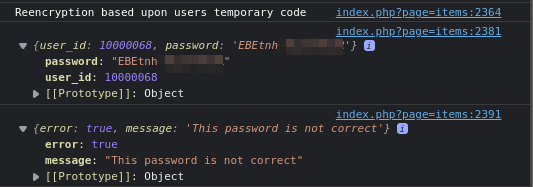
EBEtnh... is the encryption code, not password


Additional Info
After creating all user accounts, roles, and folders; sysadmin remove the first Administrator account (the one we get from Initialization step) before waiting for every user to do their first login attempt. Looks like this is what caused the issue.
Reinstalling everything works for us because fortunately it's not yet launched in production.
Maybe we should not delete the first Administrator account.
We have the same Problem, after enrolling a new User he gets asked for the encryption Key. In fact the encryption Key (from the E-Mail) is not working, but the Active Directory password of the user is working. After that the User is able to access Teampass .. but as soon as he wants to open any Password he runs into "Your authentication password has been changed in your AD since you last get logged in in Teampass.". In this Form no Passwort / encrytionkey variation is working. And its a little strange that you can read the Passwort in Chrome logs ..


Same problem here with version 3.0.0.21. After first login with my openldap user account I get asked for the current password and encryption key. If I swap those 2 fields then the login proceeds. In index.php I swapped the 2 id's dialog-user-temporary-code-value and dialog-user-temporary-code-current-password to get around this issue.
Then when opening any item I get a message saying "Your authentication password has been changed in your AD" while I never changed the password. when I echo $_SESSION['user']['private_key'] in the console, the value seems to be empty while in the DB it exists. So it looks like the private key cannot be found and teampass thinks the user password has changed because of this.


Yeah, same for me, but for changing password. It is very strange that in the field Your temporary encryption code Teampass accepts user's password and not his OTP code. Still an issue on 3.0.0.22. Also for me there is no Provide your current password field, TP shows me only one field.
Here is the video demo.

@Kyogre
Tried to reproduce.
So I created a new user from scratch.
He received the next email

Once auth for the 1st time, I had to fill in the form with elements from email.

Once clicked on button Launch, Done message appeared
I can now browser and access items.

Maybe you could try without using email? Via Show user password button.
Try how was shown on my aforementioned video. Also note that my video was not about new user, but about changing password of already existing user.
Hi @nilsteampassnet
I also have these issues (running v3.0.0.22) and I am able to reproduce this with a new account.
I created a new test account and recieved a mail:

When I login I get password is not correct:

If I swap the password field with the encryption code field then I can login. I can browse through all the passwords but when clicking/opening any item I get the message saying "Your authentication password has been changed in your AD since you last get logged in in Teampass" (Even though this is a local account):

Regards, Shane
Same as shaneki11 but for Show user password button way:
After I created user and perform log-in, reencryption page asks for password and code, BUT they need to be swapped in order to be accepted, so in the field Provide your current password I need to enter code, and in the field Your temporary encryption code I need to enter password. Recorded this on the video.

