
TeamPass

TeamPass copied to clipboard
 nilsteampassnet
Uncaught TypeError: json_decode(): must be of type string, bool given in main.functions.php:1552
Steps to reproduce
- Install Teampass according to instrunructions
- Setup LDAP
- Click Users > LDAP synchronication
- Try logging in again
Expected behaviour
This process worked just yesterday without issue.
Actual behaviour
the following error occurs:

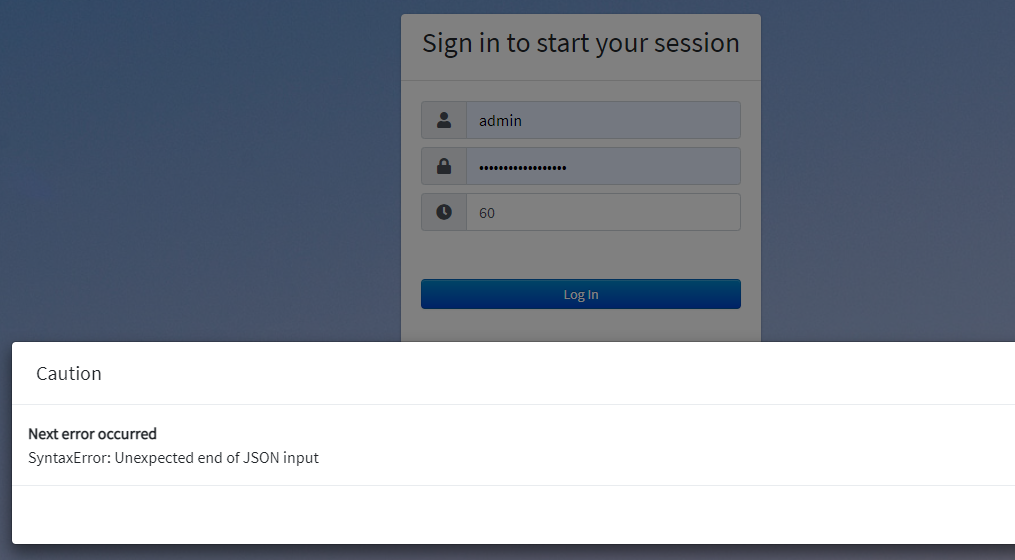
### Server configuration
**Operating system**
Ubuntu 20.04

**Web server:**
Apache2

**Database:**
Mysql

**PHP version:**
8.1

**Teampass version:**
3.0.0.18

**Teampass configuration file:**

**Updated from an older Teampass or fresh install:**
PLEASE attach to this issue the file `/includes/config/tp.config.php`.

### Client configuration
**Browser:**

**Operating system:**

### Logs
#### Web server error log
Insert your webserver log here
#### Log from the web-browser developer console (CTRL + SHIFT + i)
Insert the log here and especially the answer of the query that failed.
Uncaught TypeError: json_decode(): Argument #1 ($json) must be of type string, bool given in /var/www/html/TeamPass/sources/main.functions.php:1552
PHP Fatal error: Uncaught TypeError: Cannot access offset of type string on string in /var/www/html/teampass/sources/identify.php:306\nStack trace:\n#0 /var/www/html/TeamPass/sources/identify.php(186): identifyUser()\n#1 {main}\n thrown in /var/www/html/TeamPass/sources/identify.php on line 306
