

 nilsteampassnet
LDAP - User Object Filter is not working!
Hi Mr. Laumaillé, how are you? First thank you for this excellent project. I have teampass 2.1.27.36 installed, working and linked with more than 2000 LDAP users on my domain and need to allow access for some users. I configured LDAP connection and tested, it was ok and working on this version.
But now I want to upgrade for 3.0.0.18 version, I'm testing this new version and found a problem with (User Object Filter) on LDAP configuration. The problem is that after syncing on the users page, when I click on 'List users' the screen only prints 500 users on screen. I tried to make a lot LDAP filters, but it does not filter the users of a specific LDAP group, consecutively many of the users that I want to add to Teampass do not appear. It will be possible to indicate if I can configure something in .php and list more than 500 users on screen? Or check why no matter what I fill in, it doesn't apply the filters.
Steps to reproduce
- Login with admin account;
- Go to Users;
- Click on 'LDAP Synchronization;
- It will list just 500 first users of LDAP;
- You will not be able to add a user who is not on the list. And the list will not be filtered according to LDAP filter configuration.
Expected behaviour
It should only list users from a specific LDAP group. Or list all users on more pages.
Actual behaviour
Showed up just first 500 users of LDAP, preventing from adding some users to the TP.
Server configuration
Teampass sync with OpenLDAP hosted in Virtual Server ProxMox
Web server: Apache 2
Database: MariaDB 10.3.34
PHP version: PHP 8.1.7
Teampass version: 3.0.0.18
Teampass configuration file: Teampass Sync with OpenLDAP
Updated from an older Teampass or fresh install:
PLEASE attach to this issue the file /includes/config/tp.config.php.
Client configuration
Opera
Operating system: Debian 10
Logs
Web server error log
Insert your webserver log here Isn't any error about LDAP Sync on logs.
Log from the web-browser developer console (CTRL + SHIFT + i)
Isn't any error on web-browser developer console.
Insert the log here and especially the answer of the query that failed.

Hi I have same problem Same version (3.0.0.18) but Active Directory sync
Can you help us please?

Hi you can rewrite your ldap config in lowercase not uppercase sorry for my english

Very same experience, but with comments Fresh install, version 3.0.0.20.
Ad. 4 Only 500 entries are listed as per OpenLDAP default configuration for anonymous binds. If user and password to bind are deffined (tested on ldap admin) all users are listed. I have reconfigured my LDAP server to list 1000 entries with anonymous bind, yet teampass is still showing 500 entries unless I enter admin credentials.
Ad. 5 Filter does not work. I have tried using memberOf filtering (or for that case uid, objectclass attribute), both with mixed and lower-case only definitions) and does not work. In the log on the LDAP server side I have seen that no matter what I put in the filter, the query goes with (uid=*) Screens attached (some sensitive data redacted).
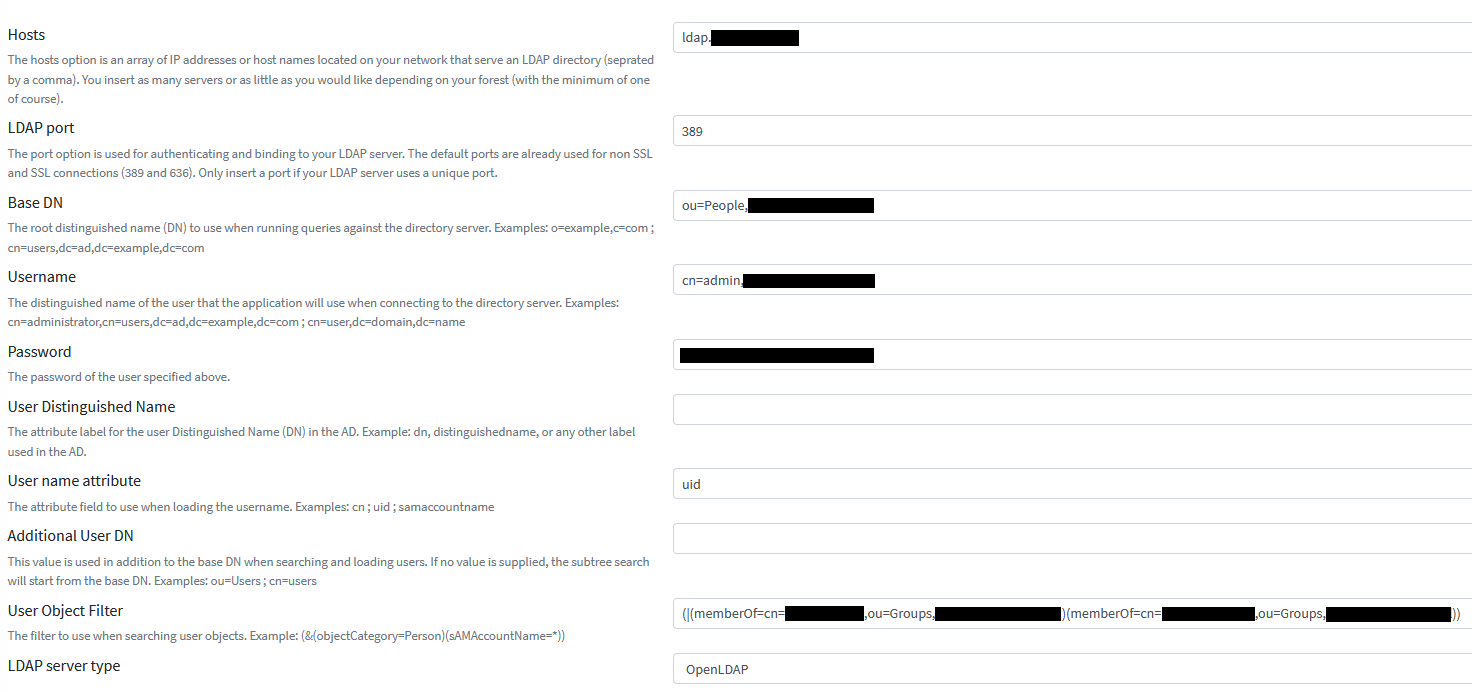

edited for typos

Hello,
The same problem on 3.0.0.22 but Active Directory sync. The filtered option does not work :(
Debian GNU/Linux 11 PHP 8.1.12 mysql Ver 15.1 Distrib 10.5.15-MariaDB

If the filter doesn't work you can try checking your users.queries.php file.
Make sure that ->rawFilter($SETTINGS['ldap_user_object_filter']) is presented in the following statement:
$users = $connection->query() ->in((empty($SETTINGS['ldap_dn_additional_user_dn']) === false ? $SETTINGS['ldap_dn_additional_user_dn'].',' : '').$SETTINGS['ldap_bdn']) ->rawFilter($SETTINGS['ldap_user_object_filter']) ->whereHas($SETTINGS['ldap_user_attribute']) ->get();

If the filter doesn't work you can try checking your users.queries.php file.
Make sure that ->rawFilter($SETTINGS['ldap_user_object_filter']) is presented in the following statement:
$users = $connection->query() ->in((empty($SETTINGS['ldap_dn_additional_user_dn']) === false ? $SETTINGS['ldap_dn_additional_user_dn'].',' : '').$SETTINGS['ldap_bdn']) ->rawFilter($SETTINGS['ldap_user_object_filter']) ->whereHas($SETTINGS['ldap_user_attribute']) ->get();
This works fine for me thanks a lot

If the filter doesn't work you can try checking your users.queries.php file.
Make sure that ->rawFilter($SETTINGS['ldap_user_object_filter']) is presented in the following statement:
$users = $connection->query() ->in((empty($SETTINGS['ldap_dn_additional_user_dn']) === false ? $SETTINGS['ldap_dn_additional_user_dn'].',' : '').$SETTINGS['ldap_bdn']) ->rawFilter($SETTINGS['ldap_user_object_filter']) ->whereHas($SETTINGS['ldap_user_attribute']) ->get();
This also fixes the problem in version 3.0.0.22 Thanks, TheBunnies

The statement listed by @TheBunnies doesn't exist in 3.0.0.22. In this version the statement is (Still in sources/users.queries.php):
$query = $connection->query()
  ->in((empty($SETTINGS['ldap_dn_additional_user_dn']) === false ? $SETTINGS['ldap_dn_additional_user_dn'].',' : '').$SETTINGS['ldap_bdn'])
  ->whereHas($SETTINGS['ldap_user_attribute'])
  ->chunk(
and should be:
$query = $connection->query()
  ->in((empty($SETTINGS['ldap_dn_additional_user_dn']) === false ? $SETTINGS['ldap_dn_additional_user_dn'].',' : '').$SETTINGS['ldap_bdn'])
  ->rawFilter($SETTINGS['ldap_user_object_filter'])
  ->whereHas($SETTINGS['ldap_user_attribute'])
  ->chunk(

Damned ... i didn't saw this open ticket and spend time on fixing the same way. Nice work @TheBunnies :+1: Pushed in recent commit
