
Unity3DHelperTools
 Unity3DHelperTools copied to clipboard
 niggo1243
The API documentation page for Unity3D helper tools (NikosHelpers)
About
This open-source package contains a collection of handy scripts like math algorithms (E.g. Vector & Quaternion helpers) for the Unity3D runtime environment and the Editor as well.
Checkout the Features section below for more information about the specific use cases and available helper scripts.
Support
Since I am developing and maintaining this asset package in my spare time, feel free to support me via paypal, buy me a coffee or check out my other published assets.
Documentation
See the API doc here
Setup
Unity Package Dependency
To add this toolkit as a package dependency to your Unity project, locate your manifest file in "Package/manifest.json".
First you need to add the "scopedRegistry" information to the manifest in order to resolve dependencies used by this toolkit.
The current dependency is a fork with performance improvements (https://github.com/niggo1243/NaughtyAttributes) of the original open-source project NaughtyAttributes by dbrizov: https://github.com/dbrizov/NaughtyAttributes
Add this snipped somewhere adjacent to the "dependencies" section in the manifest.json:
"scopedRegistries":
[
    {
        "name": "NaughtyAttributesPerfFork",
        "url": "https://upm-packages.dev",
        "scopes": [
        "com.nikosassets.naughtyattributes"
        ]
    }
]
Lastly add the following line to the "dependencies" section:
"com.nikosassets.u3dhelpertools": "https://github.com/niggo1243/Unity3DHelperTools.git#upm"
You can also choose specific releases and tags after the "#" instead of "upm".
The final result should look something like this in your manifest.json:
{
    "scopedRegistries":
    [
        {
            "name": "NaughtyAttributesPerfFork",
            "url": "https://upm-packages.dev",
            "scopes": [
            "com.nikosassets.naughtyattributes"
            ]
        }
    ],
    "dependencies"
    {
        "com.nikosassets.u3dhelpertools": "https://github.com/niggo1243/Unity3DHelperTools.git#upm"
    }
}
Or alternatively (without git urls):
{
    "scopedRegistries":
    [
        {
            "name": "NaughtyAttributesPerfFork",
            "url": "https://upm-packages.dev",
            "scopes": [
            "com.nikosassets.naughtyattributes"
            ]
        },
        {
            "name": "Unity3DHelperTools",
            "url": "https://upm-packages.dev",
            "scopes": [
            "com.nikosassets.u3dhelpertools"
            ]
        }
    ],
    "dependencies"
    {
        "com.nikosassets.u3dhelpertools": "1.3.2"
    }
}
Unity Project
You can simply download a (release) zip file or just clone this project via the git command:
git clone --recursive https://github.com/niggo1243/Unity3DHelperTools.git
Features
You can find example Scenes under "Assets/NikosAssets/U3DHelperTools/Samples/Scenes"
MonoBehaviours
- Keep the Scene view in focus after pressing the play button:

- Look at a target with special settings and constraints:

- Alarm clock event emitter:

- A generic list/ destination container helper class, emitting events when the list changes:

- An async Scene loader helper class, also emitting events:

Non-MonoBehaviours but here wrapped in sample MonoBehaviour classes
- EditorUtilitiesHelper, copy or regenerate GUIDs, rename files or generate scripts and open a project only file picker:
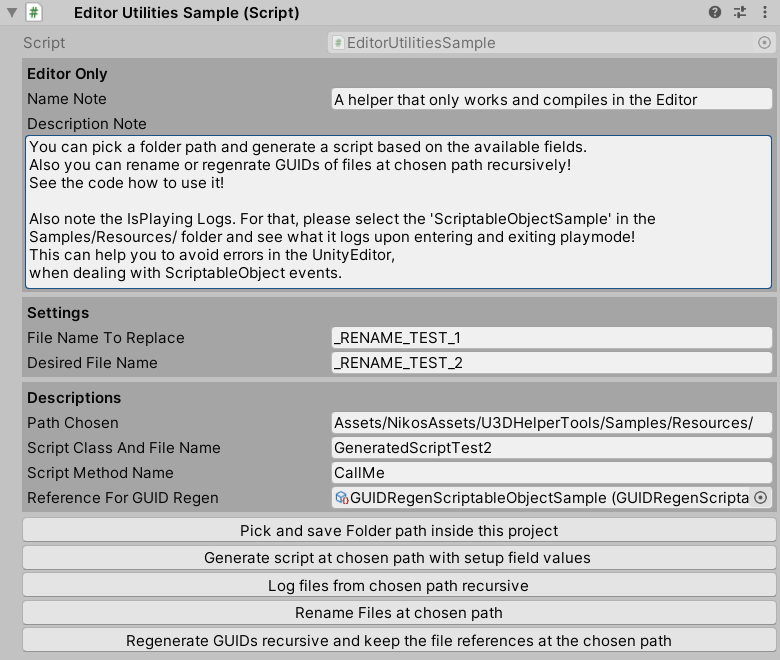
Also available via the toolbar:

- GUIHelper, to draw lines and boxes, in addition to the AlternatingListStyleHelper class:

Following picture from the AiMalgam asset (Control Panel):

- Various extension classes for object cloning, strings, NavmeshAgents, and Coroutines:

- Help with Vector, Rigidbody and Quaternion calculations (and other math stuff):


- Help with targeting transforms by distance:

- Generating random points in the 3D environment:


- Mapping strings to hashes:

- Offering some helpful methods for collections generally:

- Handy methods to retrieve type informations via reflection calls:

 niggo1243