

 nielsfaber
Enable Sensor after bypass ends.
Checklist
- [X] I checked for similar existing requests (both open and closed) before posting.
- [X] My request is generic, other users may benefit from it too.
Proposal
How about a Setting just like Bypass that ignores Sensors on arm, but uses them once they are no longer activated.
Example: I have an open window that will be ignored on arm, but after I close the window and someone reopens it, it should trigger the alarm.

+1
I miss this feature as well. It would be really great if you could implement it.

This issue is stale because it has been open 30 days with no activity. Remove stale label or comment or this will be closed in 7 days
![github-actions[bot] avatar](https://avatars.githubusercontent.com/in/15368?v=4 "Published by a pub.dev verified publisher")
No progress on this, I haven't got any time for improvements last month. I had a request for this before, given the interest for this I will see what I can do.

It could be possible to use Allow open after arming for all sensors? Right now it is enabled only on motion sensors. If it would be enabled for all sensors, it could solve this issue?

It could be possible to use Allow open after arming for all sensors? Right now it is enabled only on motion sensors. If it would be enabled for all sensors, it could solve this issue?
I do not understand this. Is it possible for a window contact to alarm if it was open when armed?
I think actually that as @JiriBalcar says, the ‘allow open after arming’ setting serves exactly the functionality as requested here. This setting is currently hidden when the user selected ‘window’ as type for the sensor. But by removing the type (clicking the X next to the selected type), the setting becomes available.
I will make it visible for windows by default in a next update.
In v1.9.6 the user can now apply the 'allow open after arming' setting for window sensors. The setting becomes visible when setting the 'use exit delay' setting (a sensor must be allowed to be active while the alarm is in arming state before it can be allowed to be active in the armed state). Hope this change helps you. @lSh4dowl Could you please test this setting and confirm this helps for your usage?
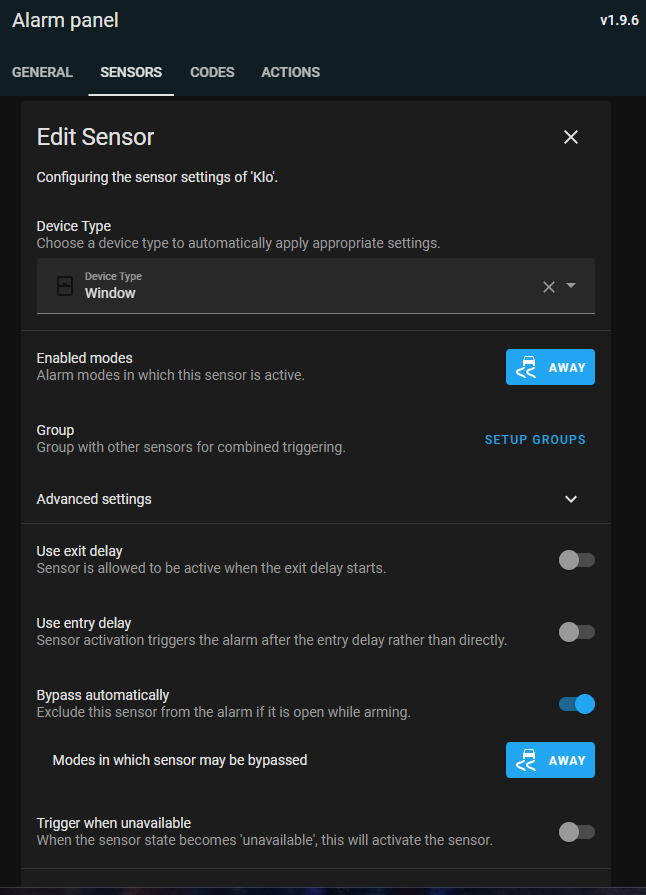
This issue is stale because it has been open 30 days with no activity. Remove stale label or comment or this will be closed in 7 days
@n0bbi You have to enable Use exit delay, after that it will show this setting right underneath.
This issue is stale because it has been open 30 days with no activity. Remove stale label or comment or this will be closed in 7 days