

 nicotine-plus
implement dialog with download options for folder downloads
Hello. Thanks for the excellent Nicotine+ software. I have a feature request.
This is one of my favourite SoulseekQT features not present in Nicotine+. When I download a folder from another user, the UI allows me to change the target folder name before starting the download. This is different from selecting the target container folder. It could be useful when the folder name is, for example, "CD1". I would like it to store that folder on my computer as "Artist name - year - album CD1".
Also, SoulseekQT allows selecting which files of the folder will be downloaded in case you don't want to download every file present in the folder. That's also a neat feature not present in Nicotine+
Thank you very much.

The dialog looks like this https://github.com/nicotine-plus/nicotine-plus/issues/1717#issuecomment-974716135:
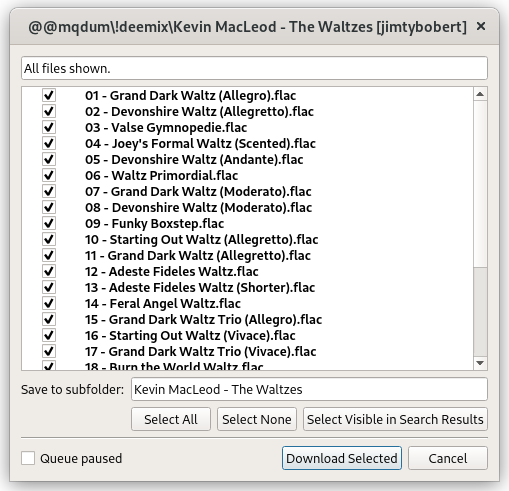
It would allow for a range of enhancements to be added for when control over downloads is required, this is a very nice idea.

How does only showing the dialog when pressing the Download Folder(s) To... menu item sound? The idea would be that the Download Folder(s) item remains an option if you quickly want to grab a few complete folders, while Download Folder(s) To... provides all the fine-grained options that might be useful, such as selecting the container folder, folder name, which files to download etc.


Hi, I have implemented this functionality and it works well.
Basically in the search results you right click a file and select 'download folder' It will make a back end request to fetch the files in the folder. On response it will pass through user/file/folder structure to new Folder Dialog. The folder Dialog allows you to select which files to save and set the path if you would like it to be different. When Download is clicked the files are added to the transfer list.
How can I contribute this to the project?

right click a file and select 'download folder'
I think we still want to retain the option of making a complete folder download without a dialog prompt, see https://github.com/nicotine-plus/nicotine-plus/issues/1659#issuecomment-1312742475.
set the path if you would like it to be different
Implement the FileChooserButton() class over a GtkButton widget for this, see the preferences dialog module DownloadPage().download_folder_button for an example of this, see:
https://github.com/nicotine-plus/nicotine-plus/blob/2f79b8b7ac1bc41871b5d297893acfbb7776b0a5/pynicotine/gtkgui/ui/settings/downloads.ui#L220-L223
https://github.com/nicotine-plus/nicotine-plus/blob/2f79b8b7ac1bc41871b5d297893acfbb7776b0a5/pynicotine/gtkgui/dialogs/preferences.py#L267-L269
https://github.com/nicotine-plus/nicotine-plus/blob/2f79b8b7ac1bc41871b5d297893acfbb7776b0a5/pynicotine/gtkgui/dialogs/preferences.py#L365
Call set_path() to set the initial folder value of the chooser button.
the files are added to the transfer list
An ToggleButton option to add as Paused with locally queued status set is also desired see https://github.com/nicotine-plus/nicotine-plus/issues/1717 to delay the transfer for later. For the time being however, you could label it with "(not implemented)".
new Folder Dialog.
For the dialog title suggest using the existing _("Select Destination Folder for File(s)") translated string. Bear in mind that the translators need to review any new strings you decide to add, so it's best to use existing ones wherever possible.
How can I contribute this to the project?
Fork the repo, create a new branch and then submit a PR (pull request).
Hi, thanks for the feedback!
Feedback from a user familiar with usage (and desperate enough to implement this feature lol)
-
The 'Download Folder' dialog should only show from 'Search Files' list. This is because you have no idea what the folder contains from here. We should always get a 'confirmation' here as a list of files before just adding to the transfer queue.
-
The 'Download Folder' dialog has the default download path presented in a textbox. You can edit the textbox path directly or use the folder selector by clicking on the icon.
-
You don't need the 'Download Folder' dialog when browsing user files and downloading folders. You can see already what's in the folders.
I believe the above is also the behaviour of the QT Soulseek version.
The Queue Paused should be easy to add. I'll check the strings, to be honest I hadn't thought about that!
-
Agree that measures are needed to avoid accidental folder downloads, with the balance of convenience. Hence that is a good reason why the double-click action should spawn the new dialog shall always ask for confirmation anyway. Additionally it seems wise to pre-select only the visible files in the case of double-click or Enter-key activation.
-
Good point. The dialog is intended to replace the standard folder chooser dialog, so it would be silly to spawn a dialog ontop, when it is probable that the intended destination folder won't exist yet anyway. A manual text entry is desirable. . It might be worth expanding the functionality of the FileChooserButton() to have the ability to wrap an editable full path entry field. In the future, filesystem path-aware autocomplete functionality would be really nice here.
-
No, you're right a dialog shall not be required for the Browse Shares interface at this time. However, a better way of handling recursive sub-folder downloads does need to be considered for the future.
The Queue Paused should be easy to add.
I don't know how we intend to approach the invocation of the transfers module in this case. I have a feeling it will lead to the discovery of an unexpected scenario that will lead to a regression, because the transfers module gets upset easily.
Thanks for working on this, looks good so far. One point:
- Could you add the Download button to the dialog, using the
suggested-actionstyle (see widgets/dialogs.py,buttons_end)? My plan is to eventually add support for downloading many folders at once, which will use a similar back/forward navigation style as the Setup Assistant. The containing folder selector will remain on all pages, while the rest of the content changes.
The containing folder selector will remain on all pages, while the rest of the content changes.
Surely the destination folder initial suggested value will be different for each multi-selected source folder?
The containing folder selector will remain on all pages, while the rest of the content changes.
Surely the destination folder initial suggested value will be different for each multi-selected source folder?
The plan was to allow changing the name of each folder you're downloading, while all of these folders will finally be downloaded to a containing/parent folder you can select.
That would be one way of doing it. Alternatively, it might be better just to include the unique path entry widget for each page, because otherwise it might be ambiguous with the default folder download location setting.
In @catkryton 's screenshot it appears that the destination folder name is acquired from the remote source?
Sorry, I won't be able to get this done for 3.3.0. I want to work on it eventually, but right now I need to spend the time I have left finishing up the 3.3.0 release and fixing any remaining bugs.