

 nicolargo
not detecting it's running on Windows 11
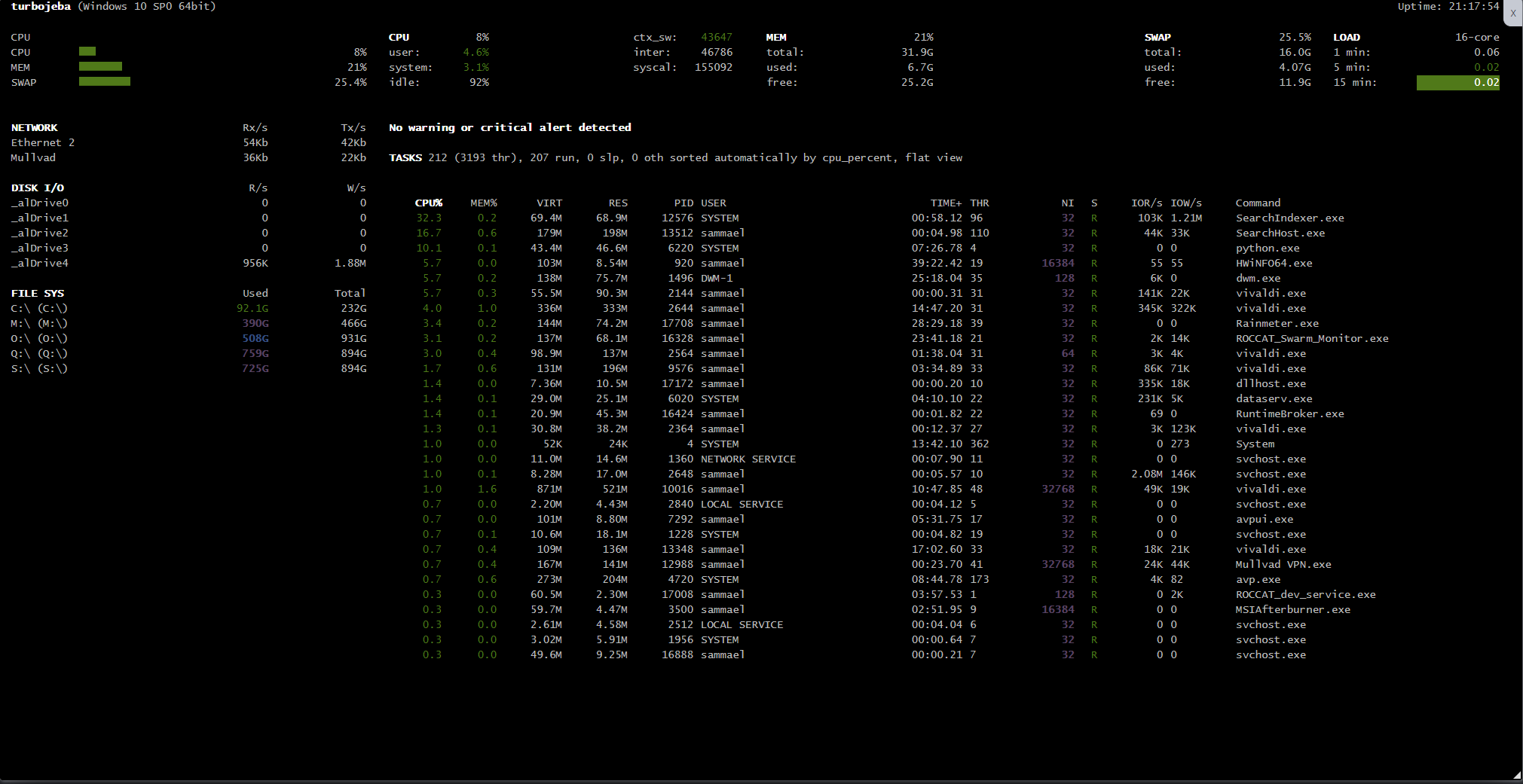
Describe the bug Glances is running on Windows 11 Pro 21H2, however it reports as: [System Name] (Windows 10 SP0 64bit)
To Reproduce Steps to reproduce the behavior:
- Start Glances with the followings options '-w -q' on Windows 11
- Access the web ui
- Look in top left corner
Expected behavior Correct system string displayed.
Screenshots
Desktop (please complete the following information):
- OS: Windows 11 Pro 21H2
- Glances Version v3.2.4.2 with PsUtil v5.9.0
- Glances logs file (the only 3 lines in it are these)
2022-03-05 09:51:28,645 -- WARNING -- PsUtil can not grab processes gids ('Process' object has no attribute 'gids')
2022-03-05 09:51:28,645 -- INFO -- Start Glances 3.2.4.2
2022-03-05 09:51:28,646 -- INFO -- CPython 3.10.2 (C:\Users\sammael\AppData\Local\Programs\Python\Python310\python.exe) and psutil 5.9.0 detected
- Glances test [output of glances --issue] (only available with Glances 3.1.7 or higher)
========================================================================================================================================================================================================================================================================================
Glances 3.2.4.2 (C:\Users\sammael\AppData\Local\Programs\Python\Python310\Lib\site-packages\glances\__init__.py)
Python 3.10.2 (C:\Users\sammael\AppData\Local\Programs\Python\Python310\python.exe)
PsUtil 5.9.0 (C:\Users\sammael\AppData\Local\Programs\Python\Python310\Lib\site-packages\psutil\__init__.py)
========================================================================================================================================================================================================================================================================================
alert         [OK]    0.00000s []
amps          [OK]    0.00000s []
cloud         [OK]    0.00000s {}
connections   [OK]    0.00000s {'LISTEN': 33, 'ESTABLISHED': 35, 'SYN_SENT': 0, 'SYN_RECV': 0, 'initiated': 0, 'terminated': 0}
core          [OK]    0.00000s {'phys': 8, 'log': 16}
cpu           [OK]    0.00000s {'total': 3.7, 'user': 1.5, 'system': 2.0, 'idle': 96.3, 'interrupt': 0.0, 'dpc': 0.1, 'time_since_update': 3.4687201976776123, 'cpucore': 16, 'ctx_switches': 99731, 'interrupts': 142800, 'soft_interrupts': 0, 'syscalls': 458719}
diskio        [OK]    0.00100s key=disk_name [{'time_since_update': 3.469717502593994, 'disk_name': 'PhysicalDrive0', 'read_count': 0, 'write_count': 0, 'read_bytes': 0, 'write_bytes': 0, 'key': 'disk_name'}, {'time_since_update': 3.469717502593994, 'disk_name': 'Physic
docker        [OK]    0.00000s []
folders       [OK]    0.00000s []
fs            [OK]    0.00499s key=mnt_point [{'device_name': 'C:\\', 'fs_type': 'NTFS', 'mnt_point': 'C:\\', 'size': 248671891456, 'used': 98941161472, 'free': 149730729984, 'percent': 39.8, 'key': 'mnt_point'}, {'device_name': 'M:\\', 'fs_type': 'NTFS', 'mnt_point': '
gpu           [OK]    0.00000s []
help          [OK]    0.00000s None
ip            [OK]    0.00000s {}
irq           [OK]    0.00000s []
load          [OK]    0.00000s {'min1': 0.0, 'min5': 0.0, 'min15': 0.0, 'cpucore': 16}
mem           [OK]    0.00000s {'total': 34294403072, 'available': 26677579776, 'percent': 22.2, 'used': 7616823296, 'free': 26677579776}
memswap       [OK]    0.00000s {'total': 17179869184, 'used': 4495118336, 'free': 12684750848, 'percent': 26.2, 'sin': 0, 'sout': 0, 'time_since_update': 3.469717502593994}
network       [OK]    0.00399s key=interface_name [{'interface_name': 'Mullvad', 'alias': None, 'time_since_update': 3.4697179794311523, 'cumulative_rx': 92181124, 'rx': 2992, 'cumulative_tx': 8064372, 'tx': 1024, 'cumulative_cx': 100245496, 'cx': 4016, 'is_up': True, '
now           [OK]    0.00000s 2022-03-05 09:56:19 +0000
percpu        [OK]    0.00000s key=cpu_number [{'key': 'cpu_number', 'cpu_number': 0, 'total': 3.5, 'user': 0.0, 'system': 1.8, 'idle': 96.5}, {'key': 'cpu_number', 'cpu_number': 1, 'total': 2.3, 'user': 1.8, 'system': 0.5, 'idle': 97.7}, {'key': 'cpu_number', 'cpu_numb
ports         [OK]    0.00000s []
processcount  [OK]    0.50964s {'total': 221, 'running': 214, 'sleeping': 0, 'thread': 3220, 'pid_max': 0}
processlist   [OK]    0.00000s key=pid [{'name': 'python.exe', 'nice': <Priority.NORMAL_PRIORITY_CLASS: 32>, 'status': 'R', 'cpu_percent': 14.3, 'ppid': 4728, 'memory_percent': 0.10170009353064385, 'pid': 13028, 'cpu_times': pcputimes(user=0.203125, system=2.203125, chi
psutilversion [OK]    0.00000s (5, 9, 0)
quicklook     [OK]    0.00000s {'cpu': 3.7, 'percpu': [{'key': 'cpu_number', 'cpu_number': 0, 'total': 3.5, 'user': 0.0, 'system': 1.8, 'idle': 96.5}, {'key': 'cpu_number', 'cpu_number': 1, 'total': 2.3, 'user': 1.8, 'system': 0.5, 'idle': 97.7}, {'key': 'cpu_number', '
raid          [OK]    0.00000s {}
sensors       [OK]    2.03555s []
smart         [OK]    0.00000s {}
system        [OK]    0.00000s {'os_name': 'Windows', 'hostname': 'turbojeba', 'platform': '64bit', 'os_version': '10 SP0', 'hr_name': 'Windows 10 SP0 64bit'}
uptime        [OK]    0.00000s {'seconds': 63835}
wifi          [OK]    0.00000s []
Additional context n/a

Hi @hugalafutro
Glances uses the standard platform lib to grab the system name.
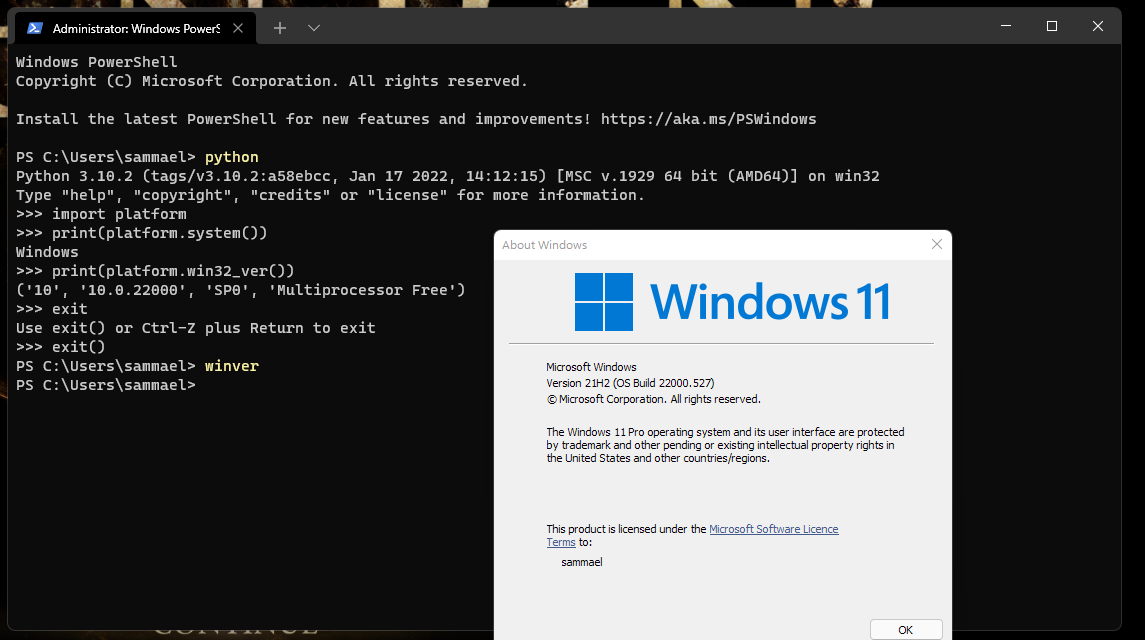
Can you please open a terminal and test the following command line:
> python
>> import platform
>> print(platform.system())
>> print(platform.win32_ver())
Send us back the result.

Hi here's screenshot from terminal + 'winver' window:
Would this be a Python bug then and should I report it on python github (assuming such thing exists)?
Apparently it's working as intended from what I can suss out from the technobabble at https://bugs.python.org/issue46869, which mentions it's discussed at https://bugs.python.org/issue45382 but no pr yet.
So not really sure now, is there a way to get the true os string somewhere or do we need to wait for python to fix it?