

 nicoladefranceschi
Bug: Scrolling gets out of control
First of all, props to you for this great project. I found a curious bug where scrolling gets out of control if you scroll too fast (with scrollbar or with middle mouse and drag). On a certain point (depends on velocity), the scrolling can not be stopped anymore by the user. The table just scrolls down very fast to the last row. Also reproduceable on your demo. Just horizontally scroll to the right until the first column is gone (with or without fixed columns) and try to scroll down (with the scrollbar). I did some tests by myself and in my opinion it has something to do with the width of the columns. I tried to set the width of one column to auto after the table has loaded with CSS (just for testing purposes) and got the same result.
P.S Columns with width: auto would be a nice2have for the future (mix of fixed width and auto).

Thanks! I didn't know someone was using this project!
I'm not able to reproduce the problem in safari and in chrome. Which browser are you using?
Regarding the auto-width columns, I'm not sure this is possible: the auto width will depends on the content of the cells for the entire table, but since we only create the visible cells, the DOM can't know the right width to set on the columns.

I'm using Chrome Version (Version 85.0.4183.102, latest atm). Seems to be Chromium related because on Firefox it works fine. On the new Edge browser on the other hand (based on Chromium) the bug is still there.
Help to reproduce:
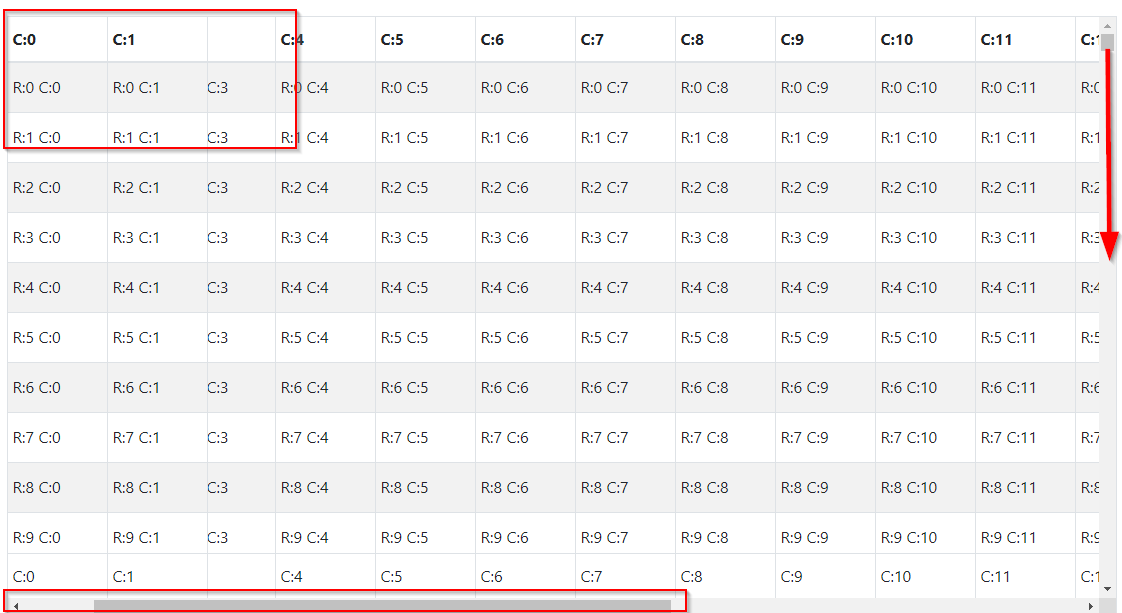 Just make sure you can't see C:2 and C:3 and grab vertical scrollbar and drag it fast to the middle. You should see that the scrollbar scrolls itself very fast to the end of the table.
Ok, I see it now... That's strange, because it happens only if c:2 is totally hidden If even a pixel of c:2 is shown, no problem.
I tried removing "position: sticky;", the "left:" style and "z-index: 3;" from the cells, but the problem persists. I have no idea how to fix it. Do you?
Nah, I did already some research if someone had a similar issue but as there is not much out there I found nothing. In my opinion it has definitely something to do with how the virtual rendering happens and its performance (and in particular it has something to do with the column width calculation/handling).
As I already mentioned, I did some tests where I encountered the same issue by setting the column width to "auto" to get actual fixed widths (table layout fixed stretches each cell if no column has width: auto). The main point is: I "fooled" your code by setting the width for one column to auto by CSS (real width was then >300) but the column object provided to the Table component still had width 100. Same strange scrolling behaviour appeared. On normal "slow" scroll everything worked fine.