

 nickrod518
Cross Domain Migration
Hi There
I am newbie to this tool .
I ran an elevated powershell to run in a domain user context with admin rights on the source computer. I selected a user profile to migrate and saved the state successfully.
On the New Computer i login with my administrative domain account, when loading the state i get a window that says Cross-Domain Migration i can see the user loaded from the old system however there is a New User field with Domain\ username .
The Domain box is greyed out and does not let me update it
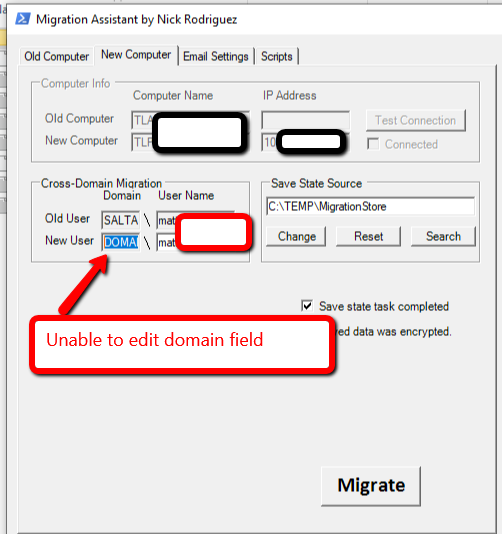
My question is does the user need to logon to the new computer so a profile exists before i run "New Computer"

You must edit line 4 in the config.ps1 file to update that domain: https://github.com/nickrod518/Migrate-WindowsUserProfile/blob/master/USMT/Config.ps1
On Wed, Feb 12, 2020 at 4:01 AM omicronx90 [email protected] wrote:
Hi There
I am newbie to this tool .
I ran an elevated powershell to run in a domain user context with admin rights on the source computer. I selected a user profile to migrate and saved the state successfully.
On the New Computer i login with my administrative domain account, when loading the state i get a window that says Cross-Domain Migration i can see the user loaded from the old system however there is a New User field with Domain\ username .
The Domain box is greyed out and does not let me update it [image: 2020-02-12_1656] https://user-images.githubusercontent.com/28760612/74318901-02d4a400-4db9-11ea-8147-cd693ab626a1.png
My question is does the user need to logon to the new computer so a profile exists before i run "New Computer"
— You are receiving this because you are subscribed to this thread. Reply to this email directly, view it on GitHub https://github.com/nickrod518/Migrate-WindowsUserProfile/issues/58?email_source=notifications&email_token=AAQVN6ZSIUK3FW4J7EDSUODRCO3FXA5CNFSM4KTVO3DKYY3PNVWWK3TUL52HS4DFUVEXG43VMWVGG33NNVSW45C7NFSM4IM3VQYA, or unsubscribe https://github.com/notifications/unsubscribe-auth/AAQVN66VTGGYEFC4C73JRK3RCO3FXANCNFSM4KTVO3DA .

Thanks for the reply that worked a treat . Making that editable in the GUI would be handy
I agree, this being an editable field in the GUI would be handy I always forget where that option is.
