
tui.grid
 tui.grid copied to clipboard
Published
20 hours ago •
 nhn
nhn
nhn
How can i change Select Box Options in Toast Grid element?
I really don't like default design of toast grid for making select box in row element if you use the following attributes.
editor: {
          type: 'select',
          options: {
            listItems: [
              { text: 'Deluxe', value: '1' },
              { text: 'EP', value: '2' },
              { text: 'Single', value: '3' }
            ]
          }
        }
I can't understand at first glance before i double click it.
I'm also pretty sure that all user are not going to like it because it's not intuitive.
So, I really want to change style of Select box when using toast grid.
of course i can make it simple by giving editor attributes in tui.Grid but i'm really hoping that i can change it.
like this!
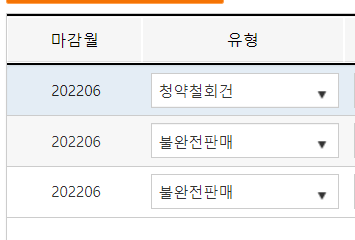
plz help me!
