
tui.grid
 tui.grid copied to clipboard
 nhn
nhn
How to color row dynamically from the value in format attribute
Hello, I'm really looking for the way i can color the row dynamically.
For example, i get codes from database from 1 to 7.
by the value of each codes, i wanna add class on the cell or row.
but, It doesn't work! in your case, how are you gonna change the row color depends on codes? , i mean datas in 'tui-grid-cell-content' class!
it just looks like this
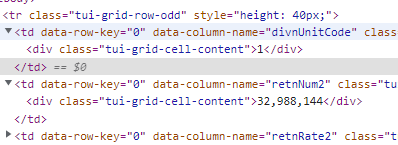
i couldn't come up with any idea. plz Sombody Help Me!

@thelovemsg
You can get rowKey and columnName in editingFinish event. Then, find row or cell by using rowKey and columnName and set the style to it.

This issue has been automatically marked as inactive because there hasn’t been much going on it lately. It is going to be closed after 7 days. Thanks!
![stale[bot] avatar](https://avatars.githubusercontent.com/in/1724?v=4 "Published by a pub.dev verified publisher")
This issue has been automatically marked as inactive because there hasn’t been much going on it lately. It is going to be closed after 7 days. Thanks!