
tui.grid
 tui.grid copied to clipboard
 nhn
nhn
Question for "Custom Renderer"
Summary I want show "input" style without doubleclick or click, but it doesn't works.
Screenshots
[As - is]

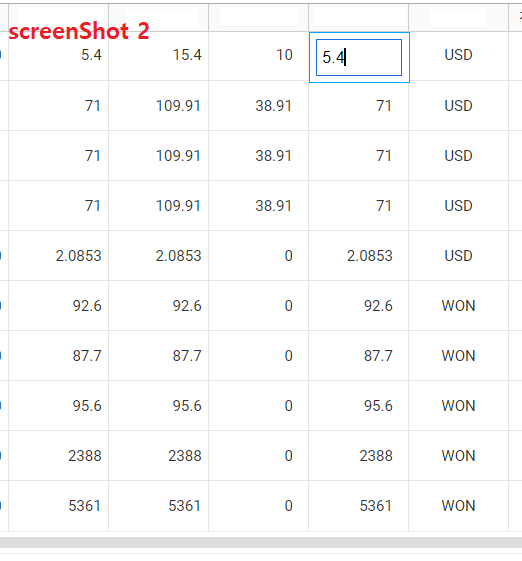
In screenShot 1, There is no input style. In screenShot 2, After doubleclick or click specific cell, we can see a cell with input style.
[To - be]
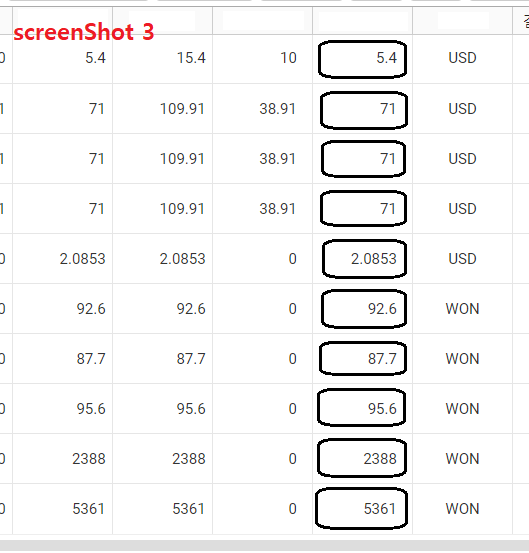
Like screenShot 3, I want to show input style at beggning.(without doubleclick or click)
Version latest (4.20.3)
Additional context There are many issues and API guides, but it doesn't work. Because it seeams that all issue and API guide explain how to use custom renderer with "Vue or React or Other JS libraries". (https://github.com/nhn/tui.grid/issues/638 <- like this issue) But i am working with JSP.
So i want to see how to use custom renderer in JSP.

● The contents below are the same as the one above. The difference is only English and Korean.
요약 input 스타일을 더블클릭이나 클릭 없이 처음부터 보여주고 싶은데, 적용이 안됩니다.
스크린샷 설명 [As - is] 스크린샷 1에서 보듯이, 셀 클릭 없이는 에딧 모드가 활성화되지 않습니다. 스크린샷 2처럼 클릭을 해야 input 스타일이 활성화 됩니다.
[To - be] 스크린샷 3처럼 데이터를 불러온 후, 더블클릭이나 클릭 없이 처음부터 에딧 모드(input 스타일)을 활성화 시키고 싶습니다.
버전 최신 버전 (4.20.3)
추가 내용 커스텀 렌더러와 관련된 많은 이슈와 가이드 문서가 있지만, 제 상황에는 맞지 않습니다. 관련 문서들이 Vue나 React, 기타 자바스크립트 라이브러리 용으로 작성되서인 듯 합니다. (https://github.com/nhn/tui.grid/issues/638 <- 이런 이슈처럼요) 근데 전 JSP로 개발하고 있습니다.
그래서 JSP에서도 커스텀 렌더러를 사용하는 법을 알고 싶습니다. (해당 가이드문서나 이슈에 나오는 props나 render 등등... jsp에서는 해당되지 않는 사항들이 많습니다)
랜더러를 통해 text나 select를 가공하여 만들순 있지만 style이 정상적이지 않아 강제적으로 조절해줘야 하는 문제가 있습니다. 또한 datepicker같은경우도 문제가 되는 것 같은데요.. 이전 이슈에도 나온 이야기이지만 useViewMode : false 해당 속성이 사라진 이후로 발생한 것 같은데...
해당 속성을 살려주실 순 없나요??

@shhong94 @MrILac
Currently, It is not supported. Thanks for the good comments. We will consider adding that feature.

This issue has been automatically marked as inactive because there hasn’t been much going on it lately. It is going to be closed after 7 days. Thanks!
![stale[bot] avatar](https://avatars.githubusercontent.com/in/1724?v=4 "Published by a pub.dev verified publisher")
This issue will be closed due to inactivity. Thanks for your contribution!