

 nhn
nhn
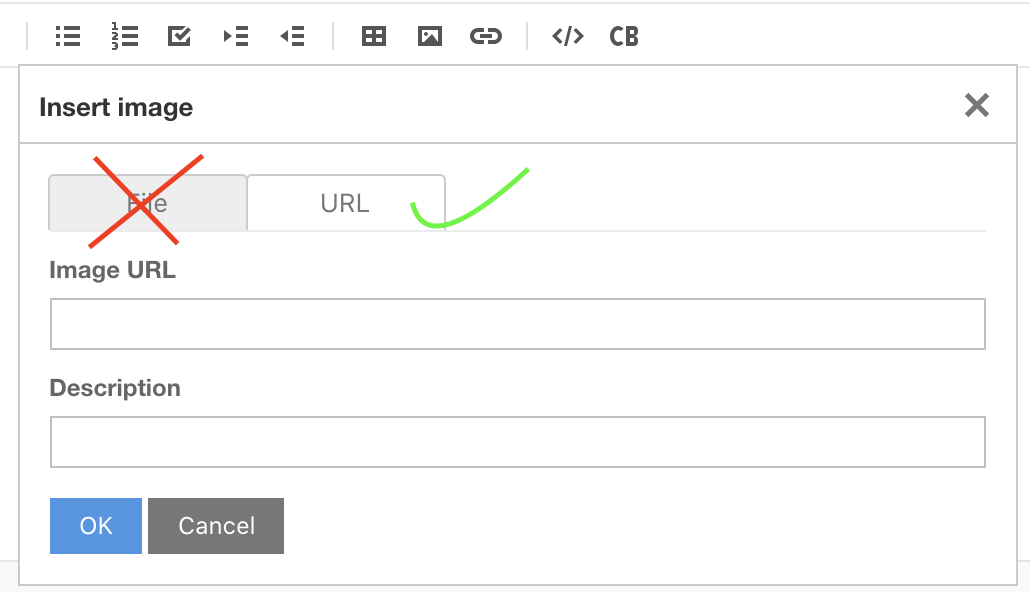
Disable/Remove image upload
Summary
Is there a way to configure the editor / toolbar to show only the image url, but not the image file upload?
Screenshots
Version
2.4

I'm also looking for a solution to this. Is it possible to somehow pass custom template in here? https://github.com/nhn/tui.editor/blob/a79dd97d453e62d3a3d858ec84fda6551572febf/apps/editor/src/js/ui/popupAddImage.js#L30-L46

@iacobson There is currently no option to use that feature. The template mentioned above is also not exposed to the outside. So, an option should be added to the editor and I'll consider this.


It is not a solution but it is fine to hide it if a special function is not assigned for the image upload tab.
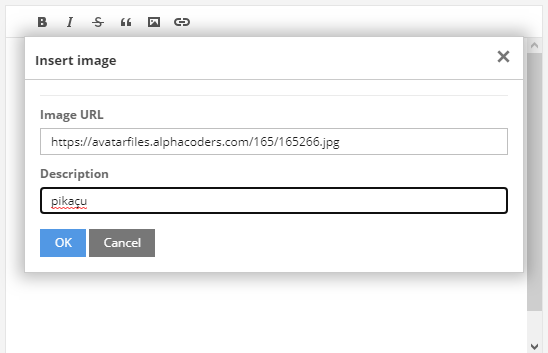
Just add some CSS.
/* TUI Editor show only image linking tab in popup */
.tui-editor-popup{
    box-shadow: 0px 0px 15px 5px rgba(0,0,0,0.26);
}

.te-popup-add-image .te-tab button, .te-popup-add-image .te-file-type{
	display: none !important;
}

.te-popup-add-image .te-url-type{
	display: block !important;
}
Result:
Actually there are to many issue, missing part and feature. I am using for comment form and this way acceptable for now.

So, an option should be added to the editor and I'll consider this.
@seonim-ryu Did you consider? Will you add this to config?

CSS solution does not work anymore. Will you add this config option to disable image "uploads"?
I too am looking for this functionality. I'm close to being able to create a simple popup replacement, but not sure how to implement the onClick functionality to insert the values into the editor. Here is my code so far:
window.editor = new toastui.Editor({
                                el: document.querySelector('#markdowneditor'),
                                height: '98vh',
                                initialValue: text,
                                initialEditType,
                                previewStyle,
                                previewHighlight,
                                autofocus
                            });
                            window.editor.removeToolbarItem('image')
                            let insertBodyHtml = document.createElement('div')
                            insertBodyHtml.innerHTML = '
                                    <label>Insert URL</label>
                                    <input
                                      id="imageUrl"
                                      type="text"
                                    />
                                    <label>Alternate Text</label>
                                    <input
                                      id="imageAltText"
                                      type="text"
                                    />
                                    <br/><br/>
                                    <div class="toastui-editor-button-container">
                                      <button type="button" class="toastui-editor-close-button" onClick="">
                                        Cancel
                                      </button>
                                      <button type="button" class="toastui-editor-ok-button" onClick="">
                                        Insert
                                      </button>
                                    </div>
'
                            window.editor.insertToolbarItem({ groupIndex: 3, itemIndex: 0 }, {
                                name: 'imageUrl',
                                tooltip: 'Insert image',
                                popup: {
                                    body: insertBodyHtml
                                },
                                text: '',
                                className: 'image toastui-editor-toolbar-icons',
                                style: {  }
                            });
update, I'm closer with following:
<button type="button" class="toastui-editor-close-button" onClick="javascript:document.querySelector('.toastui-editor-popup').style.display = 'none'">
                                        Cancel
                                      </button>
                                      <button type="button" class="toastui-editor-ok-button" onClick="javascript:window.editor.exec('addImage', { imageUrl: document.getElementById('imageUrl').value, altText: document.getElementById('imageAltText').value }); document.querySelector('.toastui-editor-popup').style.display = 'none';">
                                        Insert
                                      </button>
This works once, but not the next time because im not changing the popup state, just modifying the css to be hidden. If there is a way to hide the popup then this approach should work
ok, this version is working as expected. Here is final working code:
               window.editor = new toastui.Editor({
                                el: document.querySelector('#markdowneditor'),
                            });
                            window.editor.removeToolbarItem('image')
                            let insertBodyHtml = document.createElement('div')
                            insertBodyHtml.innerHTML = `
                                    <label>Image URL</label>
                                    <input
                                      id="imageUrl"
                                      type="text"
                                    />
                                    <label>Alternate Text</label>
                                    <input
                                      id="imageAltText"
                                      type="text"
                                    />
                                    <br/><br/>
                                    <div class="toastui-editor-button-container">
                                      <button type="button" class="toastui-editor-close-button" onClick="javascript:window.editor.eventEmitter.emit('closePopup'); window.editor.focus();">
                                        Cancel
                                      </button>
                                      <button type="button" class="toastui-editor-ok-button" onClick="javascript:window.editor.exec('addImage', { imageUrl: document.getElementById('imageUrl').value, altText: document.getElementById('imageAltText').value }); window.editor.eventEmitter.emit('closePopup'); window.editor.focus();">
                                        Insert
                                      </button>
                                    </div>
`
                            window.editor.insertToolbarItem({ groupIndex: 3, itemIndex: 0 }, {
                                name: 'imageUrl',
                                tooltip: 'Insert image',
                                popup: {
                                    body: insertBodyHtml
                                },
                                text: '',
                                className: 'image toastui-editor-toolbar-icons',
                                style: {  }
                            });


I do not have the 2.4 (only 3.0) but the general idea should work with any version, any framework, just check the classnames we're referring to in the code. When the editor is loaded, set up a MutationObserver (has a pretty good browser support) for the target class ".toastui-editor-popup " (there is a space character at the end of it!). This will run a function when a popup opens in the editor (which is just a display style change on the element - that's what we're watching for with the observer). We need to filter more to avoid errors, and make sure it only runs when the popup div's classname is ".toastui-editor-popup.toastui-editor-popup-add-image", meaning you've clicked on the add image button and not any other tool that displays a popup (like headings, insert table). Since the upload from file is selected by default, within this function we can programmatically switch to the URL tab, then hide the File tab's button.
window.onload = () => {
    const observer = new MutationObserver(() => {
        if (document.querySelector('.toastui-editor-popup.toastui-editor-popup-add-image')) {
          document.querySelector('[aria-label="URL"]').click();
          document.querySelector('[aria-label="File"]').style.display = "none";
        }
    });

    const target = document.querySelector(".toastui-editor-popup ");
    observer.observe(target, { attributes: true, attributeFilter: ["style"] });
  }

window.addEventListener('click', (e) => {
    if(document.querySelector('[aria-label="File"]')) {
        document.querySelector('[aria-label="File"]').style.display = "none"
    }
})
Works fine, just without using mutation observers for performance
just change the aria label to URL instead of File for url image uploads

This works for me: it simulates a click to the URL tab and hides the File button.
window.addEventListener('click', (e) => {
	var element = document.querySelector('.toastui-editor-tabs .tab-item[aria-label="URL"]');
	if (element) {
		element.click();
	}
	if(document.querySelector('[aria-label="File"]')) {
		document.querySelector('[aria-label="File"]').style.display = "none"
	}
})

Any progress on this issue? Would be great to have the fix done by @JuliaCasamitjana
